

 Wscats
Chrome插件开发
5种类型的JS对比
Chrome插件的JS主要可以分为这5类:injected script、content-script、popup js、background js和devtools js,
权限对比
| JS种类 | 可访问的API | DOM访问情况 | JS访问情况 | 直接跨域 |
|---|---|---|---|---|
| injected script | 和普通JS无任何差别,不能访问任何扩展API | 可以访问 | 可以访问 | 不可以 |
| content script | 只能访问 extension、runtime等部分API | 可以访问 | 不可以 | 不可以 |
| popup js | 可访问绝大部分API,除了devtools系列 | 不可直接访问 | 不可以 | 可以 |
| background js | 可访问绝大部分API,除了devtools系列 | 不可直接访问 | 不可以 | 可以 |
| devtools js | 只能访问 devtools、extension、runtime等部分API | 可以 | 可以 | 不可以 |
调试方式对比
| JS类型 | 调试方式 | 图片说明 |
|---|---|---|
| injected script | 直接普通的F12即可 | 懒得截图 |
| content-script | 打开Console,如图切换 | 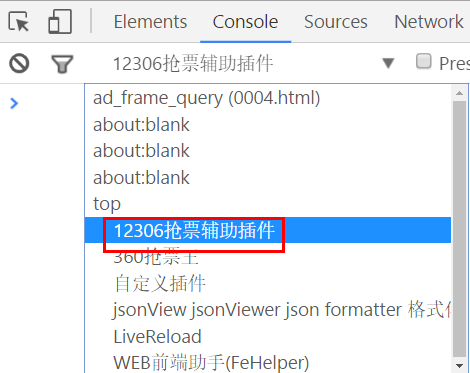 |
| popup-js | popup页面右键审查元素 | 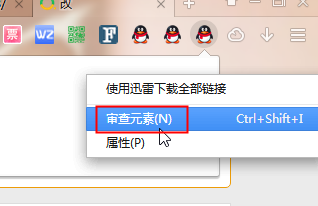 |
| background | 插件管理页点击背景页即可 | 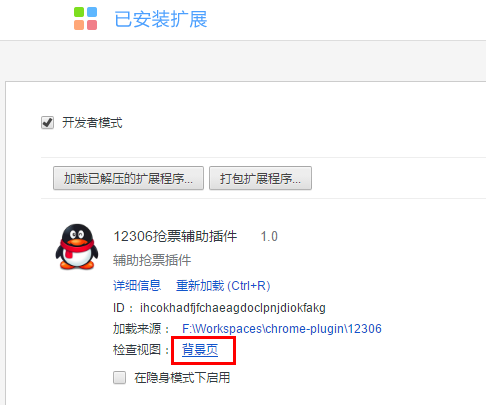 |
| devtools-js | 暂未找到有效方法 | - |
互相通信概览
注:-表示不存在或者无意义,或者待验证。
| injected-script | content-script | popup-js | background-js | |
|---|---|---|---|---|
| injected-script | - | window.postMessage | - | - |
| content-script | window.postMessage | - | chrome.runtime.sendMessage chrome.runtime.connect | chrome.runtime.sendMessage chrome.runtime.connect |
| popup-js | - | chrome.tabs.sendMessage chrome.tabs.connect | - | chrome.extension. getBackgroundPage() |
| background-js | - | chrome.tabs.sendMessage chrome.tabs.connect | chrome.extension.getViews | - |
| devtools-js | chrome.devtools. inspectedWindow.eval | - | chrome.runtime.sendMessage | chrome.runtime.sendMessage |
background和content_scripts的通信
方案1
因为background是插件一直运行的主程,而content_scripts是往内容页面注入的脚本,并且它拥有最多的权限(比如跨域,读写文件等),但是与内容页面只共享DOM,不能共享数据,所以我们需要配合background和content_scripts来做通信
background.js
chrome.contextMenus.create({
  "title": "启动", "type": "normal", //菜单项类型 "checkbox", "radio","separator"
  "onclick": function (info, tab) {
    chrome.tabs.executeScript(tab.id, {
      code: `
        // 插入JS脚本
    `}, () => {
        chrome.tabs.sendMessage(tab.id, {
          greeting: "hello to content script!"
        }, function (response) {
          console.log(response);
        });
      });
  }
});
content_scripts.js
chrome.extension.onMessage.addListener(
  function(request, sender, sendResponse) {
      console.log(request);// {greeting: "hello to content script!"}
      console.log("前端/后端/Popup收到");
      sendResponse("popup返回值");
  }
);
方案2
background.js
chrome.contextMenus.create({
  "title": "通信", "type": "normal", //菜单项类型 "checkbox", "radio","separator"
  "onclick": function (info, tab) {
    chrome.tabs.executeScript(tab.id, {
      code: `
        // 在隔离环境下清楚定时器
        window.postMessage({ type: "FROM_PAGE", text: "来自网页的问候!" }, "*");
      `})
  }, //单击时的处理函数
});
content_scripts.js
// 跟隔绝区域的JS通信
window.addEventListener("message", function (event) {
  // 我们只接受来自我们自己的消息
  if (event.source != window)
    return;

  if (event.data.type && (event.data.type == "FROM_PAGE")) {
    console.log("内容脚本接收到:" + event.data.text);
  }
}, false);
Tampermonkey
我们可以通过下载Tampermonkey实现插件功能,这是一个插件的管理工具,可以通过Greasyfork下载第三方脚本配合Tampermonkey实现一些功能
inject.js
在 content_scripts.js 可以写入以下函数来往页面注入 inject.js ,从而可以借 inject.js 之手直接操作 DOM 和获取 JS 因为 content_scripts.js 只能共享 DOM 不能共享 JS
// 向页面注入JS
function injectCustomJs(jsPath) {
  jsPath = jsPath || 'static/js/inject.js';
  var temp = document.createElement('script');
  temp.setAttribute('type', 'text/javascript');
  // 获得的地址类似:chrome-extension://ihcokhadfjfchaeagdoclpnjdiokfakg/js/inject.js
  temp.src = chrome.extension.getURL(jsPath);
  temp.onload = function () {
    // 放在页面不好看,执行完后移除掉
    this.parentNode.removeChild(this);
  };
  document.body.appendChild(temp);
}
injectCustomJs()
inject.js
console.log("监听所有input输入框")
// 获取所有输入框节点
let inputs = document.querySelectorAll("input");
// 遍历所有input节点
[].forEach.call(inputs, (input) => {
    input.addEventListener("input", (e) => {
        // 打印输入的值
        console.log(e.target)
        console.log(e.data)
    })
});
需要注意的是在 manifest.json 添加这句
{
    // 普通页面能够直接访问的插件资源列表,如果不设置是无法直接访问的
    "web_accessible_resources": ["static/js/inject.js"],
}
难点
页面为https协议时候发送http请求回产生跨域,所以可以尝试升级为https请求
// 将所有http请求升级为https请求
var meta = document.createElement("meta");
meta.httpEquiv = "Content-Security-Policy";
meta.content = "upgrade-insecure-requests";
document.head.appendChild(meta)
参考文档

推荐的方法
popup.js => content.js or background.js
这里可以实现点击图标然后触发 content.js 来获取页面的 DOM 元素或者调用 background.js 的API功能
// popup.js

document.querySelector('#btn').addEventListener('click', (e) => {
    console.log(e)
    var bg = chrome.extension.getBackgroundPage();
    bg.test(); // 访问bg的函数  意味着这里能够直接调用background.js
    sendMessageToContentScript({
        cmd: 'test',
        value: 'hello'
    }, function (response) {
        console.log('来自content的回复:' + response);
    });
})
function sendMessageToContentScript(message, callback) {
    chrome.tabs.query({
        active: true,
        currentWindow: true
    }, function (tabs) {
        chrome.tabs.sendMessage(tabs[0].id, message, function (response) {
            if (callback) callback(response);
        });
    });
}
// content.js
chrome.runtime.onMessage.addListener(function (request, sender, sendResponse) {
  // console.log(sender.tab ?"from a content script:" + sender.tab.url :"from the extension");
  if (request.cmd == 'test') {
    console.log(document.querySelector("#su"))
    console.log(request.value)
    // 这里是 content.js 跟 background.js 通信
    chrome.runtime.sendMessage({greeting: '你好,我是content-script呀,我主动发消息给后台!'}, function(response) {
      console.log('收到来自后台的回复:' + response);
    });
  }
  sendResponse('我收到了你的消息!');
});
// background.js
function test() {
    console.log("后台")
}
content.js => background.js or popup.js
我们可以利用 content.js 获取 DOM, 然后触发 background.js 的一些功能,因为 background.js 权限比较多(比如实现跨域)
// content.js
chrome.runtime.onMessage.addListener(function (request, sender, sendResponse) {
  // console.log(sender.tab ?"from a content script:" + sender.tab.url :"from the extension");
  if (request.cmd == 'test') {
    console.log(document.querySelector("#su"))
    console.log(request.value)
    // 这里是 content.js 跟 background.js 通信
    chrome.runtime.sendMessage({greeting: '你好,我是content-script呀,我主动发消息给后台!'}, function(response) {
      console.log('收到来自后台的回复:' + response);
    });
  }
  sendResponse('我收到了你的消息!');
});
// background.js
chrome.runtime.onMessage.addListener(function (request, sender, sendResponse) {
    console.log('收到来自content-script的消息:');
    console.log(request, sender, sendResponse);
    sendResponse('我是后台,我已收到你的消息:' + JSON.stringify(request));
});
注意事项:
- content_scripts向popup主动发消息的前提是popup必须打开!否则需要利用background作中转;
- 如果background和popup同时监听,那么它们都可以同时收到消息,但是只有一个可以sendResponse,一个先发送了,那么另外一个再发送就无效;