
angular-tutorial
 angular-tutorial copied to clipboard
 Wscats
:rabbit:Some of the angular tutorial - 《Angular学习笔记》
关键点在于`ng-if`的运用,利用布尔值判断页面是否显示,页面可以用ng-include包含外部页面,也可以一个页面内把两个切换页写完 然后可以用ng-class来切换样式 `ng-class="{'blue':isOne}"` 上面这句的意思是如果`$scope.isOne = true;`isOne为真的时候添加该样式,如果为假去除该样式 ``` 切换 左 右 第一页 第二页 var app = angular.module('wsscat', []); app.controller('homeCtrl', ['$scope', function($scope) { $scope.name = 'yao'; $scope.tap = { page1: true, page2:...

路由

加载路由依赖,放在angular框架后面 ``` ``` **$location.path** **$routeProvider** 两个核心方法`when()`和`otherwise()` - controller //function或string类型。在当前模板上执行的controller函数,生成新的scope - controllerAs //string类型,为controller指定别名 - template //string或function类型,视图所用的模板,这部分内容将被ngView引用 - templateUrl //string或function类型,当视图模板为单独的html文件或是使用了定义模板时使用 - resolve //指定当前controller所依赖的其他模块 - redirectTo //重定向的地址
AngularJS路由允许我们通过不同的URL访问不同的内容 路由是此链接中的`http://127.0.0.1/angular/view/route.html#/home`这部分`#/home` 它的格式是url后面加上`#/xxxx`,通过**#+标记**实现路由跳转,类似锚点 不能直接访问**home.html**,因为这是个模版文件 `http://127.0.0.1/angular/view/home.html` 所以通过AngularJS可以实现多视图的单页Web应用(single page web application,SPA) 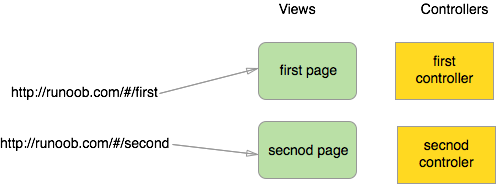 **1.创建路由** 引入路由所需要的route.js文件 ``` ``` **2.包含了ngRoute模块作为主应用模块的依赖模块** `angular.module('wsscat',['ngRoute'])` **3.使用 ngView 指令** 该div 内的HTML内容会根据路由的变化而变化,就是在这个div页面里面实现局部刷新 **4.配置$routeProvider,AngularJS$routeProvider用来定义路由规则** ``` app.config(function($routeProvider) { //when方法 $routeProvider.when('/home', { //当路由更改为home的时候,显示home.html页面,并且该页面由homeCtrl控制 controller:...
控制器
1.**ng-src** `ng-src`指令里面需要{{}},其他ng指令一般只要直接写$scope所带的属性 `` 2.**$rootScope** `$rootScope`可以实现控制器之间的数据交换,但是一旦刷新就会丢失 3.**ng-style** ng-style指令,如果要用$scope传入一个css的样式表,要用json格式传递 `ng-style="style"` ``` $scope.style = { 'border': '1px solid brown' }; ``` 4.**ng-show** isexpand在ng-show里面不能带{{}},不然会认为永远字符串为真 `...` `$scope.isexpand = true` 当它`..."`这样写时候为标签的属性 当它`...`这样写的时候表现为css类 5.**ng-**前缀的意思 不然DOM来解析,等到angular加载完才执行ng-自身指令 例如``,会先加载{{url}}地址的图片,报404错误,再等到angular解析才读取出图片 一般需用$scope把变量带到视图中的**_src,href,style,class_**等我们就带ng-前缀,如果不是的话,按原生写法即可...