

 Vector35
Windows menu font size is too large
Version and Platform (required):
- Binary Ninja Version: 3.4.4094-dev
- OS: Windows
- OS Version: 11 22H2
- CPU Architecture: x86_64
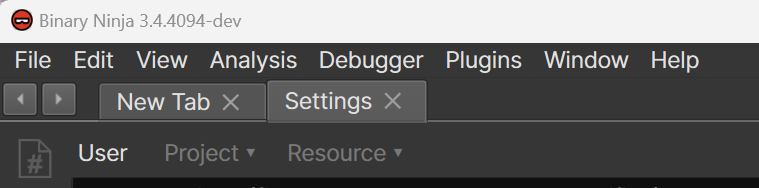
Bug Description: The font size for the menu in Windows is rather large on a High DPI monitor.
Steps To Reproduce: Open the application on Windows with High DPI settings.
Expected Behavior: The font size should be normal. See an example of another Qt application from the same machine below.
Screenshots:
Here's Binja:
Here's MuseScore:

Additional Information: This is likely bug 108663 in Qt and will require us moving to either 6.4.2 or 6.5.0, according to comments on the bug report. Will check back after we move to the new version of Qt to see if it's fixed or not.

Despite the fact that the Qt issue I linked above says that 6.4.2 solved that user's problem, the issue is actually still listed as "unresolved" and our recent upgrade to Qt 6.4.3 does not appear to have resolved the issue, either.
I'll try and look into this for our Coruscant release when I look at other font-related code.
Upon further testing, I believe this was actually multiple issues, one of which was actually solved with the Qt 6.4.3 upgrade. The biggest remaining issue appears to be that our default font size for Windows is 11pt, which now accounts for (as far as I can tell) the rest of the issue. So, the current workaround is to set the display font (Inter) to 10pt.
Need to test in some other circumstances before I can definitively say if this is wontfix past this point, or if we should change the default font size. On a HiDPI screen, 10pt is a default that fits other applications better, but it's possible we set the larger font size because of how things look in a VM or in some other context.
By default, this should look correct now in builds >= 3.5.4425-dev on Windows.
I believe I stumbled upon the actual fix for this in builds >= 3.5.4481-dev, which appears to have been setting the font on QGuiApplication instead of QApplication? Regardless, the Windows point size change has been reverted and I believe this issue to be closed for real this time.
While the change above did fix the menu, it caused regressions in a couple of other places where we don't explicitly set the font (such as the Enterprise Remote Browser buttons), and this affected all platforms - not just Windows.
I've reverted the change above, put the Windows font size back down a point (which is now documented), and am reopening this issue and slipping it to the next release. I'm starting to think that in our codebase, the right thing might be to make a more surgical adjustment. But, we're too close to release and the workaround from before was an improvement without drawbacks on other platforms, so I'll keep things that way for now.