

 ValveSoftware
Multi-pass breaks right eye rendering in HDRP
Entering play mode in multi-pass will crash and produce these errors in the console every time:
Assertion failed on expression: 'IsMatrixValid(matrix)'
UnityEngine.GUIUtility:ProcessEvent (int,intptr,bool&)

Screen position out of view frustum (screen pos 0.000000, 0.000000, 300.000000) (Camera rect 0 0 1208 510)
UnityEngine.GUIUtility:ProcessEvent (int,intptr,bool&)

Screen position out of view frustum (screen pos 1208.000000, 0.000000, 300.000000) (Camera rect 0 0 1208 510)
UnityEngine.GUIUtility:ProcessEvent (int,intptr,bool&)

Assertion failed on expression: 'IsNormalized(normal, 0.001f)'
UnityEngine.GUIUtility:ProcessEvent (int,intptr,bool&)

Assertion failed on expression: 'std::abs(det) > FLT_MIN'
UnityEngine.GUIUtility:ProcessEvent (int,intptr,bool&)
Forcing a build is possible but looks like this:
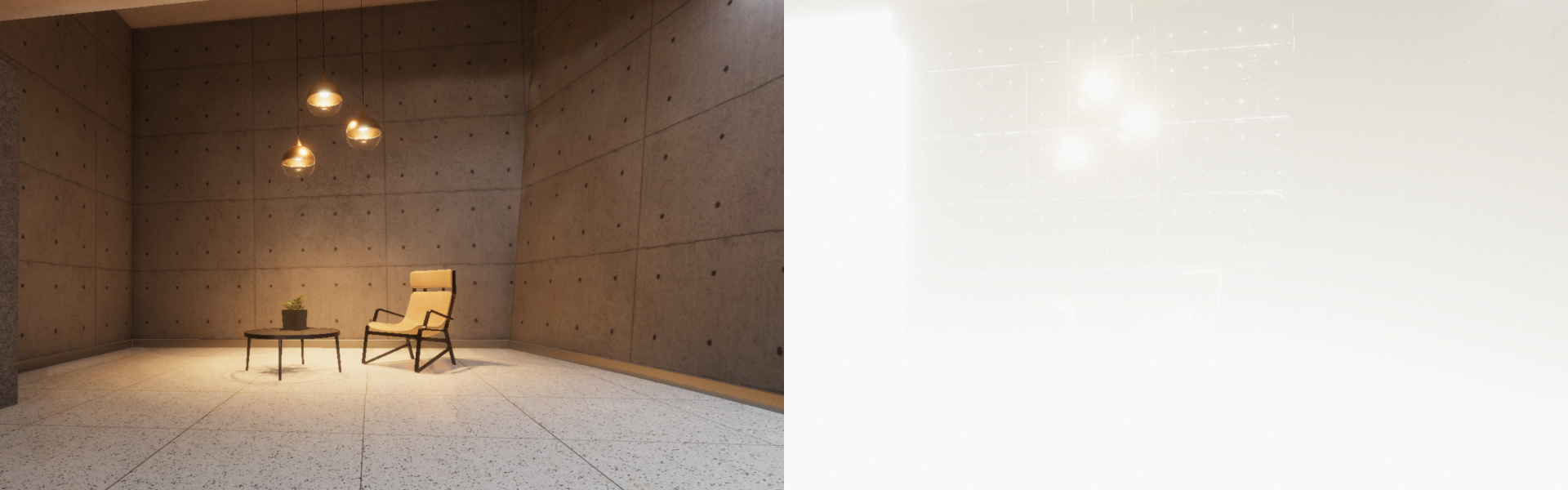
Tested on Unity 2021 LTS and 2020 LTS with SteamVR Plugin 2.7.3. This problem does not appear with the multi-pass mode in the OpenXR Plugin.

I have more or less the same Error Message, with slightly different x-coordinate and a few more of the "FLT_MIN error lines". It happened after I installed the SteamVR asset into my running VR Project. ( The Project already had some Systems implemented like a XR-System and a HDRP or a EventSystem, so it wasn't a new Project from scratch ). So the installation of the SteamVR on a existing Project causes a lot of trouble that need to be fixed. The above mentioned problem I couldn't fix until now. For the lost textures you can go to Edit/Rendering/Materials/Convert All Built-in Materials to HDRP, but this does not help with decals like the teleportation pointer (if they can be called a "decal"). It also causes the problem that in the VR glasses (Vive Cosmos Elite) only one eye gets an Image. In my case I could solve it by Edit/Project Settings/XR Plug-in Management/OpenVR: Setero Rendingerung Mode from SinglePass to MultiPass. This enable the Stereo View Rendering (Second Image) in my glasses, but they have different lighting's to be active. While the left eye seems to have in general a more darker view (maybe because of no reflections activated) the right eye seems to have no shadows. If I start a new Project from Scratch, where I first install SteamVR and afterwards HDRP. I have less problems, but the above mentioned Assertion Problem occures anyway.
