

 ValveSoftware
Unity 2021.2.6f1 gives several errors
Hello, After updating to Unity 2021.2.6f1 and installing SteamVR 2.7.3 it gives me tons of errors, these are just a few of them
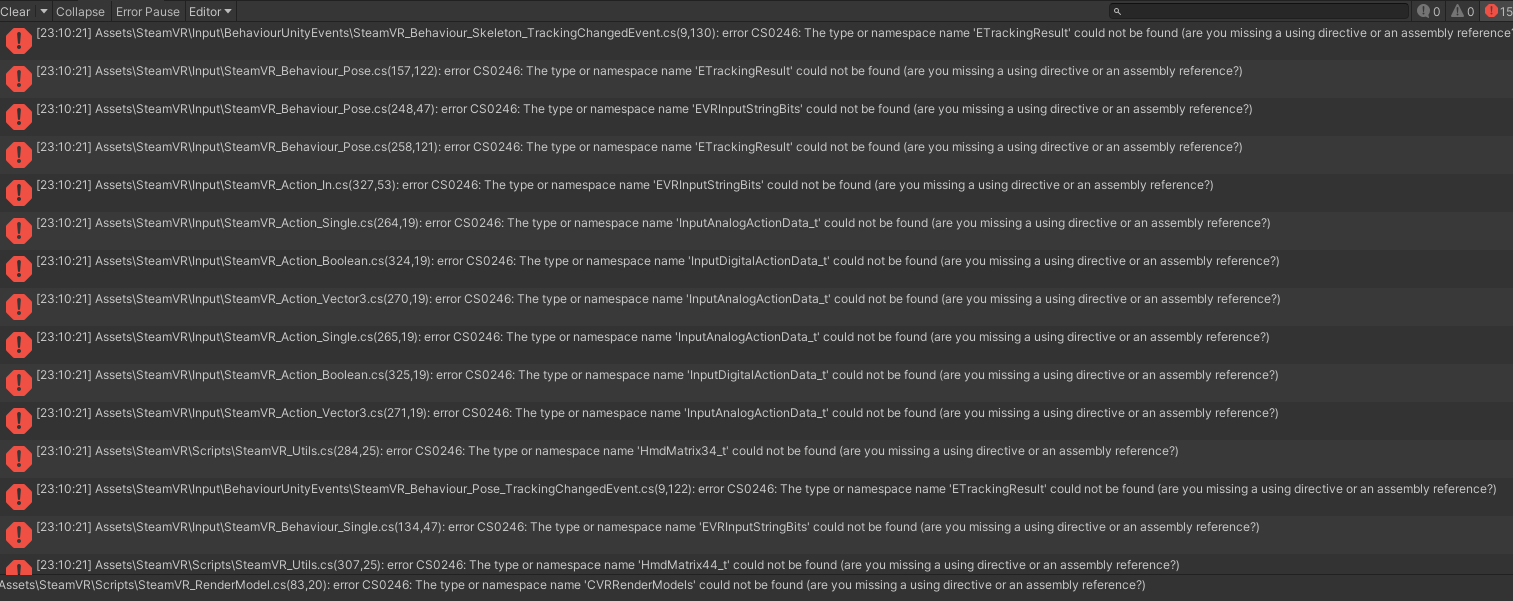


Can confirm the issuie for Unity 2021.1.28.
This is due to a version mismatch of the OpenVR XR Plugin. From the Package Manager in Unity one can update to v3.0.0 while the current version of the SteamVR plugin (v2.7.3, sdk 1.14.15) comes with OpenVR XR Plugin v1.1.4.
Updating OpenVR back to v1.1.4 removed the 150 errors, listed in the log above.

There should be no option to update this package beyond 2.7.3. Can you provide a screenshot so I can see what you're seeing?
No need for, just go to Unity's Package Manager and there you can, and in fact are even encouraged via the UI to, update the OpenVR XR Plugin.
Often there are scenarios that are hard to describe through text, or something unexpected that a picture might reveal. My environment does not show a version 3.0.0 upgrade, and I would not expect it to, as there is no version 3.0.0 of the OpenVR XR Plugin or of the SteamVR Unity Plugin. If you are still having this issue the best way I can think of to help would be to see a screenshot of what you're seeing.

Often there are scenarios that are hard to describe through text, or something unexpected that a picture might reveal. My environment does not show a version 3.0.0 upgrade, and I would not expect it to, as there is no version 3.0.0 of the OpenVR XR Plugin or of the SteamVR Unity Plugin. If you are still having this issue the best way I can think of to help would be to see a screenshot of what you're seeing.
Can confirm the behaviour of @dgarkov Though I notice you have 1.1.5 @zite
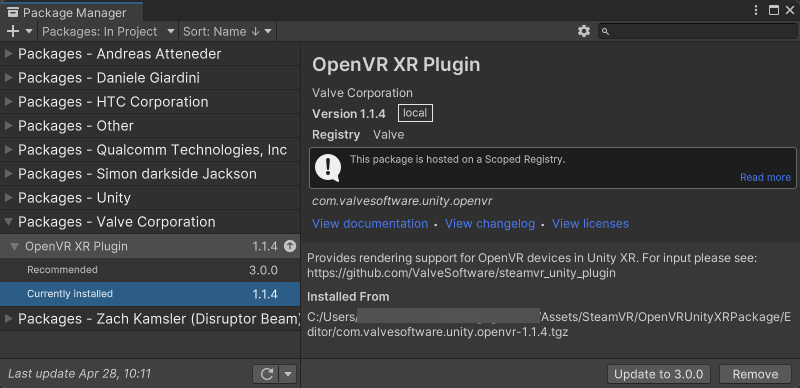

After looking into this again I discovered that you've still got the old external source installed that grabs versions from npm. If you try to grab version 3.0.0 it just deletes all the files and shows an error (as we can no longer use npm to distribute the package). So I'd recommend just not updating that package, and possibly removing the external source entry.
Thanks for the helpful image BenIVRE