

 ValveSoftware
[LINUX] After new patch, huge fps drop from 120-240 to 30-60, all lagging, its unplayable. No opengl
Your system information
- System information from steam (
Steam->Help->System Information) in a gist: debian stable - Have you checked for system updates?: [Yes/No] yes
- Are you using the latest stable video driver available for your system? [Yes/No] yes
- Have you verified the game files?: [Yes/No] yes
Please describe your issue in as much detail as possible:
Describe what you expected should happen and what did happen. Please link any large pastes as a Github Gist. Before this patch all works good with opengl with 120-240 fps. With new patch no opengl and game launch with vulkan. Huge fps drops to 30-60, massive lags, vulkan eat more ram with every played match, pc start lagging and freezing cuz no available memory.
Steps for reproducing this issue:
- Update dota
- start match
- with every played match you got memory leak
- you need reboot if you want to free your ram

Yes, similar issue here. I've been trying to avoid Vulkan for the last few months and have been using OpenGL. On it I had a much higher FPS, stable even during powerful team fights. In addition, OpenGL did not give me graphics problems like Vulkan. To sum up, Dota with Vulkan is unplayable for me on Radeon RX580 8GB with Mesa 23.0.0.
I have some regrets and feel a bit cheated because I spent a lot of money on it in the last few years and now day by day the game became unplayable. It's a pity, because even on my older PC, where I had a very old Radeon HD5850, I could still play Dota on Linux with OpenGL smoothly on it. (I still have it and ran dota when I was coming back to my family home for the weekend). Interestingly, this Radeon will still allow to play Dota smoothly - but on Windows...
As for me, bad news about the abandonment of OpenGL.

tl;dr I also suffer from this mysterious memory leak, as far as I can see there are no fixes besides buying more ram. It seems that the ram fills up slower if shader precaching is enabled and my graphics settings are lowered.


Dear Devs, Why would you drop openGL support!? Game is so dark running on Vulkan, and it's now unplayable

ryzen 5500u Vega 7, got same problem... everything its fine on opengl. but after using vulkan, fps drop and unplayable i guess...
in same setting 1080p high setting, open gl got 60fps constant some time spike 53... but on vulkan. just got 48 and spike near to 20...
running on endeavoros.. try changing driver, kernel, and still no luck.. should i back again to windows...?

Same issue running on MXLinux Ryzen 4650G APU. Used to run 60fps capped on OpenGL med settings. Now I'm consistently getting anywhere between 29-40. The main dashboard FPS is even worse even when the animations and videos are disabled. Shutting down the game also takes forever.
Not sure if OpenGL was considered too legacy to maintain internally...it did work properly...enough to justify any overhead in maintenance. Vulkan seems like a hit or miss on Linux right now.

Actually fells better for me after patch - I used Vulkan for years (Fedora 37, Intel i5-4690, Nvidia 750 Ti). Did you try to let Vulkan compile the cache and let it store in Steam's settings? As I know Vulkan is trying to cache things, probably is busy with that.
OpenGL is fine with Dota 2 but generally slows Valve's work on Source 2 and support of Proton.

@eazy12
Actually fells better for me after patch - I used Vulkan for years (Fedora 37, Intel i5-4690, Nvidia 750 Ti). Did you try to let Vulkan compile the cache and let it store in Steam's settings? As I know Vulkan is trying to cache things, probably is busy with that.
OpenGL is fine with Dota 2 but generally slows Valve's work on Source 2 and support of Proton.
Maybe because you are using nvidia card.
And yes I always wait for the game to compile vulkan shaders before launching it. It's not help. The Vulkan implementation in Dota has clear problems with AMD cards or maybe it's a problem with RADV - I don't know but for sure smth is horrible broken that make this game unplayable.
BTW. there is even mesa bug where is mentioned that in Dota Vulkan works worse than OpenGL - but the title suggests only 10-20%, which for me is a much bigger difference than 20%... https://gitlab.freedesktop.org/mesa/mesa/-/issues/8075
Maybe because you are using nvidia card.
Nah, i've got 1070ti and it got really poor performance on vulkan so i had to use opengl. But now i've got no choice and had to use it.
Even on lowest possible settings with dropped down resolution i have huge lags when spells with lots of particles are casted and fps drops on camera movement :P

Also getting crashes on Arch with mesa and mesa-git. Game crashes if I go over 60-70fps but if I have it set to 60 max it is 'playable'
Journal entry:
Process 19293 (dota2) of user 1000 dumped core.

                                                  Stack trace of thread 19296:
                                                  #0  0x00007f8d7b26718b n/a (/run/host/usr/lib/amdvlk64.so + 0xa6718b)
                                                  ELF object binary architecture: AMD x86-64

Hello @DarnMik, amdvlk64.so is a pretty clear indicator that you're using AMDVLK with the game, not mesa. It would be worthwhile to also test what happens when you run the game with mesa/RADV.

Hi @kisak-valve, Ah so it is! I have removed the amdvlk package and I can have my settings maxed again without crashing but I still only get max 60fps before the last patch I was getting ~180
+1, Debian testing, Ryzen 5800u, just basic "install" without any custom changes with AMD drivers. openGL version was far more stable.
Not a scientific observation, but on vulkan any effect like fire, light or "magic skill effects" will affect FPS very much (great example - intro about "Muerta" new character which have a ton of such effect, it was 1-2FPS). So, even max settings worked pretty "well" until any of such effects used.
Happy to try to get any artifacts, if you pin me at some docs to use them.


I have this problem too with an RX 580, not only the fps is bad but the frametimes are also super unstable even on the lowest possible settings and with using a frame rate limiter
https://gist.github.com/barfin/c6f335f74740efc3b28f0b2c030e86d6


Can those of you experiencing problems report if adding -vulkan_disable_steam_shader_cache to your Launch Options improves things for you?

Can those of you experiencing problems report if adding -vulkan_disable_steam_shader_cache to your Launch Options improves things for you?
i tried it and it changed nothing
@danginsburg No changes for me with -vulkan_disable_steam_shader_cache
What do I have to add.
- OpenGL with the same graphics settings performed much better.
- Vulkan before the muerta update also worked much better than it does now. Putting aside the issue of removing the api, I think that the muerta update messed up something in the performance of vulkan itself.
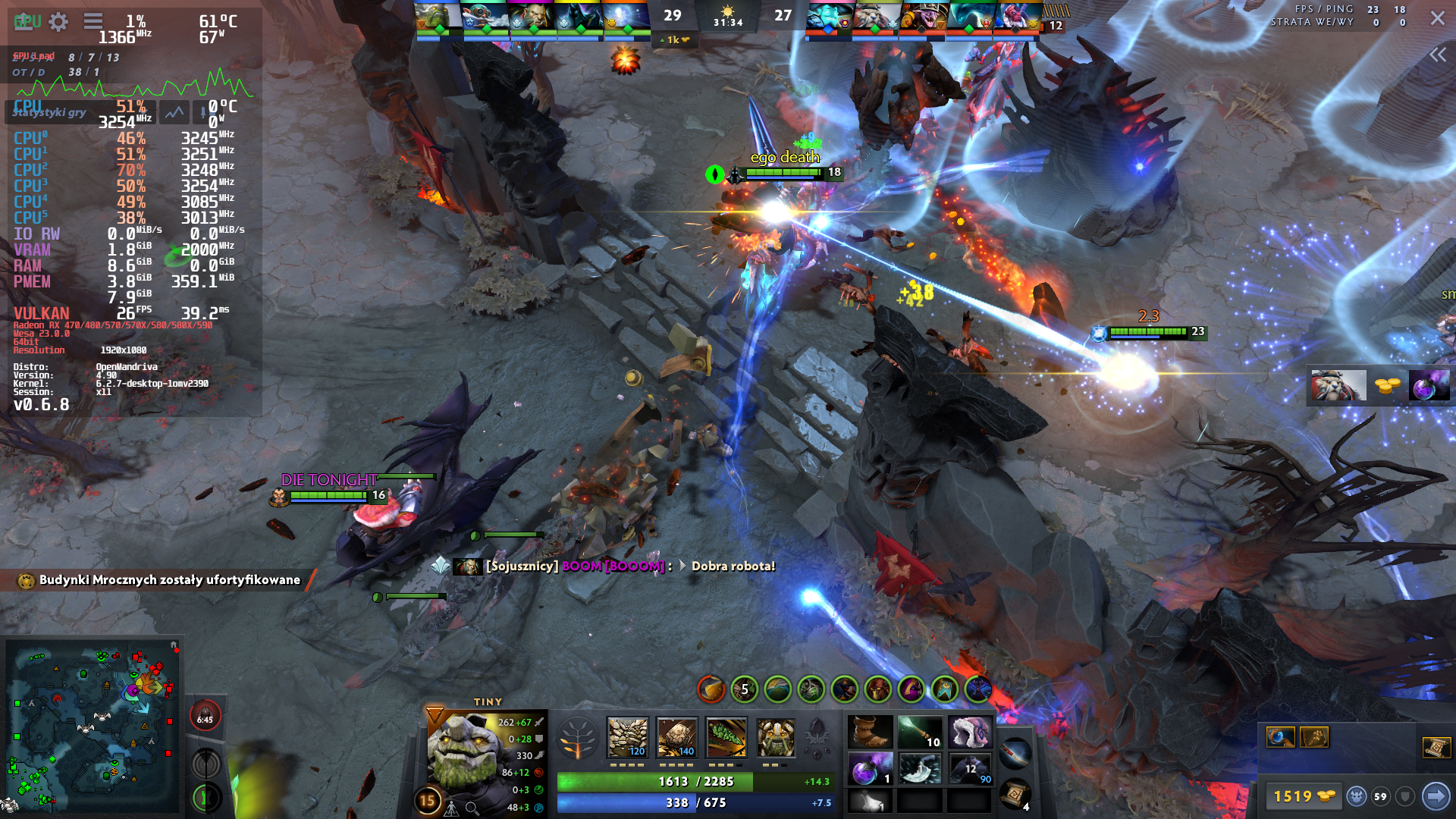
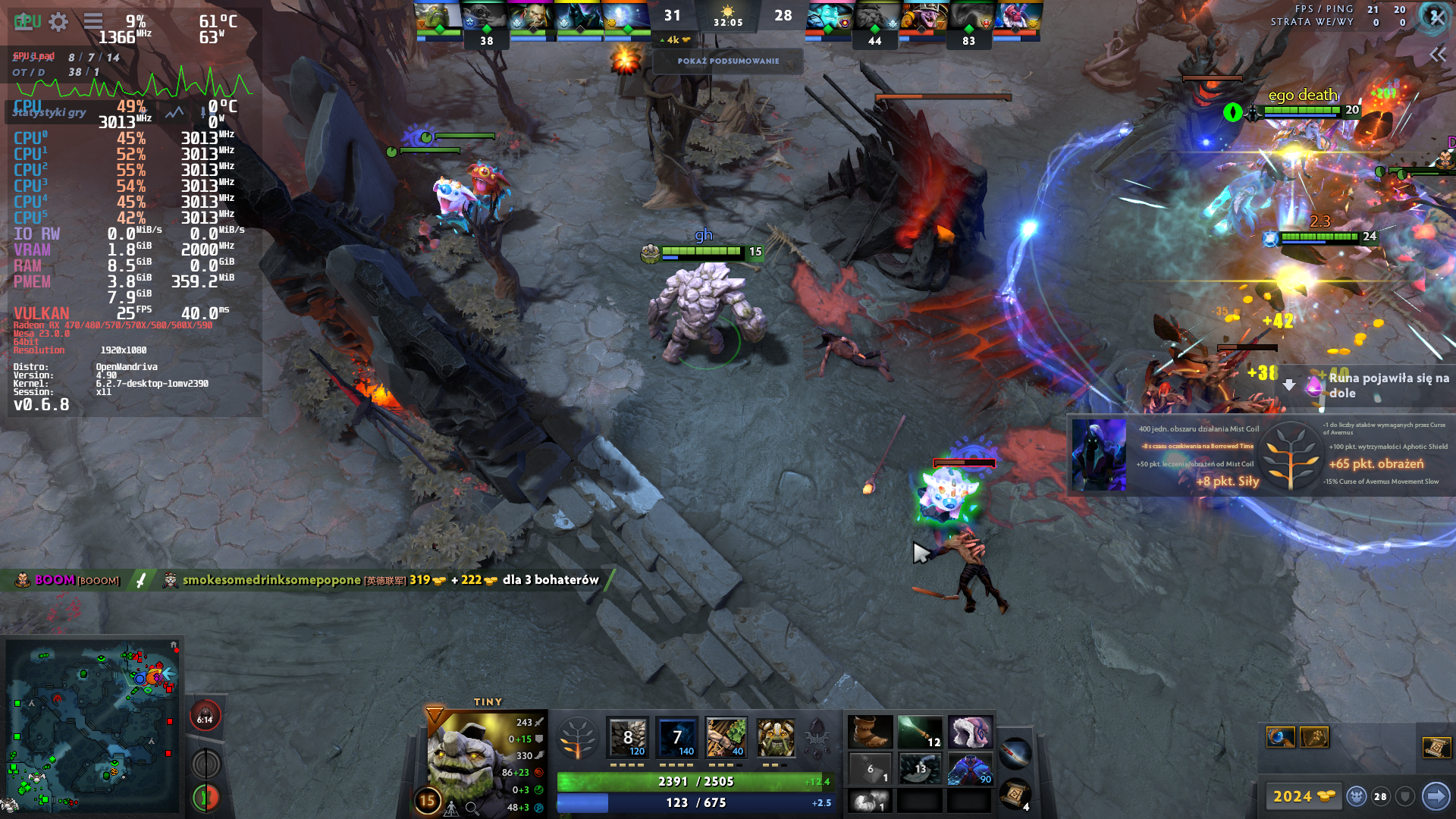
See these screenshots with mangohud for me on Radeon RX580 8GB, fps is weak, but importantly gpu usage is very low. And shouldn't it be like that?
Screenshots


Today i tested dota 2 on arch linux with mesa 23 and amdvlk 2022.Q4.4-3. Almost no difference, but with amdvlk i got little higher fps and less lags. With amdvlk also i got memory leak. If i try launch steam with mesa 23 radv and use command RADV_PERFTEST=gpl then game totally freezing with 10-25 fps, slideshow, almost all ram was eaten from 1-2 minutes, system lagging like a shit, only trash slideshow. I think issue with memory leak can not be fixed because developers from mesa, vulkan, amd and valve just don't want do it, cuz for them its easier redirect issue from one to another and don't spent time for fixing it. Also why they use garbage vulkan api in dota??? I lost double-triple fps, from 120-240 fps to 30-60 fps. Just bring back opengl to dota, we don't need this vulkan on linux and macos. Also i install windows 10 22h2 with latest updates and with latest amd video driver and with directx i got 100-200 fps (even with opengl on linux i got more fps 120-240). And this trash vulkan on windows gave me 70-100fps with lags. I dont know why i am write this, anyway developers didn't read this...
No improvements on my end after disabling shader cache. For those interested, this is also being tracked on the mesa repos -> https://gitlab.freedesktop.org/mesa/mesa/-/issues/8075
Does anyone have a simple way to reproduce this? Ideally from a demo game since I doubt anyone's going to appreciate me stopping the game in my debugger while playing ranked?
Do any graphical settings affect this at all? Can some people who have the issue post their graphics settings?

Does anyone have a simple way to reproduce this? Ideally from a demo game since I doubt anyone's going to appreciate me stopping the game in my debugger while playing ranked?
Do any graphical settings affect this at all? Can some people who have the issue post their graphics settings?
I haven't found a reliable way to reproduce this bug but i remember it happening when i using max settings in a bot match it was all fine until the timer reached 00:00 and the runes appeared
Can confirm, max settings on 580 with vulkan was pretty smooth dips to 80-90. Now it's dips to 40 and in general a micro stutters all over the place after the Muerta update.

Okay, repro method aside, is anyone experiencing this issue with a driver that is not RADV?
Okay, repro method aside, is anyone experiencing this issue with a driver that is not RADV?
RX580 8GB with mesa radv and amdvlk gives me almost same performance. No difference... Radv when game start about +30 FPS Radv in team fights 10-25
amdvlk when game start ~30 Amdvlk in team fight 10-30
Okay, repro method aside, is anyone experiencing this issue with a driver that is not RADV?
RX580 8GB with mesa radv and amdvlk gives me almost same performance. No difference... Radv when game start about +30 FPS Radv in team fights 10-25
amdvlk when game start ~30 Amdvlk in team fight 10-30
Interesting. Do you have resizable BAR enabled?
Okay, repro method aside, is anyone experiencing this issue with a driver that is not RADV?
RX580 8GB with mesa radv and amdvlk gives me almost same performance. No difference... Radv when game start about +30 FPS Radv in team fights 10-25 amdvlk when game start ~30 Amdvlk in team fight 10-30
Interesting. Do you have resizable BAR enabled?
Unfortunately not.
I suppose that's a tough ask for GPUs of that generation.
Alright, so amd in general from the 5XX/apu series and then I saw someone reporting the issue with a Nvidia 10XX. Anyone seeing the issue who isn't covered by one of these GPU types?
@zmike I don't know if it's hard for the gpu, but I don't think so. See my post above. I have given screenshots there (they are wrapped) which show the GPU usage and it is very low. https://github.com/ValveSoftware/Dota-2/issues/2264#issuecomment-1479905949
It seems to me that if the GPU could not cope, the GPU usage would be high. Meanwhile, I have a few %. While CPU utilization is also around 40-50% so the CPU is not a bottleneck either. Of course, the problem may relate to a specific generation of GPUs - because most people report problems on Polaris.
But the gpu itself works fine in other games. Dying Light 1 or 2 in Proton, Hunt Showdown, Witcher 3 New gen update or Vampire: The Masquerade – Bloodhunt etc work flawlessly. In the dota itself in opengl it worked very well, less so in vulkan. But with the muerta update vulkan became unplayable, and the game did not get improved graphics requiring a stronger system. Something went wrong with this update.