

 UniPiTechnology
EVOK Unipi 1.1 input not counting in UI
Prerequisites
- [x] Are you running the latest Master or the latest release version?
- [x] Did you try to reinstall EVOK?
- [x] Did you perform a cursory search on the forum and google?
Log files needed
Include the output of the following commands on your Neuron/UniPi device:
sudo su
cat /var/log/evok.access.log
ps -fax
cat /var/log/evok.log
cat /var/log/evok.access.log ps -fax cat /var/log/evok.logroot@raspberrypi:/home/pi# cat /var/log/evok.access.log cat: /var/log/evok.access.log: No such file or directory root@raspberrypi:/home/pi# ps -fax PID TTY STAT TIME COMMAND 2 ? S 0:00 [kthreadd] 4 ? I< 0:00 _ [kworker/0:0H] 6 ? I< 0:00 _ [mm_percpu_wq] 7 ? S 0:07 _ [ksoftirqd/0] 8 ? I 0:03 _ [rcu_sched] 9 ? I 0:00 _ [rcu_bh] 10 ? S 0:00 _ [migration/0] 11 ? S 0:00 _ [cpuhp/0] 12 ? S 0:00 _ [cpuhp/1] 13 ? S 0:00 _ [migration/1] 14 ? S 0:00 _ [ksoftirqd/1] 16 ? I< 0:00 _ [kworker/1:0H] 17 ? S 0:00 _ [cpuhp/2] 18 ? S 0:00 _ [migration/2] 19 ? S 0:00 _ [ksoftirqd/2] 21 ? I< 0:00 _ [kworker/2:0H] 22 ? S 0:00 _ [cpuhp/3] 23 ? S 0:00 _ [migration/3] 24 ? S 0:00 _ [ksoftirqd/3] 26 ? I< 0:00 _ [kworker/3:0H] 27 ? S 0:00 _ [kdevtmpfs] 28 ? I< 0:00 _ [netns] 33 ? S 0:00 _ [khungtaskd] 34 ? S 0:00 _ [oom_reaper] 35 ? I< 0:00 _ [writeback] 36 ? S 0:00 _ [kcompactd0] 37 ? I< 0:00 _ [crypto] 38 ? I< 0:00 _ [kblockd] 39 ? I< 0:00 _ [watchdogd] 40 ? I< 0:00 _ [rpciod] 41 ? I< 0:00 _ [xprtiod] 44 ? S 0:00 _ [kswapd0] 45 ? I< 0:00 _ [nfsiod] 55 ? I< 0:00 _ [kthrotld] 56 ? I< 0:00 _ [iscsi_eh] 57 ? I< 0:00 _ [dwc_otg] 58 ? I< 0:00 _ [DWC Notificatio] 59 ? S< 0:00 _ [vchiq-slot/0] 60 ? S< 0:00 _ [vchiq-recy/0] 61 ? S< 0:00 _ [vchiq-sync/0] 62 ? S 0:00 _ [vchiq-keep/0] 63 ? S< 0:00 _ [SMIO] 65 ? S 0:07 _ [irq/92-mmc1] 68 ? S 0:07 _ [mmcqd/0] 69 ? S 0:04 _ [jbd2/mmcblk0p2-] 70 ? I< 0:00 _ [ext4-rsv-conver] 71 ? I< 0:00 _ [ipv6_addrconf] 211 ? I< 0:00 _ [cfg80211] 219 ? I< 0:00 _ [brcmf_wq/mmc1:0] 220 ? S 0:08 _ [brcmf_wdog/mmc1] 470 ? I< 0:00 _ [kworker/u9:0] 476 ? I< 0:00 _ [kworker/u9:2] 570 ? I< 0:00 _ [kworker/3:1H] 571 ? I< 0:00 _ [kworker/1:1H] 572 ? I< 0:00 _ [kworker/2:1H] 573 ? I< 0:00 _ [kworker/0:1H] 15910 ? I 0:04 _ [kworker/3:0] 26237 ? I 0:24 _ [kworker/2:2] 2238 ? I 0:03 _ [kworker/1:1] 11070 ? I 0:15 _ [kworker/2:1] 12242 ? I 0:02 _ [kworker/3:2] 17567 ? I 0:01 _ [kworker/u8:2] 19257 ? I 0:00 _ [kworker/1:2] 22261 ? I 0:00 _ [kworker/0:1] 22300 ? I 0:00 _ [kworker/u8:0] 22460 ? I 0:00 _ [kworker/0:0] 22521 ? I 0:00 _ [kworker/0:2] 22546 ? I 0:00 _ [kworker/u8:1] 22583 ? I 0:00 _ [kworker/u8:3] 1 ? Ss 0:05 /sbin/init 106 ? Ss 0:31 /lib/systemd/systemd-journald 124 ? Ss 0:01 /lib/systemd/systemd-udevd 265 ? Ssl 0:00 /lib/systemd/systemd-timesyncd 320 ? Ss 0:00 /lib/systemd/systemd-logind 322 ? Ss 0:00 /usr/sbin/cron -f 323 ? Ssl 0:05 /usr/sbin/rsyslogd -n 326 ? Ss 0:01 /usr/sbin/thd --triggers /etc/triggerhappy/triggers.d/ --socket /run/thd.socket --user nobody --devi 327 ? Ss 0:29 avahi-daemon: running [raspberrypi.local] 367 ? S 0:00 _ avahi-daemon: chroot helper 336 ? Ss 0:00 /usr/bin/dbus-daemon --system --address=systemd: --nofork --nopidfile --systemd-activation 348 ? SLsl 0:22 /usr/sbin/rngd -r /dev/hwrng 355 ? SLsl 286:10 /usr/local/bin/pigpiod 379 ? Ss 0:01 /sbin/wpa_supplicant -u -s -O /run/wpa_supplicant 408 ? Ssl 49:51 /usr/bin/python /opt/evok/evok.py 458 ? S 1:08 _ /usr/bin/python /opt/evok/evok.py 430 ? Ss 0:02 wpa_supplicant -B -c/etc/wpa_supplicant/wpa_supplicant.conf -iwlan0 -Dnl80211,wext 471 ? S 0:00 /usr/bin/hciattach /dev/serial1 bcm43xx 921600 noflow - b8:27:eb:ff:f3:c0 477 ? Ss 0:00 /usr/lib/bluetooth/bluetoothd 533 ? Ss 0:00 /sbin/dhcpcd -q -w 546 tty1 Ss+ 0:00 /sbin/agetty --noclear tty1 linux 549 ? Ss 0:00 /usr/sbin/sshd -D 22538 ? Ss 0:00 _ sshd: pi [priv] 22558 ? S 0:00 _ sshd: pi@pts/0 22561 pts/0 Ss 0:00 _ -bash 22582 pts/0 S 0:00 _ sudo su 22587 pts/0 S 0:00 _ su 22592 pts/0 S 0:00 _ bash 22594 pts/0 R+ 0:00 _ ps -fax 553 ? Ss 0:00 nginx: master process /usr/sbin/nginx -g daemon on; master_process on; 554 ? S 0:09 _ nginx: worker process 555 ? S 0:13 _ nginx: worker process 556 ? S 0:20 _ nginx: worker process 557 ? S 0:20 _ nginx: worker process 22548 ? Ss 0:00 /lib/systemd/systemd --user 22551 ? S 0:00 _ (sd-pam) root@raspberrypi:/home/pi# cat /var/log/evok.log 2019-05-08 19:26:30,904 - evok - ERROR - Error in config section P1_1 - Invalid device circuit number 1 Traceback (most recent call last): File "/opt/evok/config.py", line 317, in create_devices sbus = Devices.by_int(UART,circuit) File "/opt/evok/devices.py", line 67, in by_int raise Exception('Invalid device circuit number %s' % str(circuit)) Exception: Invalid device circuit number 1 root@raspberrypi:/home/pi#
Description
[Description of the bug or feature] When an digital input of an Unipi 1.1 is set to count mode the UI does not change to counting mode. This was the case in Evok 1.0.1.
Steps to Reproduce
- In the evok.conf, set [DI_1] counter_mode=rising
- Open the UI
- Go to the input tab
Expected behavior: [What you expected to happen] On the inputs tab i would expect to see input 1 is 0 (or the actual counts on input 1)
Actual behavior: [What actually happened] On the Inputs tab, input 1 is Off or On.

Did you restart the evok service by calling "systemctl restart evok" after the evok.conf has been modified?

Please also paste your evok.conf file since it seems that you have a some typo based on the log...
It is only the UI that does not show the counting. The WS connection does give the count_mode=true parameter.
Hereby the evok.conf, as you can see i have the DI_1 on counter_mode=rising
#!!! Do not use '#' for comments !!!

[MAIN]
config_version = 2.5                                    ; Mandatory, Configuration file version, DO NOT CHANGE!
use_schema_verification = False                 ; Mandatory, Enabling this will deny any requests that do not match the JSON Schema; NOTE THAT THIS RESULTS IN A SIGNIFICANT INCREASE IN LATENCY AND SHOULD NOT BE USED EXCEPT FOR TESTING
log_level = ERROR                                       ; Mandatory, Minimum severity of messages to be logged; one of INFO, DEBUG, WARNING, ERROR, CRITICAL
log_file = /var/log/evok.log                    ; Mandatory, Log file to use; will be cleared on boot
port = 8080                                                             ; Mandatory, !!! Internal API port - only change if you are certain you know what you are doing; FOR OUR WEB INTERFACE THE PORT SHOULD BE CHANGED IN "/etc/evok-nginx.conf" INSTEAD !!!
;modbus_port = 0                                                ; Optional, enables Modbus access to hardware inputs
;modbus_address = *                                             ; Optional, enables Modbus access to hardware inputs
webhook_enabled = False                                 ; Mandatory, Enables webhook notification - see e.g. https://sendgrid.com/blog/whats-webhook/
webhook_address = http://127.0.0.1:80   ; Mandatory, Put your server endpoint address here (e.g. http://123.123.123.123:/wh )
webhook_device_mask = ["input","wd"]    ; Mandatory, List of device types to notify on (written as a JSON list) - adding AI will generate a large amount of messages!
webhook_complex_events = False                  ; Mandatory, EVOK will send POST requests with the same data as WebSocket, rather than an empty GET request
wifi_control_enabled = False                    ; Mandatory, !!! REQUIRES THE UNIPIAP WIFI CONTROLLER TO BE INSTALLED !!! Will allow evok to control the internal wifi
soap_server_enabled = False                             ; Mandatory, Enables the simple SOAP server; use only if you need the functionality
soap_server_port = 8081                                 ; Mandatory, !!! IF SOAP SERVER IS ENABLED, THIS PORT NEEDS TO BE UNIQUE (i.e. different from the port setting above) !!!

[OWBUS_1]
owbus = /dev/i2c-1 --i2c=/dev/i2c-1:ALL ; Mandatory, scanned bus (--i2c=/dev/i2c-1:ALL or localhost:2122 or 'u' for USB dongle)
interval = 3                                            ; Mandatory, [s] length of sensor reading
scan_interval = 300                                     ; Mandatory, [s] How often the scanning is done

; Configuration example for a 1Wire thermometer
;[SENSOR_1]                                                     ; onewire thermometer
;bus = 1                                                        ; link to OWBUS_X
;address = 28527B930500001F
;type = DS18B20
;interval = 1

[UART_1]
uart_port = /dev/ttyS0
uart_baudr = 115200

[I2CBUS_1]
busid = 1                                                       ;[integer] id of bus /dev/i2c-X

;[EPROM_1]                                                              ;EPROM device will not be used anymore, eprom should be handled by kernel module
;i2cbus = 1
;address = 0x50
;size = 256

[MCP_1]
i2cbus = 1                                                              ; link to I2CBUS_X
address = 0x20                                                  ; i2c address

[RELAY_1]
mcp = 1                                                                 ; link to MCP_X
pin = 7

[RELAY_2]
mcp = 1                                                                 ; link to MCP_X
pin = 6

[RELAY_3]
mcp = 1
pin = 5

[RELAY_4]
mcp = 1
pin = 4

[RELAY_5]
mcp = 1
pin = 3

[RELAY_6]
mcp = 1
pin = 2

[RELAY_7]
mcp = 1
pin = 1

[RELAY_8]
mcp = 1
pin = 0

[P1_1]

[AICHIP_1]
i2cbus =1
address = 0x68

[AI_1]
chip=1
channel=0
bits=18
gain=1
;correction = 5.558737622
;correction = 5.564920867
corr_rom = 1
corr_addr = 0xf0
interval=2

[AI_2]
chip=1
channel=1
bits=18
gain=1
;correction = 5.558737622
;correction = 5.564920867
corr_rom = 1
corr_addr = 0xf4
interval=1

[GPIOBUS_1]

[AO_1]
gpiobus = 1
frequency = 100

[DI_1]
gpiobus = 1
pin=4
debounce = 0
;Enable counting on rising/falling edge or disable it
;By default(or parameter not present) this function is disabled
;Can be turned on on all on-board digital inputs (not inputs on 1Wire or other extensions)
counter_mode = rising
;counter_mode = falling
;counter_mode = disabled

[DI_2]
gpiobus = 1
pin=17
debounce = 0

[DI_3]
gpiobus = 1
pin=27
debounce = 0

[DI_4]
gpiobus = 1
pin=23
debounce = 0

[DI_5]
gpiobus = 1
pin=22
debounce = 0

[DI_6]
gpiobus = 1
pin=24
debounce = 0

[DI_7]
gpiobus = 1
pin=11
debounce = 0

[DI_8]
gpiobus = 1
pin=7
debounce = 0

[DI_9]
gpiobus = 1
pin=8
debounce = 0

[DI_10]
gpiobus = 1
pin=9
debounce = 0

[DI_11]
gpiobus = 1
pin=25
debounce = 0

[DI_12]
gpiobus = 1
pin=10
debounce = 0

;[DI_13]
;gpiobus = 1
;pin=31
;debounce = 0

;[DI_14]
;gpiobus = 1
;pin=30
;debounce = 0

;
;Example of 8xRelay extension module addon (EMO-R8) on address 0x21
;
;[MCP_2]
;i2cbus = 1
;address = 0x21

;[RELAY_9]
;mcp = 2
;pin = 7

;[RELAY_10]
;mcp = 2
;pin = 6

;[RELAY_11]
;mcp = 2
;pin = 5

;[RELAY_12]
;mcp = 2
;pin = 4

;[RELAY_13]
;mcp = 2
;pin = 3

;[RELAY_14]
;mcp = 2
;pin = 2

;[RELAY_15]
;mcp = 2
;pin = 1

;[RELAY_16]
;mcp = 2
;pin = 0

;
;Example of Analog Output extension module EMO-Ao4/12
;
;[PCA9685_1]
;i2cbus = 1
;address = 0x40
;frequency = 400
;
;[AO_2]
;pca = 1
;channel = 0
;
;[AO_3]
;pca = 1
;channel = 1
;
;[AO_4]
;pca = 1
;channel = 2
;
;[AO_5]
;pca = 1
;channel = 3


;Example of 1W-4R/4DI extension module, 1W-8R is almost the same just replace inputs with relays
;
; - First map a new 1Wire sensor with appropriate address, type, and interval
; - Can use both SENSOR or 1WDEVICE syntax
; - Reading interval is crucial to achieve expected performance, default interval is 15s
;
;[1WDEVICE_2]
;bus = 1
;address = 29F39A17000000BC
;type = DS2408
;interval = 1
;
;[1WRELAY_10]
;sensor = 2
;pin = 0
;
;[1WRELAY_11]
;sensor = 2
;pin = 1
;
;[1WRELAY_12]
;sensor = 2
;pin = 2
;
;[1WRELAY_13]
;sensor = 2
;pin = 3
;
;[1WINPUT_20]
;sensor = 2
;pin = 4
;
;[1WINPUT_21]
;sensor = 2
;pin = 5
;
;[1WINPUT_22]
;sensor = 2
;pin = 6
;
;[1WINPUT_23]
;sensor = 2
;pin = 7
And this is what the UI shows..
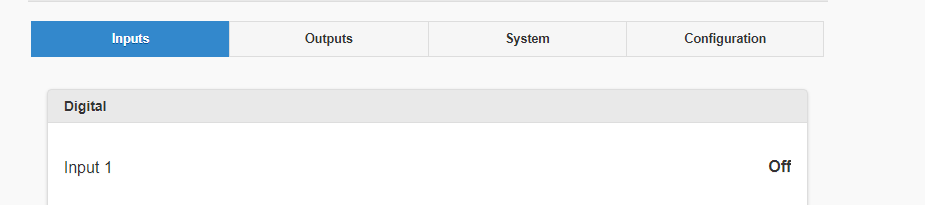
This behavior is correct. Digital inputs only have on/off status in the UI. In the UI, counters can be displayed in the configuration section.
Counter mode is now turned on permanently if the device supports it.
