

 TypeFox
Can we disable error logging?
Is it possible to disable language client errors to log in to the console? I tried to with setTrace to 0 but errors are still logged to the console. And these errors filled our Rollbar logs. I don't want to send these errors to Rollbar. Error: Uncaught (in promise): Error: Client is not running and can't be stopped. It's current state is: startFailed Error: Client is not running and can't be stopped. It's current state is: startFailed

I noticed in this pull, we have the option to disable logs but in the latest version it is not there.
It now relies on the NotificationService from monaco/vscode.
When creating your first editor, you can overwrite it:
import { INotificationService } from 'vscode/services'

const EventNone: monaco.IEvent<any> = () => ({ dispose() { } });
class NoOpProgress {
  infinite(): void { }
  done(): void { }
  total(): void { }
  worked(): void { }
}
class NoOpNotification {

  readonly progress = new NoOpProgress();

  readonly onDidClose = EventNone;
  readonly onDidChangeVisibility = EventNone;

  updateSeverity(): void { }
  updateMessage(): void { }
  updateActions(): void { }

  close(): void { }
}

class NullNotificationService implements INotificationService {
  private static readonly NO_OP = new NoOpNotification();

  _serviceBrand: undefined
  doNotDisturbMode = true
  onDidAddNotification = () => ({ dispose() { } })
  onDidRemoveNotification = () => ({ dispose() { } })
  onDidChangeDoNotDisturbMode = () => ({ dispose() { } })
  public notify() {
    // Ignore
    return NullNotificationService.NO_OP
  }
  public info() {
    // Ignore
    return NullNotificationService.NO_OP
  }
  public warn() {
    // Ignore
    return NullNotificationService.NO_OP
  }

  public error() {
    // Ignore
    return NullNotificationService.NO_OP
  }
  prompt() {
    // Ignore
    return NullNotificationService.NO_OP
  }
  status() {
    return { dispose() { } }
  }
}

monaco.editor.create(el, {}, {
  [INotificationService.toString()]: new NullNotificationService()
})


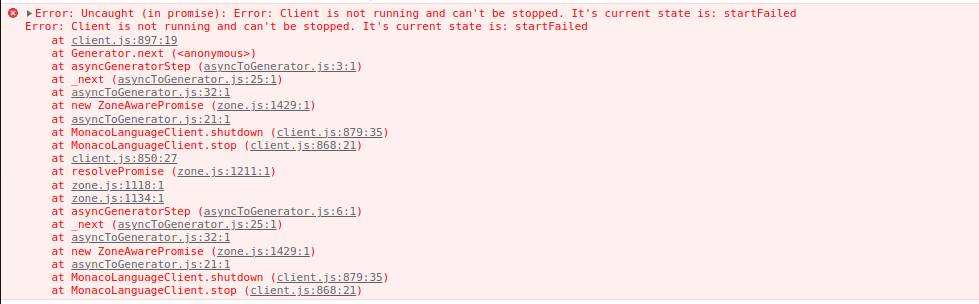
These errors are coming from Monaco Language Client not from the editor.
Are you sure your service is used? The services can only be overriden once
Yes, I implemented in the same way, still errors are logged in the console.
Oh your error in uncaught, it probably mean you are the one calling stop without handling the promise error
No, I handled the languageClient.stop() using the try catch. This error appears even before the stop method is called. A connection error occurs when the specific language server(Java, Clangd) in the backend crashes but socket connection is successfull.
Can you follow the stack to find where the stop() method is called? The only place where stop is called from the lib itself is when the initialization fails it seems

Hi @kaisalmen , Unfortunately, I was unable to stop these errors from logging to the console. It seems what @CGNonofr mentioned here is why these errors are occurring since my socket connection was successful but the language server crashed, which resulted in an error during initialization. Is it possible to handle this somehow?
@tyagirajat200 With the latest version of the please try:
import { ILogService, LogLevel, StandaloneServices } from 'vscode/services';
StandaloneServices.get(ILogService).setLevel(LogLevel.Off);