
git-switcher.vim
 git-switcher.vim copied to clipboard
 ToruIwashita
Automatically save and load vim session based on switching of git branch
git-switcher.vim
git-switcher provide the save and load of the session based on switching of git branch. This plugin can be used for session management even if it is outside of git directory.
Installation
Install either with vim-plug, Pathogen, Vundle, NeoBundle, or other plugin manager.
On Windows
When using on Windows, it is neccesary to set PATH to make Git Bash executable.
e.g.)
> setx /M PATH "%PATH%;c:\Program Files\Git\bin"
Support for other plugins
This plugin supports the following plugins. Therefore, states such as special windows generated by other plugins are also saved.
Usage
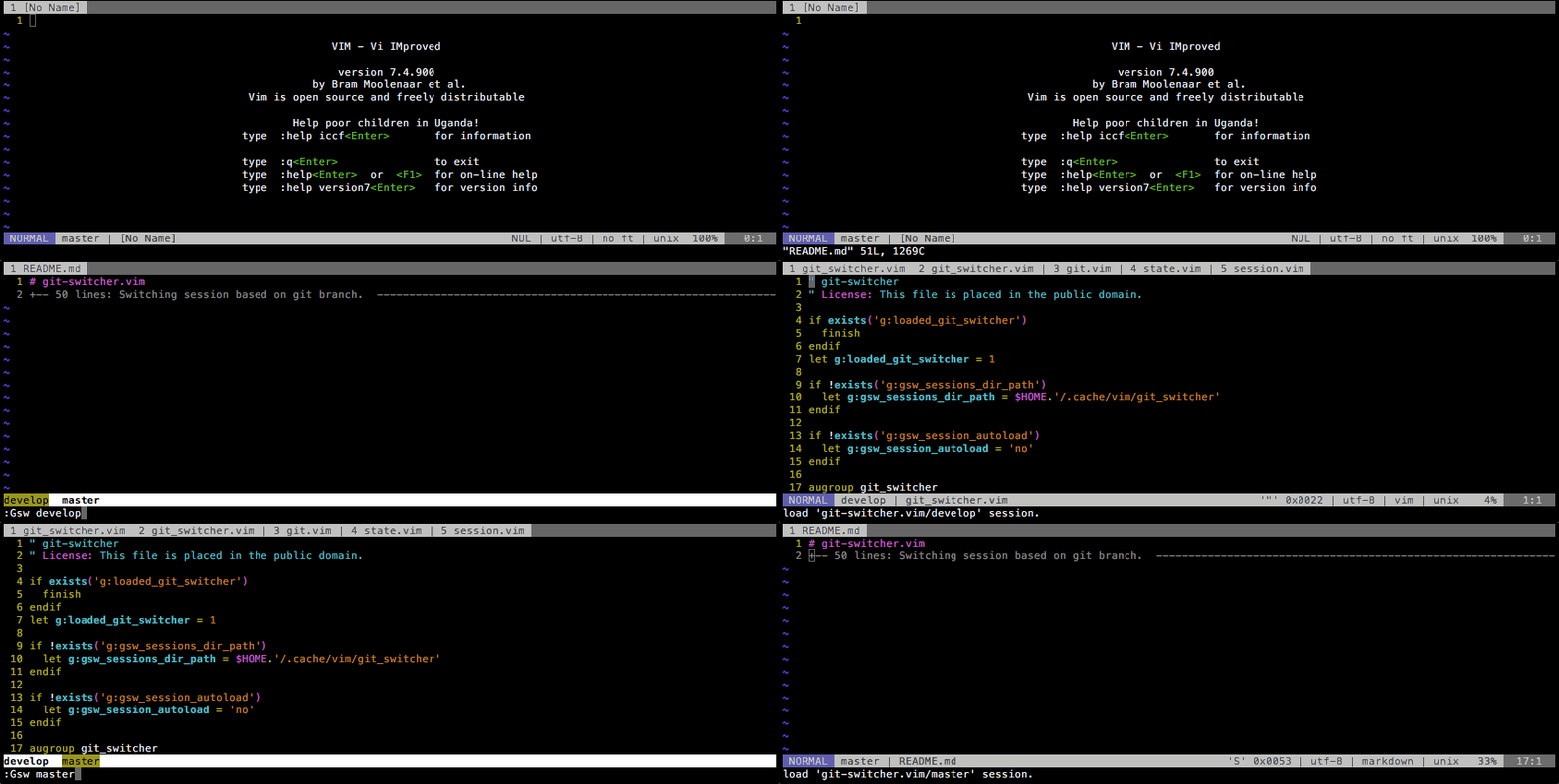
Commands
- Gsw[!] <branch name>
Switch branches. When switching branches, If the session that the same name as the branch has been saved, the session is loaded. With a '!' bang, it only switch branches. If there is no switching destination branch, create new branch and switch to it. This command is equipped with branch names completion.
- GswRemote[!] <branch name>
Checkout a remote branch. At that time, if the session that the same name as the remote branch has been saved, the session is loaded. With a '!' bang, it only checkout a remote branch. This command is equipped with remote branch names completion.
- GswPrev[!]
Switch to the previous branch that switched by git-switcher. The operation except switching to the previous branch is the same as the Gsw command.
- GswSave [session-name]
If this command is run with no arguments, then save the session in the current working branch name. With an argument, then save the given string as the session name. This command is equipped with session names completion that has already been saved. In addition, this command works even if it is not in the git managed directory, that case is to save the session using g:gsw_non_project_sessions_dir and g:gsw_non_project_default_session_name option.
- GswLoad [session-name]
If this command is run with no arguments, then load the session in the current working branch name. With an argument, then load the given string as the session name. This command is equipped with saved session names completion. In addition, this command works even if it is not in the git managed directory, that case is to load the session using g:gsw_non_project_sessions_dir and g:gsw_non_project_default_session_name option.
- GswMove[!] <branch name>
This command move(rename) the current working branch. With a '!' bang, to move without confirmation.
- GswRemove[!] <branch-name>
This command remove specified branch. With a '!' bang, to remove without confirmation.
- GswSessionList
This command display a list of saved session names.
- GswPrevBranchName
This command display the name of the previous branch that switched by git-switcher.
- GswClearState
This command initialize Vim's window, tab, buffer.
- GswDeleteSession[!] <session-name>
This command remove the specified session after confirming. With a '!' bang, to remove without confirmation. This command is equipped with saved session names completion.
- GswDeleteSessionsIfBranchNotExists[!]
This command remove saved sessions there is no branch of the same name after confirming in the local repositry. With a '!' bang, to remove without confirmation.
- GswBranch
This command display a list of branch in the local repositry.
- GswBranchRemote
This command display a list of branch in the remote repositry.
- GswFetch
Execute git fetch. With a '!' bang, it is executed asynchronously.
- GswPull
Execute git pull. With a '!' bang, it is executed asynchronously.
Options
- g:gsw_sessions_dir
Directory path where saving the session.
Default: g:gsw_sessions_dir = $HOME.'/.cache/vim/git_switcher'
- g:gsw_non_project_sessions_dir
This is the project (directory) name to use when saving the session outside of the repository.
Default: g:gsw_non_project_sessions_dir = 'non_project'
- g:gsw_non_project_default_session_name
This is the default session name to use when saving the session outside of the repository.
Default: g:gsw_non_project_default_session_name = 'default'
- g:gsw_save_session_confirm
It is setting of whether or not to confirm the save of the session when the Gsw command is executed.
yes: Enable the save confrimation.no: Disable the save confrimation.
Default: g:gsw_save_session_confirm = 'yes'
- g:gsw_save_non_project_session_confirm
It is setting of whether or not to confirm the save of the session when the GswSave command is executed outside of the git repository.
yes: Enable the save confrimation.no: Disable the save confrimation.
Default: g:gsw_save_non_project_session_confirm = 'yes'
- g:gsw_load_session_confirm
It is setting of whether or not to confirm the load of the session when the Gsw command is executed.
yes: Enable the load confrimation.no: Disable the load confrimation.
Default: g:gsw_load_session_confirm = 'no'
- g:gsw_switch_prev_confirm
It is a setting whether or not to check the destination branch when the GswPrev command is executed.
yes: Enable the switching confrimation.no: Disable the switching confrimation.
Default: g:gsw_switch_prev_confirm = 'no'
- g:gsw_autoload_session
Session automatic load settings on startup. On the git repository, load the session with the same name as the working branch name. If it is outside the git repository, load it with the default session name specified by the g:gsw_non_project_default_session_name.
yes: Automatic loading immediately.confirm: Automatic loading after confirming.no: Disable automatic loading.
Default: g:gsw_autoload_session = 'no'
- g:gsw_autodelete_sessions_if_branch_not_exists
During start-up, to remove saved sessions there is no branch of the same name in the local repository.
yes: Automatic deleting immediately.confirm: Automatic deleting after confirming.no: Disable automatic deleting.
Default: g:gsw_autodelete_sessions_if_branch_not_exists = 'no'
Metadata
Owner
 ToruIwashita
Metadata
Automatically save and load vim session based on switching of git branch