

 TomSchimansky
Auto calculation of window size not working
Hello,
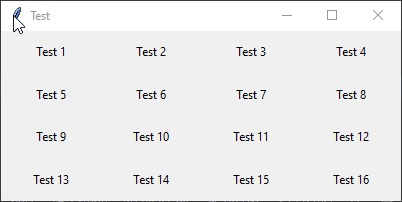
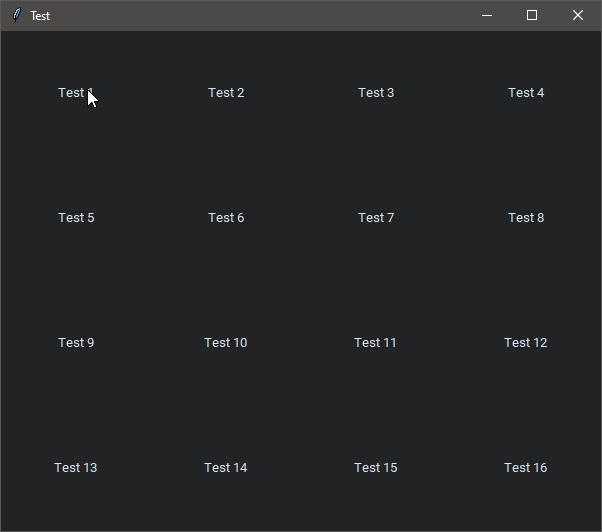
when writing the exact same code in Tkinter I get a correctly autosized window, while in CustomTkinter the window is way too big
Tkinter
CustomTkinter

You have to post your code otherwise there is no way I can tell what's the problem here.

No problem, the pads are different but that does not change the behavior, the rest is 1:1
Native
class DeviceGui(tkinter.Tk):

    def __init__(self, rows=4, columns=4):
        super().__init__()

        self.geometry("-0-50")
        self.title("Test")
        self.minsize(400, 170)
        self.rows = rows
        self.columns = columns
        self.labels = []

        self.grid_rowconfigure(tuple((x for x in range(self.rows))), weight=1)
        self.grid_columnconfigure(tuple((x for x in range(self.columns))), weight=1)

        encnum = 1

        for r in range(self.rows):
            for c in range(self.columns):
                self.labels.append(tkinter.Label(master=self, text="Test " + str(encnum)))
                self.labels[encnum - 1].grid(row=r, column=c, columnspan=1, padx=5, pady=5, sticky="")
                encnum += 1
Custom
class DeviceGui(customtkinter.CTk):

    def __init__(self, rows=4, columns=4):
        super().__init__()

        self.geometry("-0-50")
        self.title("Test")
        self.minsize(400, 170)
        self.rows = rows
        self.columns = columns
        self.labels = []

        self.grid_rowconfigure(tuple((x for x in range(self.rows))), weight=1)
        self.grid_columnconfigure(tuple((x for x in range(self.columns))), weight=1)

        encnum = 1

        for r in range(self.rows):
            for c in range(self.columns):
                self.labels.append(customtkinter.CTkLabel(master=self, text="Test " + str(encnum)))
                self.labels[encnum - 1].grid(row=r, column=c, columnspan=1, padx=10, pady=10, sticky="")
                encnum += 1
You can also see the positioning issue in this example I mentioned in the other issue
What's your monitor scaling in the Windows settings? And what's the monitor resolution?
3840x2160 100% Extended dual monitor setup though, using main screen, meaning Screen 1
@crankedguy Try self.geometry("400x170-0-50") in the customtkinter window.

@Akascape The sense of this? This a) places the window half out of sight, as negative positiion values are not working as in native right now and b) makes the window not autoresize, because a window with a size in geometry does not autoresize