

 ThisIsBenny
Date range in Apple Order widget
The widget might display weird things, if Apple offers a time range as the remaining time. If it takes Apple longer than the “from” time, the widget displays a negative remaining time.
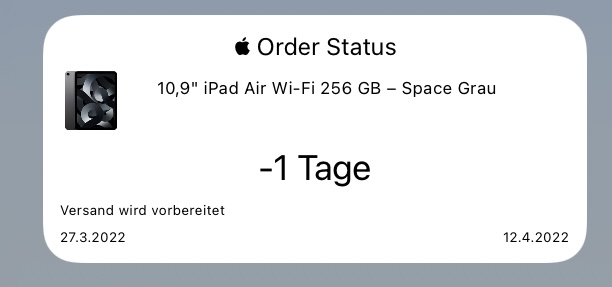
I therefore propose two improvements: If the remaining time becomes negative, it should be set to 0 by just using something like max(0, whatever calculation). Or maybe you should set it to 1 if it is lower than 1, I’m not really sure about Apple’s logic here. If a time range is used, the widget always uses an optimistic estimation, that is, it takes the “from” time for the calculation of the remaining time. You could offer a pessimistic estimation (selectable by some parameter in the code’s config section) by using the “to” date as the basis for the calculation of the remaining time.
I tried to make a proposal, but after looking at the code for a while I had to admit my programming skills are too weak to help. Sorry about that.

Hi @Bernd95 thanks for reporting this bug. I will try to find some time in the next days to fix this issue. I hope i'm able to fix it without test data.
