

 TheJuki
Wrong word division on segmented buttons
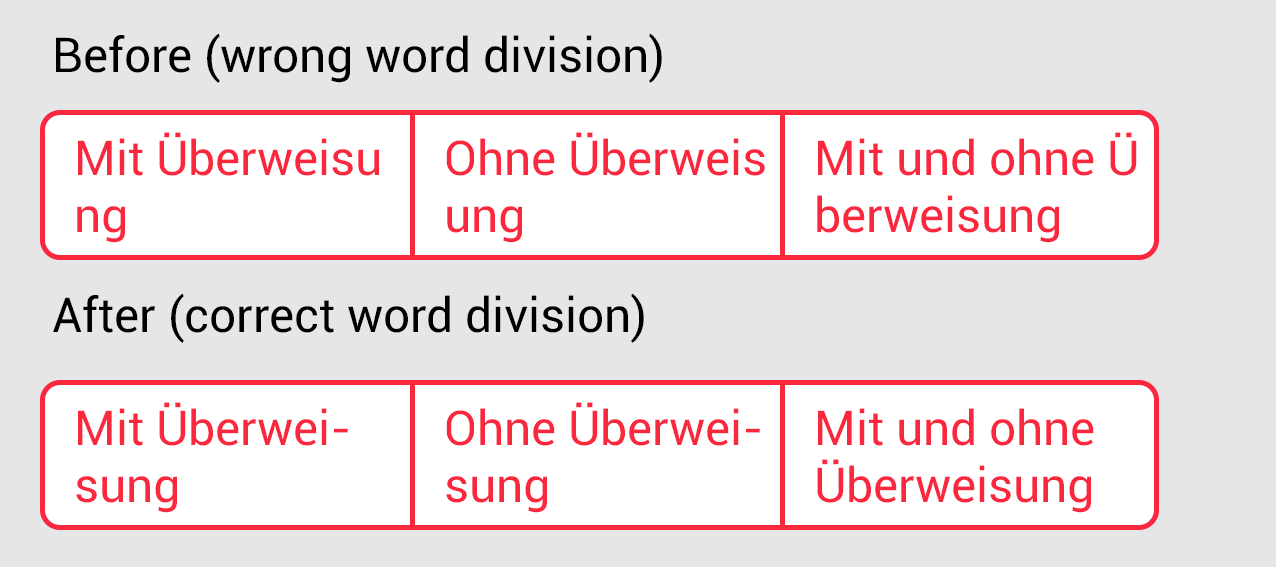
The segmented button view ignored the german word division which leads into hard to read and bad looking labels.
The layout of button label should stick to the word division rules of the locale language. (I guess there is some layout setting in android)
Please see my example attached. (on top is the current version, on the bottom is what I expect)

I am not exactly sure how to achieve this. Perhaps there is a library that achieves this?
http://tutorials.jenkov.com/java-internationalization/breakiterator.html
BreakIterator sounds promising but I am not sure if that can help for short label widths.

Hi @TheJuki
I found something on stackoverflow: https://stackoverflow.com/questions/4454911/hyphenation-in-android
Not sure but maybe this could do the trick on the TextView:
android:hyphenationFrequency="none"
And some library was mentioned, too. -> https://github.com/mathew-kurian/TextJustify-Android
But I'm not sure if this will solve the problem of above. Maybe you can try out.
Best, Daniel