

 TheAssassin
list available commands with `ail-cli --help` and mention this in the wiki
Pre-submit checks
- [X] I checked for similar issues beforehand, but could not find any. I could not add my proposal to any existing issue.
- [X] I am going to take the time to to fill in all the required details. I know that the bug report will be dismissed otherwise.
Feature description
Thank you for this app. I would like to be shown the available commands for ail-cli. This what I see:
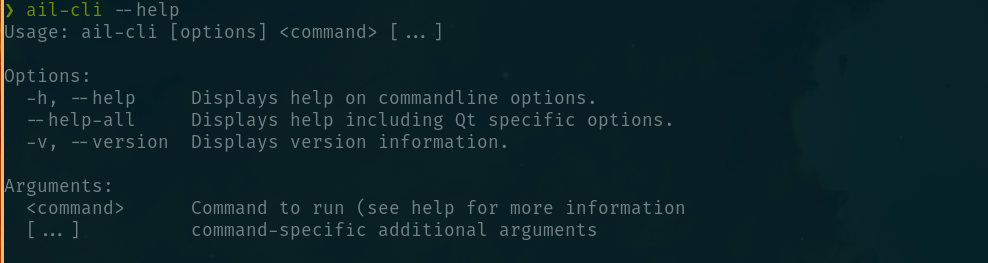
I figured out by trial and error that unintegrate works, and by a mention of this word in the text of the main readme.
Context: appimagelauncher's upgrade feature didn't install for me, so I needed to figure out how to upgrade manually, and make sure I removed any existing desktop entries before I swapped out my appimage and let appimagelauncher integrate it again when I executed it manually:
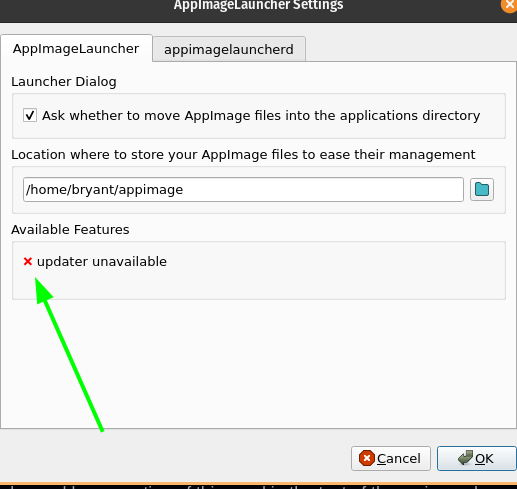
Also, a mention in the wiki that a workaround for the upgrade feature not working is to run ail-cli unintegrate <path_to_appimage> , replace the appimage, and click it again, would be helpful. Also, it should be mentioned that running ail-cli --help lists available commands and options.
Proposed solution
List all commands in the output. This looks like python argparse output to me, but I haven't looked at the code.
Alternative solutions you considered
I considered just removing the appimage and executing it again, and seeing what appimage launcher did, but I didn't want to end up with two desktop entries for two images, one eventually stale if I decided to remove the old appimage. So, I wanted a way to remove it first, since upgrading feature wasn't present.
Additional context
Should I file a bug that the upgrade feature didn't work for me in PopOS? I don't feel strongly about this, but if you'd like it documented, I can do that.

Should I file a bug that the upgrade feature didn't work for me in PopOS? I don't feel strongly about this, but if you'd like it documented, I can do that.
Not sure what you mean. In case of doubt, just create the issue, please. Your build most likely just doesn't support the feature (e.g., PPA installations). This should probably be documented at some point...

Just for the record, appimagelauncherd would have taken care of removing the stale integration.
Should I file a bug that the upgrade feature didn't work for me in PopOS? I don't feel strongly about this, but if you'd like it documented, I can do that.
Not sure what you mean. In case of doubt, just create the issue, please. Your build most likely just doesn't support the feature (e.g., PPA installations). This should probably be documented at some point...
OK, I'll go ahead and file a bug that the following feature doesn't work in PopOS:
After desktop integration, the context menu of the AppImage's entry in the application launcher will have an "Update" entry that launches a little helper tool to apply updates.
Just for the record, appimagelauncherd would have taken care of removing the stale integration.
Just to check, this would occur when I removed the old appimage, and executed the new one?
EDIT: I just confirmed that even downloading the new appimage into AIL's configured directory creates a new desktop menu entry without even executing it. Then, removing the old one, and executing the new appimage clears the stale menu entry.
Not to be nit-picky, but a bullet-point description on either the home page or in the wiki, describing exactly how to do a manual (without upgrade menu option) upgrade, would be very helpful. It would clarify that AIL will take care of everything automatically, just like it does when installing for the first time (which is documented). If it's in the wiki, it would help to have a link to that in the main page, when upgrading is described. Or it could be in a linked FAQ.
Thanks, love the application.
Strangely, ail-cli does list its commands, just not with --help, but if it is called without arguments.
$ ail-cli
Usage: ail-cli [options] <command> [...]

Options:
  -h, --help     Displays help on commandline options.
  --help-all     Displays help including Qt specific options.
  -v, --version  Displays version information.

Arguments:
  <command>      Command to run (see help for more information
  [...]          command-specific additional arguments

Available commands:
  integrate    Integrate AppImages passed as commandline arguments
  unintegrate  Unintegrate AppImages passed as commandline arguments

interesting and thanks... unfortunately it does not seem to work for me: the unintegrate command?
