

 TermiT
Flycut has stopped working altogether
I've updated my Mac last week and since then Flycut has stopped working altogether. Cannot re-initialise this brilliant little app, on which I've become so dependent. Have tried de-installing and re-installing several times. What may be wrong?

What version do you use? Is it the one from Mac App Store? What Mac version do you have?

Hi; I've had the same problem. I can see the flycut icon on my dashboard when I'm in finder but not on any of the dashboards where I actually use it eg word, excel, chrome etc. I've become so reliant on this amazing app - I miss it terribly. I've tried uninstalling and reinstalling several times. No luck. I'm using version 1.9.6 and Mac OS see attached.
I've also attached screengrabs of where you can see the icon (in finder) but not, for example in word. Thanks so much for your help. Fingers crossed it can work again.
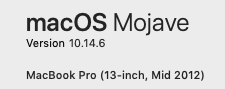



Hi; I've had the same problem. I can see the flycut icon on my dashboard when I'm in finder but not on any of the dashboards where I actually use it eg word, excel, chrome etc. I've become so reliant on this amazing app - I miss it terribly. I've tried uninstalling and reinstalling several times. No luck. I'm using version 1.9.6 and Mac OS see attached.
I've also attached screengrabs of where you can see the icon (in finder) but not, for example in word. Thanks so much for your help. Fingers crossed it can work again.
@Leeanne789 I think this is more so a system issue than flycut. Some apps that have a lot of menus will hide some of your tray icons to make up for it. I know this as experience this a lot when I rotate my monitor to Portrait mode.
I would suggest creating a second workspace as just an empty desktop (no application windows), then use a gesture to switch to it and your Flycut icon should be visible. This is what I do for apps whose menus hide some of my tray icons. 😃

Thnx. I figured it out. You were right. Somehow there wasn't enough space on my dashboard (tho nothing had changed). I simply went into finder, held down control and moved the icon over. Voila! I can see it on all my programs now. Phew.