

 TechnitiumSoftware
docker: local date logging not working properly
i've set the docker container to use the correct time zone but the logs and gui still show UTC
attached is a screenshot of the docker running the 'time' command and a screenshot of the logs
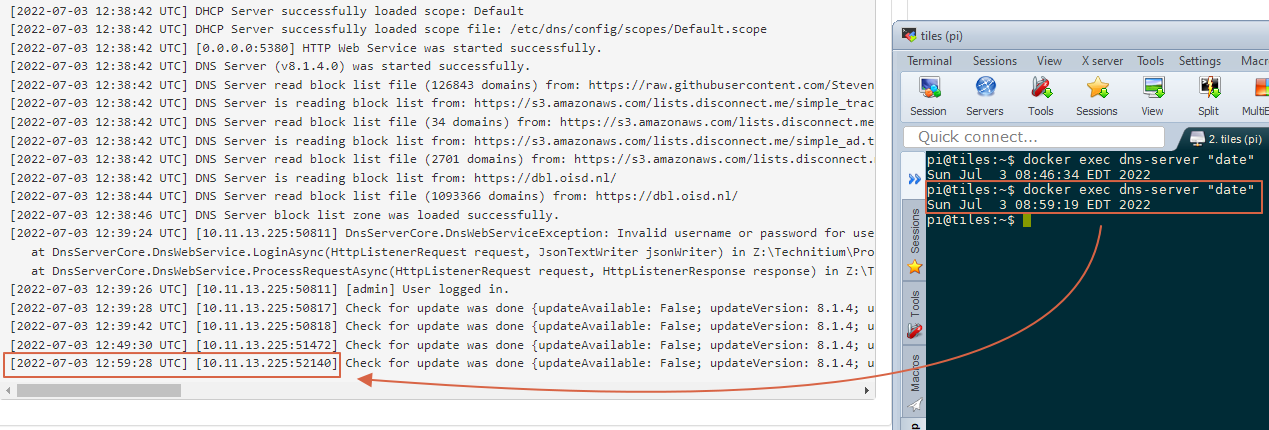
below is my docker-compose
  dns-server:
    container_name: dns-server
    hostname: dns-server
    image: technitium/dns-server:latest
    ports:
      - "5380:5380/tcp" #DNS web console
      - "53:53/udp" #DNS service
      - "53:53/tcp" #DNS service
    environment:
      - DNS_SERVER_DOMAIN=whodat #The primary domain name used by this DNS Server to identify itself.
      - DNS_SERVER_LOG_USING_LOCAL_TIME=true #Enable this option to use local time instead of UTC for logging.
    volumes:
      - /home/pi/dockers/dnser:/etc/dns/config
      # get local time from system
      - /etc/timezone:/etc/timezone:ro
      - /etc/localtime:/etc/localtime:ro
    restart: unless-stopped
    sysctls:
      - net.ipv4.ip_local_port_range=1024 65000

Thanks for the post. Can you check from the GUI if the "Use Local Time" option in Settings > Logging section is enabled?

It wasn't before, but it is now. I restarted the container and things are still in UTC.
It wasn't before, but it is now. I restarted the container and things are still in UTC.
You mean to say that settings are getting reverted when you restart container?
no, the box wasn't checked before, but now it is, and it still is after restarting the container.
no, the box wasn't checked before, but now it is, and it still is after restarting the container.
Thanks for confirming. Now since the "Use Local Time" is enabled, new log entries will be in local time. You will see Local in place of UTC for the log entries.
The thing about the environment variables is that they are used by the DNS server only when dns.config file does not exists i.e. only the first time. If you had the container reuse an existing volume which you had previously used with the DNS server then it will contain the dns.config and so any environment variables that you may have wont be used.
I am running v8.1.4 in a container on Docker as well. I too see the logs are not time stamped correctly. The timezone seems to be ignored...
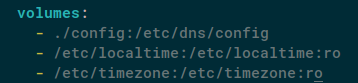
docker-compose.yml volumes:

Thanks for the feedback. See comments inline:
I am running v8.1.4 in a container on Docker as well. I too see the logs are not time stamped correctly. The timezone seems to be ignored...
I tried to replicate this by setting CDT timezone in Windows and Ubuntu VM setup. With windows, it worked fine so there is no logical issue with the code/implementation.
However with Ubuntu, the DNS server uses the timezone that was configured when it was started and not the current time zone. That is, if the timezone was changed while the DNS server is running then it does not apply to it but when the DNS process is restarted, it starts getting correct date time. There is no proper way to fix such issue in code since the date time is a service provided by the runtime.
I am not that good with Docker so not sure how to get this to work. Will check it out with my docker setup once and post here.
I am not that good with Docker so not sure how to get this to work. Will check it out with my docker setup once and post here.
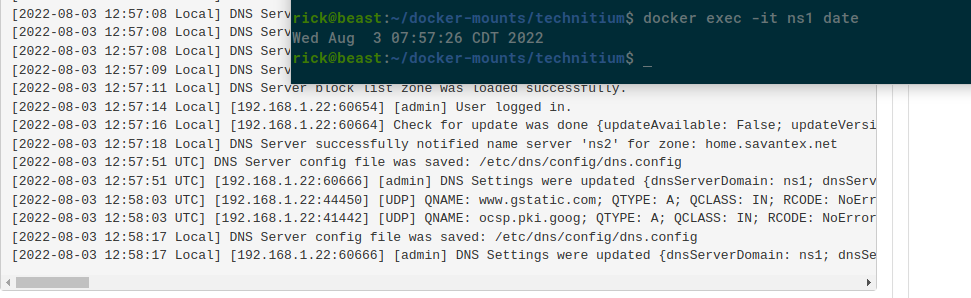
If it helps any, here's what I've noticed on my host running Debian 11.4 with the timezone set to "America/Chicago" (CDT)...
Without - /etc/localtime:/etc/localtime:ro set under volumes in the docker-compose.yaml file, the technitium container reports UTC timezone with the correct UTC time. This can be tested by ("ns2" is the name of my container):
$ docker exec ns2 date
Wed Aug  3 14:47:37 UTC 2022
The logs also show the correct UTC time and are stamped with the UTC timezone.
When - /etc/localtime:/etc/localtime:ro is added to the volumes section of the the docker-compose.yml file and the container is rebuilt via docker-compose up -d, the technitium container reports the correct CDT time and timezone. This can be tested like:
$ docker exec ns2 date
Wed Aug  3 09:49:36 CDT 2022
The logs still show the correct UTC time and UTC timezone.
Regardless of the timezone reported by docker exec ns2 date, the logs always show the correct UTC time. Checking and unchecking the "Use local time" checkbox in the settings only seems to change the "Local" and "UTC" tag in the logs, not the actual time. I have tried restarting the container after checking the "Use local time" checkbox in the settings to no avail as well.
I just tried with my docker setup on ubuntu server with the same config that you posted and its working fine:
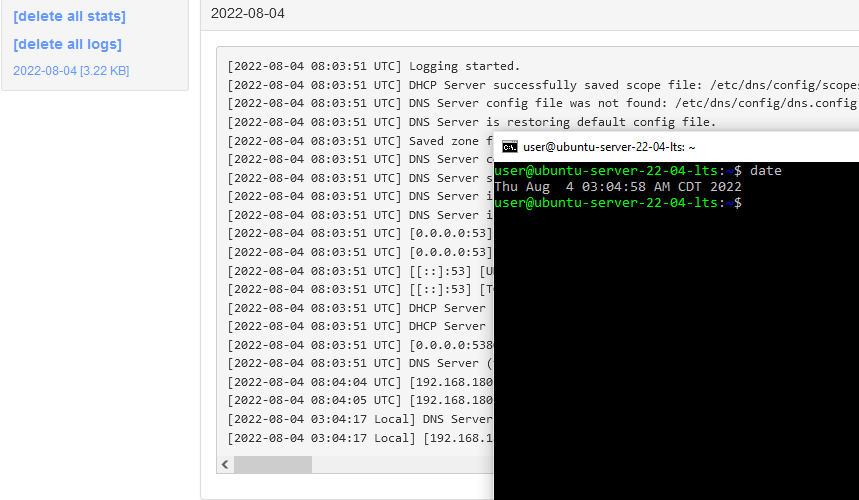
I tried using both the following docker compose options:
environment:
      - TZ=America/Chicago
and the following after setting the CDT timezone on the Ubuntu server.
volumes:
      - config:/etc/dns/config
      - /etc/timezone:/etc/timezone:ro
      - /etc/localtime:/etc/localtime:ro
Both worked well without any issues. Do share the complete docker compose file that you are using.
I honestly don't know why, but this morning the timestamps in the log were correct. Any chance of the date change causing a re-eval of time? FWIW - I never deleted my config files between making changes and recreating the container. I'm fishing because I have no answers. Bottom line, it's working as intended. Thanks for looking into it.
I honestly don't know why, but this morning the timestamps in the log were correct. Any chance of the date change causing a re-eval of time? FWIW - I never deleted my config files between making changes and recreating the container. I'm fishing because I have no answers. Bottom line, it's working as intended. Thanks for looking into it.
I am not sure what could have caused it but, good to know that its working well now.