

 TeamREPENTOGON
Incorrect dsound.dll being loaded by the game
Ok, so I am willing to concede that my computer is just cursed beyond all reason, and that the wicked witch of the west herself has come to make my own life a living hell for whatever reason she so desires. But for some reason, the game is just not loading the dsound.dll (or any of the relevant replacement DLLs) from the working directory. Instead, it's grabbing all of them from %windir%\SysWOW64
Here's the console output of isaac-ng.exe attached console output from Visual Studio:
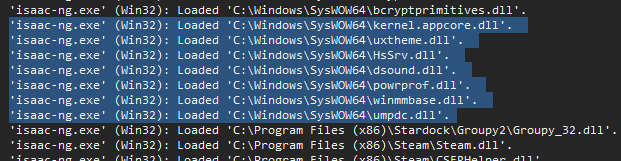
and here's a video of me attempting to load the game with the full setup installed (the slower startup time is due to me recording the screen with ShareX): https://youtu.be/s-WQGvrRlfY?si=LeqKaW4fSRccfjF6
I am (attempting to 💀) running REPENTOGON 1.9.0d on Windows 10 22H2 (19045.4412)
as a side note, how would I be able to debug Isaac from the REPENTOGON vs solution itself? it'd be nice for my own purposes haha but if it's not possible that's ok.

Our custom dsound.dll occasionally not being loaded is something we've unfortunately been aware of since release. We are currently developing a launcher solution that will supersede the dsound.dll injection method on completion.

You could also generate a separate executable launcher that could launch the game on Windows, similar to how Playlunky is executed.

Our launcher is now in a usable though not release ready alpha form. https://github.com/TeamREPENTOGON/Launcher/releases/tag/v0.1.1-alpha This will require a couple of debug dlls, which can be found in #588