

 TargetFrameworkMigrator
VS 2022 support
TODO, see
https://docs.microsoft.com/en-us/visualstudio/extensibility/migration/update-visual-studio-extension?view=vs-2022#update-your-extension-to-visual-studio-2022
- Modernize your projects.
- Refactor your source code into a shared project to allow for targeting Visual Studio 2022 and older versions.
- Add a Visual Studio 2022-targeted VSIX project, and our package/assembly remapping table.
- Making necessary code adjustments.
- Testing your Visual Studio 2022 extension.
- Publishing your Visual Studio 2022 extension.


Sure. Question:
When you change the target framework do you have to manually reset nugget packages yourself?
Get Outlook for iOShttps://aka.ms/o0ukef
From: Julian Verdurmen @.> Sent: Friday, September 10, 2021 8:23:47 PM To: TargetFrameworkMigrator/TargetFrameworkMigrator @.> Cc: ajtruckle @.>; Mention @.> Subject: Re: [TargetFrameworkMigrator/TargetFrameworkMigrator] VS 2022 support (#93)
@ajtrucklehttps://emea01.safelinks.protection.outlook.com/?url=https%3A%2F%2Fgithub.com%2Fajtruckle&data=04%7C01%7C%7C4d7fd6da0fcd465f20cf08d974908371%7C84df9e7fe9f640afb435aaaaaaaaaaaa%7C1%7C0%7C637668986294103309%7CUnknown%7CTWFpbGZsb3d8eyJWIjoiMC4wLjAwMDAiLCJQIjoiV2luMzIiLCJBTiI6Ik1haWwiLCJXVCI6Mn0%3D%7C1000&sdata=ikRWQtUamzIOwMbGy36XvS47hcIRkBk4xq0s4VgTGa8%3D&reserved=0 Could you please test if I provide a link to the VSIX?
— You are receiving this because you were mentioned. Reply to this email directly, view it on GitHubhttps://emea01.safelinks.protection.outlook.com/?url=https%3A%2F%2Fgithub.com%2FTargetFrameworkMigrator%2FTargetFrameworkMigrator%2Fissues%2F93%23issuecomment-917153786&data=04%7C01%7C%7C4d7fd6da0fcd465f20cf08d974908371%7C84df9e7fe9f640afb435aaaaaaaaaaaa%7C1%7C0%7C637668986294113258%7CUnknown%7CTWFpbGZsb3d8eyJWIjoiMC4wLjAwMDAiLCJQIjoiV2luMzIiLCJBTiI6Ik1haWwiLCJXVCI6Mn0%3D%7C1000&sdata=6m2t63q%2BJE99c%2Fp%2Fow93OUPyRIWQgM8zPZcYcNUqM1E%3D&reserved=0, or unsubscribehttps://emea01.safelinks.protection.outlook.com/?url=https%3A%2F%2Fgithub.com%2Fnotifications%2Funsubscribe-auth%2FAB45RM5O2CM7UYBMP5CBBILUBJLMHANCNFSM5A54EEWQ&data=04%7C01%7C%7C4d7fd6da0fcd465f20cf08d974908371%7C84df9e7fe9f640afb435aaaaaaaaaaaa%7C1%7C0%7C637668986294113258%7CUnknown%7CTWFpbGZsb3d8eyJWIjoiMC4wLjAwMDAiLCJQIjoiV2luMzIiLCJBTiI6Ik1haWwiLCJXVCI6Mn0%3D%7C1000&sdata=XhKW6%2BVRkbijDCUB5QabLBZm6CLXOhaISFMyN9mRn0U%3D&reserved=0.
@ajtruckle please test: https://github.com/TargetFrameworkMigrator/TargetFrameworkMigrator/releases/tag/1.8-preview1
When you change the target framework do you have to manually reset nugget packages yourself?
Please open a new issue for this and elaborate
Thanks for the installer. I get issues when I try to run the tool after re-starting VS2022:
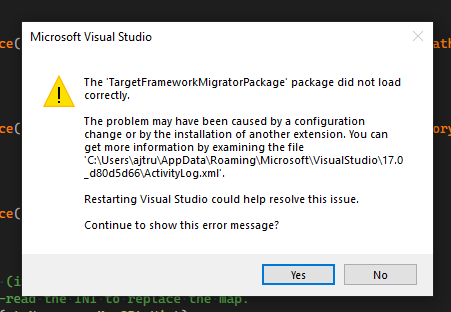
The error in the activity log:
<entry>
<record>2378</record>
<time>2021/09/10 20:37:50.662</time>
<type>Error</type>
<source>VisualStudio</source>
<description>LegacySitePackage failed for package [TargetFrameworkMigratorPackage]Source: 'mscorlib' Description: Could not find file 'c:\users\XXXX\appdata\local\microsoft\visualstudio\17.0_d80d5d66\extensions\zsmmudbq.qy4\Frameworks.xml'.
System.IO.FileNotFoundException: Could not find file 'c:\users\XXXX\appdata\local\microsoft\visualstudio\17.0_d80d5d66\extensions\zsmmudbq.qy4\Frameworks.xml'.
File name: 'c:\users\XXXX\appdata\local\microsoft\visualstudio\17.0_d80d5d66\extensions\zsmmudbq.qy4\Frameworks.xml'
 at System.IO.__Error.WinIOError(Int32 errorCode, String maybeFullPath)
 at System.IO.FileStream.Init(String path, FileMode mode, FileAccess access, Int32 rights, Boolean useRights, FileShare share, Int32 bufferSize, FileOptions options, SECURITY_ATTRIBUTES secAttrs, String msgPath, Boolean bFromProxy, Boolean useLongPath, Boolean checkHost)
 at System.IO.FileStream..ctor(String path, FileMode mode, FileAccess access, FileShare share, Int32 bufferSize)
 at System.Xml.XmlDownloadManager.GetStream(Uri uri, ICredentials credentials, IWebProxy proxy, RequestCachePolicy cachePolicy)
 at System.Xml.XmlUrlResolver.GetEntity(Uri absoluteUri, String role, Type ofObjectToReturn)
 at System.Xml.XmlTextReaderImpl.OpenUrlDelegate(Object xmlResolver)
 at System.Runtime.CompilerServices.RuntimeHelpers.ExecuteCodeWithGuaranteedCleanup(TryCode code, CleanupCode backoutCode, Object userData)
 at System.Threading.CompressedStack.Run(CompressedStack compressedStack, ContextCallback callback, Object state)
 at System.Xml.XmlTextReaderImpl.OpenUrl()
 at System.Xml.XmlTextReaderImpl.Read()
 at System.Xml.XmlLoader.Load(XmlDocument doc, XmlReader reader, Boolean preserveWhitespace)
 at System.Xml.XmlDocument.Load(XmlReader reader)
 at System.Xml.XmlDocument.Load(String filename)
 at VHQLabs.TargetFrameworkMigrator.Migrator..ctor(DTE applicationObject)
 at VHQLabs.TargetFrameworkMigrator.TargetFrameworkMigratorPackage.Initialize()
 at Microsoft.VisualStudio.Shell.Package.Microsoft.VisualStudio.Shell.Interop.IVsPackage.SetSite(IServiceProvider sp)</description>
<guid>{4C5B2B2F-17B1-4B85-ACEB-F5E8865DC05A}</guid>
<hr>80070002</hr>
<errorinfo></errorinfo>
</entry>
thx for the check. Will install VS2022 locally. But that won't be today probably
Thanks. Once we have this working I will raise the other issue and elaborate as you requested.
Sent from Mailhttps://go.microsoft.com/fwlink/?LinkId=550986 for Windows
From: Julian @.> Sent: 10 September 2021 21:45 To: @.> Cc: @.>; @.> Subject: Re: [TargetFrameworkMigrator/TargetFrameworkMigrator] VS 2022 support (#93)
thx for the check. Will install VS2022 locally. But that won't be today probably
— You are receiving this because you were mentioned. Reply to this email directly, view it on GitHubhttps://emea01.safelinks.protection.outlook.com/?url=https%3A%2F%2Fgithub.com%2FTargetFrameworkMigrator%2FTargetFrameworkMigrator%2Fissues%2F93%23issuecomment-917200335&data=04%7C01%7C%7C3fbedd5d08214ee846ff08d9749bf794%7C84df9e7fe9f640afb435aaaaaaaaaaaa%7C1%7C0%7C637669035480381312%7CUnknown%7CTWFpbGZsb3d8eyJWIjoiMC4wLjAwMDAiLCJQIjoiV2luMzIiLCJBTiI6Ik1haWwiLCJXVCI6Mn0%3D%7C1000&sdata=x3IQ9%2B%2FyS9Tt5V78rqziY1JF3yYLs7MsNcujL0uorwU%3D&reserved=0, or unsubscribehttps://emea01.safelinks.protection.outlook.com/?url=https%3A%2F%2Fgithub.com%2Fnotifications%2Funsubscribe-auth%2FAB45RMYFCKB2EROZWLNXACTUBJU7VANCNFSM5A54EEWQ&data=04%7C01%7C%7C3fbedd5d08214ee846ff08d9749bf794%7C84df9e7fe9f640afb435aaaaaaaaaaaa%7C1%7C0%7C637669035480381312%7CUnknown%7CTWFpbGZsb3d8eyJWIjoiMC4wLjAwMDAiLCJQIjoiV2luMzIiLCJBTiI6Ik1haWwiLCJXVCI6Mn0%3D%7C1000&sdata=d35WTtKrfY8Gp03dcQ%2Bo8isqT9A2TupPYWoQ0Y4VSWQ%3D&reserved=0.
Hi. Any joy?
Get Outlook for iOShttps://aka.ms/o0ukef
From: Julian Verdurmen @.> Sent: Friday, September 10, 2021 9:45:46 PM To: TargetFrameworkMigrator/TargetFrameworkMigrator @.> Cc: ajtruckle @.>; Mention @.> Subject: Re: [TargetFrameworkMigrator/TargetFrameworkMigrator] VS 2022 support (#93)
thx for the check. Will install VS2022 locally. But that won't be today probably
— You are receiving this because you were mentioned. Reply to this email directly, view it on GitHubhttps://emea01.safelinks.protection.outlook.com/?url=https%3A%2F%2Fgithub.com%2FTargetFrameworkMigrator%2FTargetFrameworkMigrator%2Fissues%2F93%23issuecomment-917200335&data=04%7C01%7C%7C3fbedd5d08214ee846ff08d9749bf794%7C84df9e7fe9f640afb435aaaaaaaaaaaa%7C1%7C0%7C637669035480381312%7CUnknown%7CTWFpbGZsb3d8eyJWIjoiMC4wLjAwMDAiLCJQIjoiV2luMzIiLCJBTiI6Ik1haWwiLCJXVCI6Mn0%3D%7C1000&sdata=x3IQ9%2B%2FyS9Tt5V78rqziY1JF3yYLs7MsNcujL0uorwU%3D&reserved=0, or unsubscribehttps://emea01.safelinks.protection.outlook.com/?url=https%3A%2F%2Fgithub.com%2Fnotifications%2Funsubscribe-auth%2FAB45RMYFCKB2EROZWLNXACTUBJU7VANCNFSM5A54EEWQ&data=04%7C01%7C%7C3fbedd5d08214ee846ff08d9749bf794%7C84df9e7fe9f640afb435aaaaaaaaaaaa%7C1%7C0%7C637669035480381312%7CUnknown%7CTWFpbGZsb3d8eyJWIjoiMC4wLjAwMDAiLCJQIjoiV2luMzIiLCJBTiI6Ik1haWwiLCJXVCI6Mn0%3D%7C1000&sdata=d35WTtKrfY8Gp03dcQ%2Bo8isqT9A2TupPYWoQ0Y4VSWQ%3D&reserved=0.
I followed the upgrade guide, but for some reason it broke the extension without a clear error. I'm afraid this will be hours/days work to find out.
I'm not sure I have to time to fix this.
Pull request are accepted of course.
@304NotModified , Hello.
I found the issue with the package you posted earlier. The vsix does not include the "Frameworks.xml" file.
I happened to have the file from the VS2017 version, was able to copy it and paste it into my VS2019 location, and it's working.
If you update the VSIX to include the file, it'll work as intended.


I downloaded the branch vs2022, compiled it and installed it. It worked perfectly in VS2022 :)
Can confirm that this works.

All, I attempted to build this in VS2022, but after clearing a blocked file error, it couldn't load the form and so I couldn't build it. Any updates to get this working?
