

 TabularEditor
Replace on selection not working on DAX scripts?
I was trying to make a replacement on selected text, but apparently it takes the whole script if you say select all. Am I the only one?

Could you elaborate or perhaps share a screenshot or a short video to demonstrate this issue?

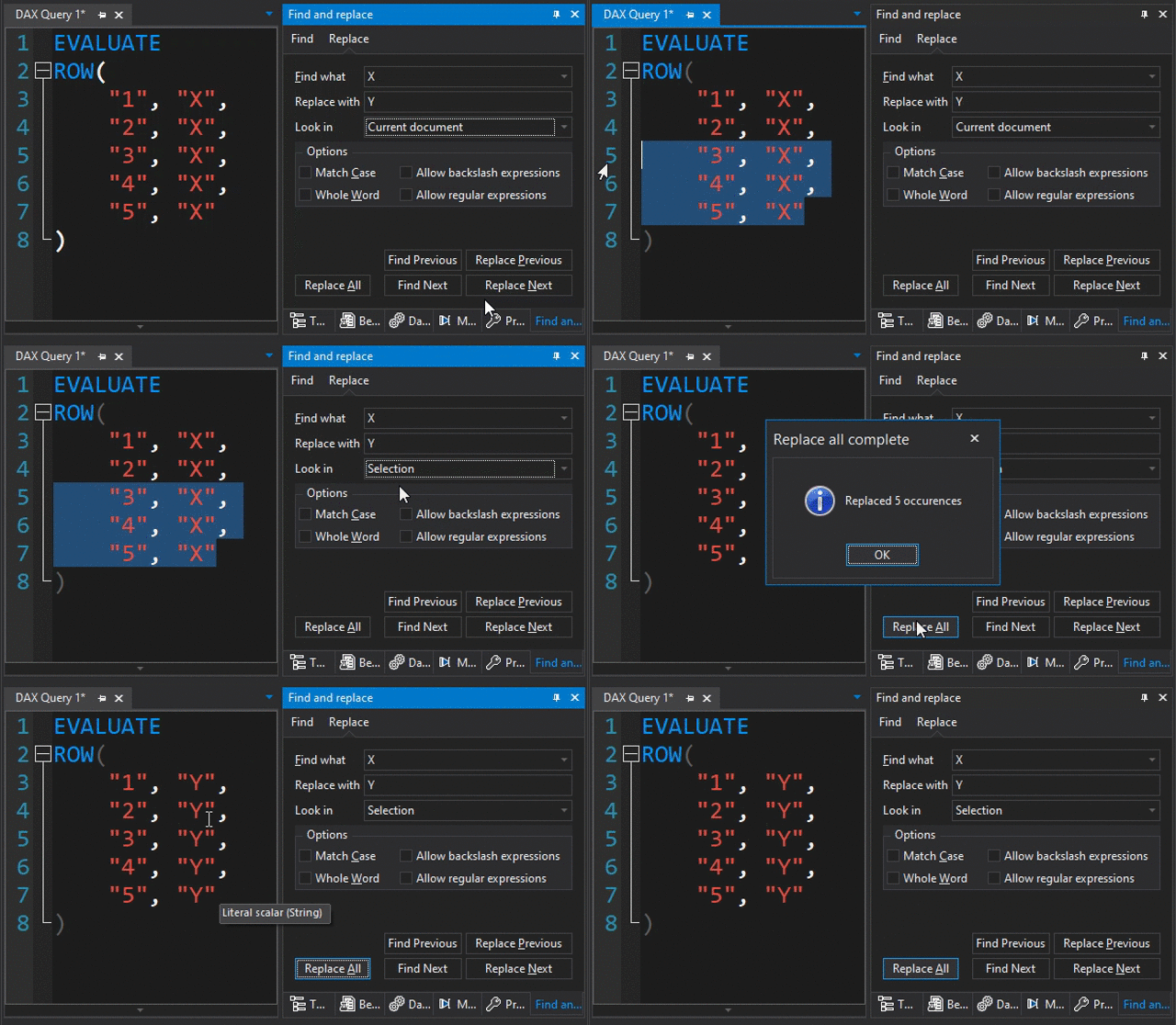
Hi @otykier, here's a short video to reproduce this issue (TE3 v3.6.1). It seems that the text replacement is applied to the whole document instead of the selected text. This behavior applies to all editors, DAXQuery, DAXScript and C#Script.

Thank you Alberto! I had this in my to do list forever, but not getting to do it. hopefully it will get fixed
El jue, 25 nov 2021 19:31, Alberto Spelta @.***> escribió:
Hi @otykier https://github.com/otykier, here's a short video to reproduce this issue (TE3 v3.6.1). It seems that the text replacement is applied to the whole document instead of the selected text. This behavior applies to all editors, DAXQuery, DAXScript and C#Script.
[image: te3-issue293] https://user-images.githubusercontent.com/1957788/143487442-2b327143-decd-45de-9185-50ea7e37c619.gif
— You are receiving this because you authored the thread. Reply to this email directly, view it on GitHub https://github.com/TabularEditor/TabularEditor3/issues/293#issuecomment-979415714, or unsubscribe https://github.com/notifications/unsubscribe-auth/AJUUXHPXLHKLZIXL2R7XI3TUNZ6IFANCNFSM5HYOH7FA . Triage notifications on the go with GitHub Mobile for iOS https://apps.apple.com/app/apple-store/id1477376905?ct=notification-email&mt=8&pt=524675 or Android https://play.google.com/store/apps/details?id=com.github.android&referrer=utm_campaign%3Dnotification-email%26utm_medium%3Demail%26utm_source%3Dgithub.
Hello, this seems to not be working yet
https://user-images.githubusercontent.com/40455069/218253467-24197f7f-afa9-4de5-b790-41fa81bd4764.mp4
Thanks for letting us know. We’ll look into it. As a workaround, try to enable Regular Expressions.
hey this is weird, checking "Allow regular Expressions" indeed did the trick, but now it works even if the option is unchecked