

 TabularEditor
PBIDesktop does not synchronize and measures are not saved
Describe the bug The Power BI Desktop UI under certain conditions does not synchronise correctly with changes applied to the data model. In the following example, several measures are created, but after saving the changes they are not visible in PBIDesktop.
To Reproduce
Sample.PBIX Sample.zip
(test 1) - measures saved via TOM.Model.SaveChanges are not persisted and are lost:
- Open the attached Sample.PBIX
- Execute the C# script by using TE2. All measures have been added to the TE2 TOM object model.
- On TE2 save the changes back to the connected database. PBIDesktop user interface does not update and none of the new measures are visible.
TOM.Model.SaveChangesdoes not raise any exception and if you connect through a new TE instance all measures are present in the tabular model. - Close PBIDesktop. You are not prompted to save any pending changes
- Re-open the PBIX file that was just closed. None of the added measures exist, the measures have not been saved
(test 2) - measures saved via TOM.Model.SaveChanges are not lost but are visible only after the PBIX is closed and reopened:
- (same as test 1) Open the attached Sample.PBIX
- (same as test 1) Execute the C# script by using TE2. All measures have been added to the TE2 TOM object model.
- (same as test 1) On TE2 save the changes back to the connected database. PBIDesktop user interface does not update and none of the new measures are visible.
TOM.Model.SaveChangesdoes not raise any exception and if you connect through a new TE instance all measures are present in the tabular model. - On PBIDesktop change the expression of an existing measure (e.g. add a whitespace at the end) and save the PBIX file
- Close PBIDesktop. You are prompted to save pending changes
- Re-open the PBIX file that was just closed. Now all added measures exist
foreach (var measure in Model.AllMeasures)
{
    for (var i = 1; i <= 43; i++)
    {
        measure.Table.AddMeasure("___" + measure.Name + i.ToString()).Expression = measure.Expression;
    }
}

// Cleanup
// Model.AllMeasures.Where((m) => m.Name.StartsWith("___")).ToList().ForEach((m) => m.Delete());
Expected behavior PBIDesktop UI automatically synchronizes with the changes and all 43 created measures are displayed in the fields panel.
Observed behavior The number of measures used to generate this issue (43) is not a constant but depends on the structure of the tabular model since it affects the size of the XMLA Alter statement that TOM generates. The issue does not occur if a value less than 43 is used for this tabular model.
Application specifics
- Tabular Editor 2.X version: 2.16.5
- Semantic Engine used: Power BI Desktop 2.103.661.0 64-bit (March 2022)
- Model Compatibility Level: 1550/PowerBI

Thanks for the detailed information and repro steps. I've reached out to the PBI product team to see if there's something that can be done about this.

Just curious, did Microsoft implement a change to fix this?
I was struggling with the same issue for the last month or so, but it seems to have resolved in the last couple days. Also, I tried following the repro steps in Test 1 above, and it seems to be working as expected now (new measures are synchronized to model, and PBI Desktop prompts to "save changes" upon exit).
I know there was a QFE just a few days ago, but I didn't see anything in the change log that seemed to address this specifically.
https://docs.microsoft.com/en-us/power-bi/fundamentals/desktop-change-log#april-2022-qfe-1
PBI Desktop Version: Version: 2.104.941.0 64-bit (April, 2022)

Hi @ebeery11 I haven’t heard anything, but it wouldn’t surprise me if a fix was snuck in. They make a lot of updates between each release, and they rarely list minor bugfixes publicly.
Hi @ebeery11, I just tried with both PBIDesktop versions (download and store app) and unfortunately the issue still occurs to me. Did you also tried the steps in Test 2 ?
PBI Desktop Version: Version: 2.104.941.0 64-bit (April 2022)
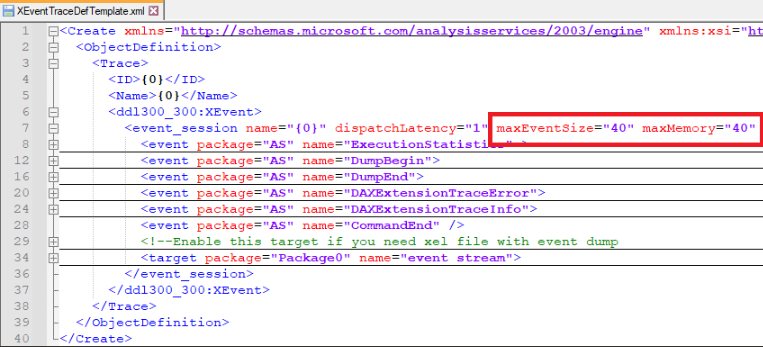
I did some further testing and the only way I found to solve this issue is to change the definition for the XEvent session that monitors executed XMLA statements. I tried changing the maxEventSize and maxMemory parameters in the XEvent trace template by increasing their value from 4(default) to 40(which is probably enough to fit the entire XMLA string for this sample) and the issue no longer occurs to me. I think this is probably because the size of the XMLA Alter statement exceeds the max configured size for the XEvent session and the CommandEnd event is discarded and not sent to the listener.
This is only a temporary workaround as the change will be lost with the installation of a new version of PBIDesktop.
%PROGRAMFILES%\Microsoft Power BI Desktop\bin\XEventTraceDefTemplate.xml
Hi @ebeery11, I just tried with both PBIDesktop versions (download and store app) and unfortunately the issue still occurs to me. Did you also tried the steps in Test 2 ?
PBI Desktop Version: Version: 2.104.941.0 64-bit (April 2022)
I'm sorry @albertospelta, not sure what happened when I tested yesterday. I re-tested with your repro steps and you're right, it still persisted. I must've messed something up and inadvertently triggered the re-sync.
Glad to see you've discovered at least a temporary workaround, thank you for sharing it!