

 THUDM
THUDM
[BUG/Help] <cli_demo.py启动后就一直闪,生成不了答案>
Is there an existing issue for this?
- [X] I have searched the existing issues
Current Behavior
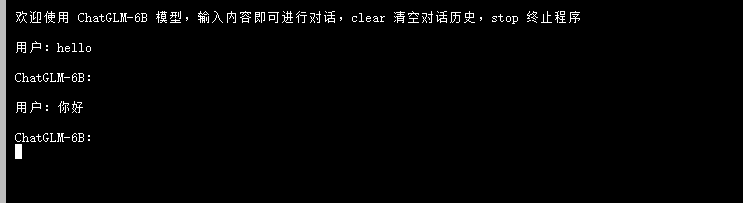 我训练好ckpt模型文件后就改了cli_demo的路径,然后就输入你好,终端就一直闪没有出现答案
这到底是什么原因呢??
我训练好ckpt模型文件后就改了cli_demo的路径,然后就输入你好,终端就一直闪没有出现答案
这到底是什么原因呢??
Expected Behavior
No response
Steps To Reproduce
就按着步骤训练好了ckpt权重文件, 然后更改cli_demo的路径。 就一直有这个情况
Environment
OS: Ubuntu 20.04
Python: 3.8
Transformers: 4.26.1
PyTorch: 1.12
CUDA Support: True
Anything else?
No response


没法复现这个问题。你加载checkpoint之后有做量化吗
是不是还需要执行 evaluate.sh吗?
不用。你可以提供一下你修改后的 cli_demo.py 的完整代码吗
没法复现这个问题。你加载checkpoint之后有做量化吗
是不是还需要执行 evaluate.sh吗?
不用。你可以提供一下你修改后的
cli_demo.py的完整代码吗
from transformers import AutoConfig, AutoModel, AutoTokenizer import gradio as gr import mdtex2html import torch import os
tokenizer = AutoTokenizer.from_pretrained("./ptuning/output/adgen-chatglm-6b-pt-128/checkpoint-3000", trust_remote_code=True)
model = AutoModel.from_pretrained("./ptuning/output/adgen-chatglm-6b-pt-128/checkpoint-3000", trust_remote_code=True).half().cuda()
tokenizer = AutoTokenizer.from_pretrained("./chatglm", trust_remote_code=True) config = AutoConfig.from_pretrained("./chatglm", trust_remote_code=True, pre_seq_len=128) model = AutoModel.from_pretrained("test2/checkpoint4", trust_remote_code=True) prefix_state_dict = torch.load(os.path.join("test2/checkpoint4", "pytorch_model.bin")) new_prefix_state_dict = {} for k, v in prefix_state_dict.items(): new_prefix_state_dict[k[len("transformer.prefix_encoder."):]] = v model.transformer.prefix_encoder.load_state_dict(new_prefix_state_dict) print(f"Quantized to 4 bit") model = model.quantize(4) model = model.half().cuda() model.transformer.prefix_encoder.float() model = model.eval()
"""Override Chatbot.postprocess"""
def postprocess(self, y): if y is None: return [] for i, (message, response) in enumerate(y): y[i] = ( None if message is None else mdtex2html.convert((message)), None if response is None else mdtex2html.convert(response), ) return y
gr.Chatbot.postprocess = postprocess
def parse_text(text):
"""copy from https://github.com/GaiZhenbiao/ChuanhuChatGPT/"""
lines = text.split("\n")
lines = [line for line in lines if line != ""]
count = 0
for i, line in enumerate(lines):
if "```" in line:
count += 1
items = line.split('') if count % 2 == 1: lines[i] = f'<pre><code class="language-{items[-1]}">' else: lines[i] = f'<br></code></pre>' else: if i > 0: if count % 2 == 1: line = line.replace("", "`")
line = line.replace("<", "<")
line = line.replace(">", ">")
line = line.replace(" ", " ")
line = line.replace("*", "*")
line = line.replace("_", "_")
line = line.replace("-", "-")
line = line.replace(".", ".")
line = line.replace("!", "!")
line = line.replace("(", "(")
line = line.replace(")", ")")
line = line.replace("$", "$")
lines[i] = "
"+line
text = "".join(lines)
return text
def predict(input, chatbot, max_length, top_p, temperature, history): chatbot.append((parse_text(input), "")) for response, history in model.stream_chat(tokenizer, input, history, max_length=max_length, top_p=top_p, temperature=temperature): chatbot[-1] = (parse_text(input), parse_text(response))
yield chatbot, history
def reset_user_input(): return gr.update(value='')
def reset_state(): return [], []
with gr.Blocks() as demo: gr.HTML("""
AI
""")chatbot = gr.Chatbot()
with gr.Row():
with gr.Column(scale=4):
with gr.Column(scale=12):
user_input = gr.Textbox(show_label=False, placeholder="Input...", lines=10).style(
container=False)
with gr.Column(min_width=32, scale=1):
submitBtn = gr.Button("Submit", variant="primary")
with gr.Column(scale=1):
emptyBtn = gr.Button("Clear History")
max_length = gr.Slider(0, 4096, value=2048, step=1.0, label="Maximum length", interactive=True)
top_p = gr.Slider(0, 1, value=0.7, step=0.01, label="Top P", interactive=True)
temperature = gr.Slider(0, 1, value=0.95, step=0.01, label="Temperature", interactive=True)
history = gr.State([])
submitBtn.click(predict, [user_input, chatbot, max_length, top_p, temperature, history], [chatbot, history],
show_progress=True)
submitBtn.click(reset_user_input, [], [user_input])
emptyBtn.click(reset_state, outputs=[chatbot, history], show_progress=True)
demo.queue().launch(share=False, inbrowser=True)
没法复现这个问题。你加载checkpoint之后有做量化吗
是不是还需要执行 evaluate.sh吗?
不用。你可以提供一下你修改后的
cli_demo.py的完整代码吗from transformers import AutoConfig, AutoModel, AutoTokenizer import gradio as gr import mdtex2html import torch import os
tokenizer = AutoTokenizer.from_pretrained("./ptuning/output/adgen-chatglm-6b-pt-128/checkpoint-3000", trust_remote_code=True)
model = AutoModel.from_pretrained("./ptuning/output/adgen-chatglm-6b-pt-128/checkpoint-3000", trust_remote_code=True).half().cuda()
tokenizer = AutoTokenizer.from_pretrained("./chatglm", trust_remote_code=True) config = AutoConfig.from_pretrained("./chatglm", trust_remote_code=True, pre_seq_len=128) model = AutoModel.from_pretrained("test2/checkpoint4", trust_remote_code=True) prefix_state_dict = torch.load(os.path.join("test2/checkpoint4", "pytorch_model.bin")) new_prefix_state_dict = {} for k, v in prefix_state_dict.items(): new_prefix_state_dict[k[len("transformer.prefix_encoder."):]] = v model.transformer.prefix_encoder.load_state_dict(new_prefix_state_dict) print(f"Quantized to 4 bit") model = model.quantize(4) model = model.half().cuda() model.transformer.prefix_encoder.float() model = model.eval()
"""Override Chatbot.postprocess"""
def postprocess(self, y): if y is None: return [] for i, (message, response) in enumerate(y): y[i] = ( None if message is None else mdtex2html.convert((message)), None if response is None else mdtex2html.convert(response), ) return y
gr.Chatbot.postprocess = postprocess
def parse_text(text): """copy from https://github.com/GaiZhenbiao/ChuanhuChatGPT/""" lines = text.split("\n") lines = [line for line in lines if line != ""] count = 0 for i, line in enumerate(lines): if "```" in line: count += 1 items = line.split('
') if count % 2 == 1: lines[i] = f'\<pre\><code class="language-{items[-1]}">' else: lines[i] = f'<br></code>\</pre\>' else: if i > 0: if count % 2 == 1: line = line.replace("", "`") line = line.replace("<", "<") line = line.replace(">", ">") line = line.replace(" ", " ") line = line.replace("", "") line = line.replace("", "") line = line.replace("-", "-") line = line.replace(".", ".") line = line.replace("!", "!") line = line.replace("(", "(") line = line.replace(")", ")") line = line.replace("$", "$") lines[i] = ""+line text = "".join(lines) return textdef predict(input, chatbot, max_length, top_p, temperature, history): chatbot.append((parse_text(input), "")) for response, history in model.stream_chat(tokenizer, input, history, max_length=max_length, top_p=top_p, temperature=temperature): chatbot[-1] = (parse_text(input), parse_text(response))
yield chatbot, historydef reset_user_input(): return gr.update(value='')
def reset_state(): return [], []
with gr.Blocks() as demo: gr.HTML("""
AI
""")
chatbot = gr.Chatbot()
with gr.Row():
    with gr.Column(scale=4):
        with gr.Column(scale=12):
            user_input = gr.Textbox(show_label=False, placeholder="Input...", lines=10).style(
                container=False)
        with gr.Column(min_width=32, scale=1):
            submitBtn = gr.Button("Submit", variant="primary")
    with gr.Column(scale=1):
        emptyBtn = gr.Button("Clear History")
        max_length = gr.Slider(0, 4096, value=2048, step=1.0, label="Maximum length", interactive=True)
        top_p = gr.Slider(0, 1, value=0.7, step=0.01, label="Top P", interactive=True)
        temperature = gr.Slider(0, 1, value=0.95, step=0.01, label="Temperature", interactive=True)

history = gr.State([])

submitBtn.click(predict, [user_input, chatbot, max_length, top_p, temperature, history], [chatbot, history],
                show_progress=True)
submitBtn.click(reset_user_input, [], [user_input])

emptyBtn.click(reset_state, outputs=[chatbot, history], show_progress=True)
demo.queue().launch(share=False, inbrowser=True)
https://github.com/THUDM/ChatGLM-6B/tree/main/ptuning#%E6%A8%A1%E5%9E%8B%E9%83%A8%E7%BD%B2 应该是
model = AutoModel.from_pretrained("./chatglm", trust_remote_code=True)
这是按照原先的cli_demo.py和部署文档改的
import os
import platform
import signal
import torch
from transformers import AutoConfig, AutoModel, AutoTokenizer
import readline

modelPath = "../model"
checkpointPath = "./output/checkpoint-500"
preSeqLen = 128

# Load model and tokenizer of ChatGLM-6B
config = AutoConfig.from_pretrained(modelPath, trust_remote_code=True, pre_seq_len=preSeqLen)
tokenizer = AutoTokenizer.from_pretrained(modelPath, trust_remote_code=True)
model = AutoModel.from_pretrained(modelPath, config=config, trust_remote_code=True)

# Load PrefixEncoder
prefix_state_dict = torch.load(os.path.join(checkpointPath, "pytorch_model.bin"))
new_prefix_state_dict = {}
for k, v in prefix_state_dict.items():
    new_prefix_state_dict[k[len("transformer.prefix_encoder."):]] = v
model.transformer.prefix_encoder.load_state_dict(new_prefix_state_dict)

print(f"Quantized to 4 bit")
model = model.quantize(4)
model = model.half().cuda()
model.transformer.prefix_encoder.float()
model = model.eval()

os_name = platform.system()
clear_command = 'cls' if os_name == 'Windows' else 'clear'
stop_stream = False


def build_prompt(history):
    prompt = "欢迎使用 ChatGLM-6B 模型,输入内容即可进行对话,clear 清空对话历史,stop 终止程序"
    for query, response in history:
        prompt += f"\n\n用户:{query}"
        prompt += f"\n\nChatGLM-6B:{response}"
    return prompt


def signal_handler(signal, frame):
    global stop_stream
    stop_stream = True


def main():
    history = []
    global stop_stream
    print("欢迎使用 ChatGLM-6B 模型,输入内容即可进行对话,clear 清空对话历史,stop 终止程序")
    while True:
        query = input("\n用户:")
        if query.strip() == "stop":
            break
        if query.strip() == "clear":
            history = []
            os.system(clear_command)
            print("欢迎使用 ChatGLM-6B 模型,输入内容即可进行对话,clear 清空对话历史,stop 终止程序")
            continue
        count = 0
        for response, history in model.stream_chat(tokenizer, query, history=history):
            if stop_stream:
                stop_stream = False
                break
            else:
                count += 1
                if count % 8 == 0:
                    os.system(clear_command)
                    print(build_prompt(history), flush=True)
                    signal.signal(signal.SIGINT, signal_handler)
        os.system(clear_command)
        print(build_prompt(history), flush=True)


if __name__ == "__main__":
    main()

更新过后ptunning/output只存了新的参数,需要参考ptunning/main.py 下加载模型的方法,更新cli_demo.py中的加载模型部分


@xiaoyaolangzhi请问一下您用这个代号能解决上记问题吗
可以,微调后参考文档里的<部分>代码测试
你这个是cpu版本吧? GPU版怎么解决?