

 TASEmulators
Creating external GUI windows via Lua scripts no longer works as described in Qt version
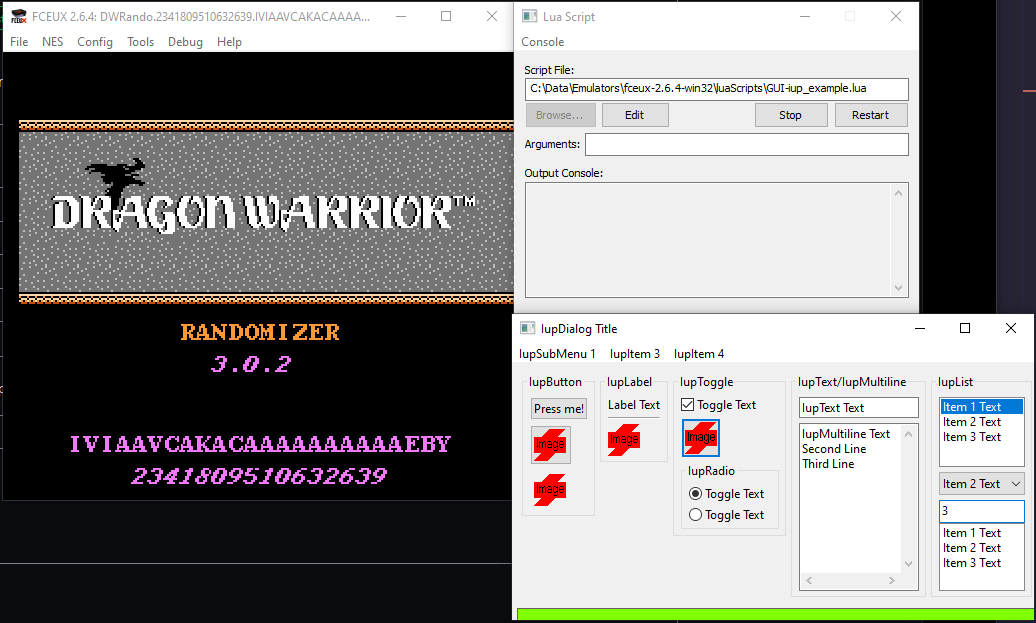
Describe the bug Trying to create a new OS window via a Lua script in qfceux.
In the old Win32 fceux, the IUP library was included, and is documented here and included in example script GUI-iup_example.lua via an import of the auxlib library.
In the new Qt version, I see the Qt dlls in the bin folder, but no Lua interface for them anywhere that I can import in my script. Is there a new way to do that in this new version?
To Reproduce Steps to reproduce the behavior:
- Open Qt x64 qfceux
- Load a ROM
- Load the example script
GUI-iup_example.lua - Click the 'Start' button
- See error
Lua thread bombed out: ...rs/qfceux-2.5.0-win64/luaScripts/GUI-iup_example.lua:6: module 'auxlib' not found:
	no field package.preload['auxlib']
	no file '.\auxlib.lua'
	no file 'C:\Data\Emulators\qfceux-2.5.0-win64\bin\lua\auxlib.lua'
	no file 'C:\Data\Emulators\qfceux-2.5.0-win64\bin\lua\auxlib\init.lua'
	no file 'C:\Data\Emulators\qfceux-2.5.0-win64\bin\auxlib.lua'
	no file 'C:\Data\Emulators\qfceux-2.5.0-win64\bin\auxlib\init.lua'
	no file '.\auxlib.dll'
	no file 'C:\Data\Emulators\qfceux-2.5.0-win64\bin\auxlib.dll'
	no file 'C:\Data\Emulators\qfceux-2.5.0-win64\bin\loadall.dll'
stack traceback:
	[C]: in function 'require'
	...rs/qfceux-2.5.0-win64/luaScripts/GUI-iup_example.lua:6: in main chunk
Lua thread bombed out: ...rs/qfceux-2.6.4-win64/luaScripts/GUI-iup_example.lua:6: module 'auxlib' not found:
	no field package.preload['auxlib']
	no file '.\auxlib.lua'
	no file 'C:\Data\Emulators\qfceux-2.6.4-win64\bin\lua\auxlib.lua'
	no file 'C:\Data\Emulators\qfceux-2.6.4-win64\bin\lua\auxlib\init.lua'
	no file 'C:\Data\Emulators\qfceux-2.6.4-win64\bin\auxlib.lua'
	no file 'C:\Data\Emulators\qfceux-2.6.4-win64\bin\auxlib\init.lua'
	no file '.\auxlib.dll'
	no file 'C:\Data\Emulators\qfceux-2.6.4-win64\bin\auxlib.dll'
	no file 'C:\Data\Emulators\qfceux-2.6.4-win64\bin\loadall.dll'
stack traceback:
	[C]: in function 'require'
	...rs/qfceux-2.6.4-win64/luaScripts/GUI-iup_example.lua:6: in main chunk
Expected behavior The example script test window appears and displays as it did on prior versions.
(please complete the following information):
- OS and Version: Windows 10 Pro v21H1 (build 19043.2006)
- FCEUX: x64 Qt both 2.5.0 6c3a31a and 2.6.4 2b8c618
Additional context If there's an easier way to generate an external window via a Lua script, I'm happy to do that -- I'm just used to using this mechanism, and now that I've updated to the Qt version on my new machine, I seem to be unable to do this now. Thanks!
Note: I did reinstall the win32 version and confirm that that importable still exists, and the example script works as expected there.

Is there any alternative here? I haven't found any myself a year plus later. Would appreciate some guidance. Thanks!
Qt has its own built in scripting engine called QScriptEngine which uses the ECMAScript language. Which I believe is a javascript like language. QScript is fully integrated with the Qt's object system and allows for easy use of UI form files that can be built with Qt creator. I will post again once I have had more time to research and prove the concept.

Update on this, I have proved the concept that I can create custom UI dialogs that are backed by Qt's javascripting engine. I'm going to move forward implementing the interface.