

 TASEmulators
Memory Watch prefixes are broken because of input sanitation
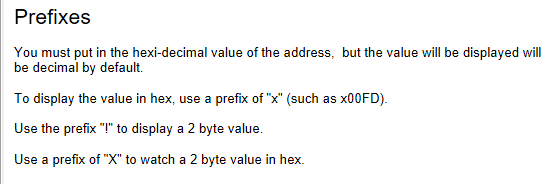
Describe the bug The input sanitation of Memory Watch addresses prevents me from adding prefixes to format the value as explained in the FCEUX help manual. This misguided input sanitation locks the functionality away. I tried getting around it by editing the external "Memory address list" with a text editor, but unfortunately FCEUX converts all addresses to upper case, making my address x0198 into X0198 which has a different meaning.
To Reproduce Steps to reproduce the behavior:
- Open Memory Watch
- Click in the first Address textbox
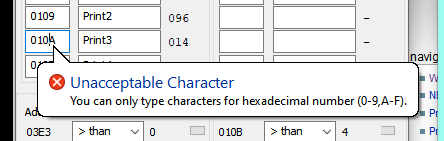
- Type "x"
- Error pops up saying "You can only type characters for hexadecimal numbers (0-9,A-F)"
Expected behavior There should be no input sanitation on the Address textbox, adding it was a mistake as it's not purely used for hex values. It should also not upper case the addresses when reading them from an external file, as the casing has an impact on the syntax.
Screenshots
Info
- OS and Version: Windows 10 Pro, version 21H2
- Version of FCEUX used (QT or non-QT): FCEUX 2.6.4 win32 Binary, non-QT
