

 TASEmulators
RAM Search Changes column does not update
Summary
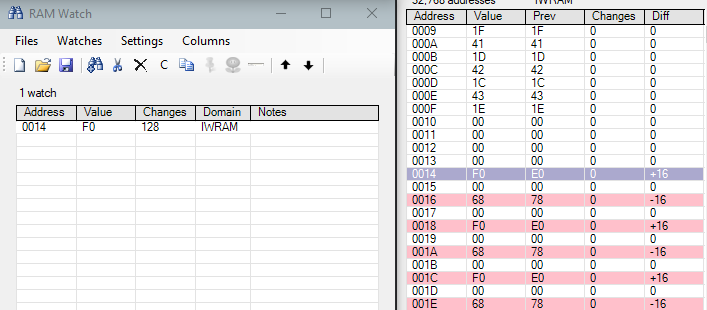
The "Changes" column in BizHawk's RAM Search window does not increment when values in memory update. Setting a watch for the address correctly tracks the changes.
Repro
- Load a Gameboy Advance Rom (I used Pokémon Leaf Green in the screenshot)
- Open the RAM Search and look at an area of memory (I used the top of IWRAM for the screenshot)
- Find an easy-to-control address and set a watch on it (I used address 0014 of IWRAM)
- Update the address and observe the discrepancy
Host env.
- BizHawk 2.7.0; Windows 10 Education 1900; Intel/NVIDIA
Screenshots

CNR with Pokémon Emerald in 2.8 release. By "update" I assume you meant trigger an update by playing the game, though I also didn't see anything weird with poking.

Apologies for necro.
The "Changes" column does nothing unless Options > Mode is set to "Detailed" (the default is "Fast"). This may or may not be what OP's problem was (maybe it was that changes during a single frame aren't counted #3304), but the UX needs improvement regardless.
edit: For example, the cells in the Changed column could be greyed-out in Fast mode.