

 Subsentient
Poweroff or reboot do not logout remotely connected users.
I'm almost done with epoch support for my distro. Very few issues left, but there is a little one that kept me awake last night. If I connect with ssh to the host and execute reboot, halt, poweroff or shutdown, I'm forced to add a '; exit' at the end of the command. Otherwise terminal (e.g. mate-terminal) keeps open and unresponsive until I close it or wait for the broken pipe. Looks like halt process does a pkill -STOP insead of a pkill -KILL.
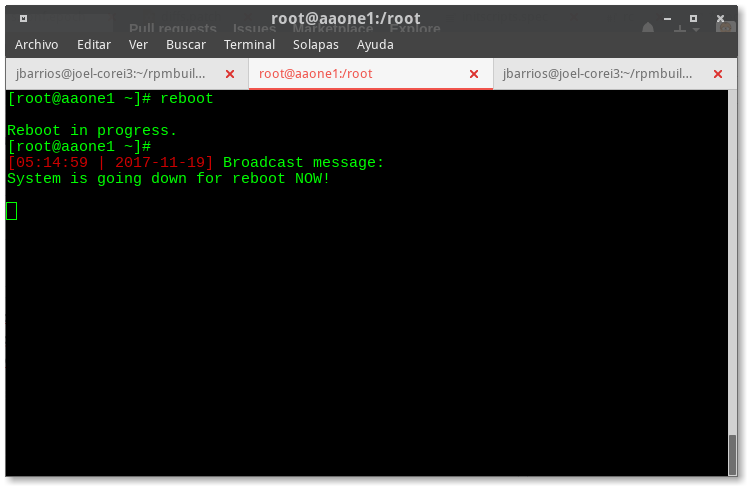
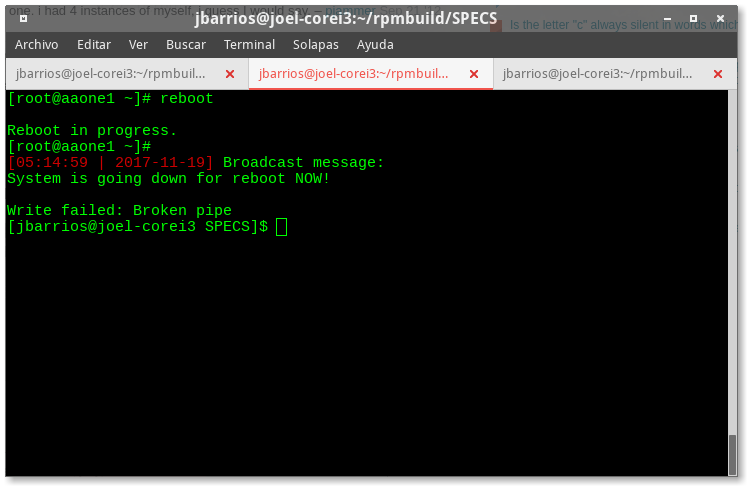
Workarround for my tasks could be create wrapper scripts with 'epoch reboot; exit'. Another one could be to add an ObjectID that kill all the pts logins with pkill -KILL.
I'm attaching here the work I have done so far. I'm using the ObjectIDs from the epoch.conf example. ALDOS-epoch-sources.tar.gz
Offtopic: I'm working on wrapper scripts for service and chkconfig. I'll share them when I'm done. Epoch will go as default init system for ALDOS on January.

Successful workarround:
ObjectID=kill_pts
    ObjectDescription=Kill psuedo terminal slaves
    ObjectStopCommand=for pts in $(cd /dev/pts; ls [0-9]*|tr '\n' ' '); do pkill -KILL -t pts/${pts}; done
    ObjectStartPriority=0
    ObjectStopPriority=1
    ObjectEnabled=true
    ObjectOptions=RAWDESCRIPTION HALTONLY
The result:
[root@aaone1 ~]#
[16:55:58 | 2017-11-19] Broadcast message:
System is going down for poweroff NOW!

Connection to 192.168.1.5 closed.