

 StatCan
Repeatable way to deploy istio egress gateways onto AAW
Epic: #1097
TODO
- [x] Figure out why default configuration for egress gateway does not work on AAW
- [x] Advice from CNS on a repeatable way to deploy istio egress gateways on AAW
- [ ] Implement the egress gateway deployment
Description
Given that the Istio egress gateway for https://github.com/StatCan/daaas/issues/1097 is the first use case for an egress gateway on the AAW, we should brainstorm a repeatable way to deploy egress gateways that aligns with how existing Istio resources are deployed.
I tried to deploy an egress gateway into the cloud-main-system namespace (created in aaw-dev-cc-00 in https://github.com/StatCan/daaas/issues/1133) using a modified version of the Kubernetes yaml approach outlined in the Istio documentation. I was able to get this example working in a local k3d cluster, but not on aaw-dev-cc-00 - I include more detail on these attempts later in this issue.
As per the first point, I thought it would be good to touch base before going too far down any debugging rabbit hole as I'm probably missing something fundamental about how Istio is configured on the AAW.
What I Tried
As a proof of concept, I tried deploying an istio egress gateway into the cloud-main-system namespace using a slightly modified version of the minimum example Kubernetes yaml approach from the Istio documentation, which I include below.
# egress-gateway.yaml (based off of https://istio.io/latest/docs/setup/additional-setup/gateway/#deploying-a-gateway)
apiVersion: v1
kind: Service
metadata:
  name: cloud-main-systemgateway
  namespace: cloud-main-system
spec:
  type: LoadBalancer
  selector:
    istio: egressgateway
  ports:
  - port: 80
    name: http
  - port: 443
    name: https
---
apiVersion: apps/v1
kind: Deployment
metadata:
  name: cloud-main-systemgateway
  namespace: cloud-main-system
spec:
  selector:
    matchLabels:
      istio: egressgateway
  template:
    metadata:
      annotations:
        # Select the gateway injection template (rather than the default sidecar template)
        inject.istio.io/templates: gateway
      labels:
        # Set a unique label for the gateway. This is required to ensure Gateways can select this workload
        istio: egressgateway
        # Enable gateway injection. If connecting to a revisioned control plane, replace with "istio.io/rev: revision-name"
        sidecar.istio.io/inject: "true"
    spec:
      containers:
      - name: istio-proxy
        image: auto # The image will automatically update each time the pod starts.
        resources:
          limits:
            memory: "1Gi"
            cpu: "800m"
          requests:
            memory: "600Mi"
            cpu: "400m"
---
# Set up roles to allow reading credentials for TLS
apiVersion: rbac.authorization.k8s.io/v1
kind: Role
metadata:
  name: cloud-main-systemgateway-sds
  namespace: cloud-main-system
rules:
- apiGroups: [""]
  resources: ["secrets"]
  verbs: ["get", "watch", "list"]
---
apiVersion: rbac.authorization.k8s.io/v1
kind: RoleBinding
metadata:
  name: cloud-main-systemgateway-sds
  namespace: cloud-main-system
roleRef:
  apiGroup: rbac.authorization.k8s.io
  kind: Role
  name: cloud-main-systemgateway-sds
subjects:
- kind: ServiceAccount
  name: default
k3d
Steps to reproduce:
k3d cluster create --config=k3d/config.yaml
kubectl --context=k3d-istio-egress-gateway create ns cloud-main-system
kubectl --context=k3d-istio-egress-gateway label ns/cloud-main-system istio-injection=enabled --overwrite
istioctl --context=k3d-istio-egress-gateway install --set profile=minimal -y
kubectl --context=k3d-istio-egress-gateway apply -f k8s/egressgateway/egress-gateway.yaml -y
where k3d/config.yaml is as follows:
# k3d/config.yaml
# k3d cluster create --config=k3d/config.yaml
apiVersion: k3d.io/v1alpha3
kind: Simple
name: istio-egress-gateway
# When connecting to the host network, k3d only allows a single server node.
servers: 1
network: host
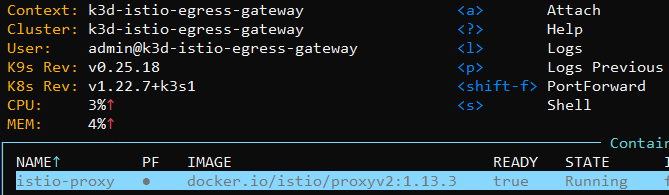
result: everything appears to be working correctly on the local k3d cluster. Importantly, the pods in the Deployment are up and running without error (see screenshot below).
aaw-dev-cc-00
Steps to reproduce: since the cloud-main-system namespace is already created on aaw-dev-cc-00 (see https://github.com/StatCan/daaas/issues/1133), I just applied k8s/egressgateway/egress-gateway.yaml directly to the cloud-main-system namespace.
kubectl apply -f k8s/egressgateway/egress-gateway.yaml
When I do this, all of the resources posted make it past admission control, the pods behind the Deployment are successfully scheduled to a node, the docker.io/istio/proxyv2:1.7.8 image is pulled successfully, and the istio-validation container is started successfully.
However, the istio-validation container instantly fails with status Init:ContainerStatusUnknown. There are no further events associated with the pods in the deployment, and there are no log messages associated with the failure. The only log message I can get before the pod is deleted is Stream closed EOF for cloud-main-system/cloud-main-systemgateway-8657489956-ccnwd (istio-validation). The only other information I can find is that the pod finishes with the terminated state and exit code 126 with reason Error.
There may be another way to gain visibility into why the istio-validation container is failing, but I'm not sure how to proceed as I can't figure out how to get more information about what causes the failure.
Next Steps
@sylus and @zachomedia , I would like to get your input about how we should be handling deployments of egress gateways on the AAW. Based on what I've tried so far, I'm guessing that there are some missing prerequisites from my example or that I'm misconfiguring something.
Also, if there is a different way I should be deploying the egress gateway (e.g. using the Istio operator instead of applying Kubernetes manifests directly), I'm happy to explore such options.
Please let me know if I can provide any additional information or if anything above is unclear. Thanks in advance!
Done
- [x] Can't use
autounder image; need to specify a particular envoy proxy image - [x] Follow egress gateway example in Istio 1.7 docs and attempt to deploy egress gateway.
- [x] ~~Change
cloud-main-systemnamespace to have label"istio-injection" = "disabled"(b/c the egress gateway is itself an envoy proxy and shouldn't be injected with a sidecar proxy).~~ The working standalone example actually hasistio-injection = "enabled"in thecloud-main-systemnamespace and everything appears to be working correctly. I'll leave this check list item in case we need to refer back to it but for now the problem seems to be solved.
TODO
There are a number of prerequisite issues that should be tackled in the following order:
- A number of recommendations were made by CNS which I detail in the following issue https://github.com/StatCan/daaas/issues/1208 - first step is to verify that everything continues to behave correctly when we apply one change at a time to the already-working standalone example. Once all components are working with the recommended changes, we can be confident to apply the changes in the various configuration and controller code in the AAW codebase.
- #1207 - refactor the network policies that are created by the
network.gocontroller in theaaw-kubeflow-profiles-controller. - #1209 - refactor the
istio.gocontroller in theaaw-kubeflow-profiles-controller. - #1210 - Update the Istio Operator controller to watch the
cloud-main-systemnamespace forIstioOperatorresources.
- [ ] Once the above items are completed, the last step is to figure out where to deploy the
IstioOperatorfor theegress-gateway. Currently, this code lives in my standalone example repo, but it needs to be deployed from somewhere in the AAW codebase. - [ ] Once decision is made on the step above, need to add the
IstioOperatormanifest to that location and ensure it is deployed correctly by ArgoCD.
