

 Stability-AI
Change batch defaults to 1 to be friendlier to lower VRAM cards (x768 model)
Problem
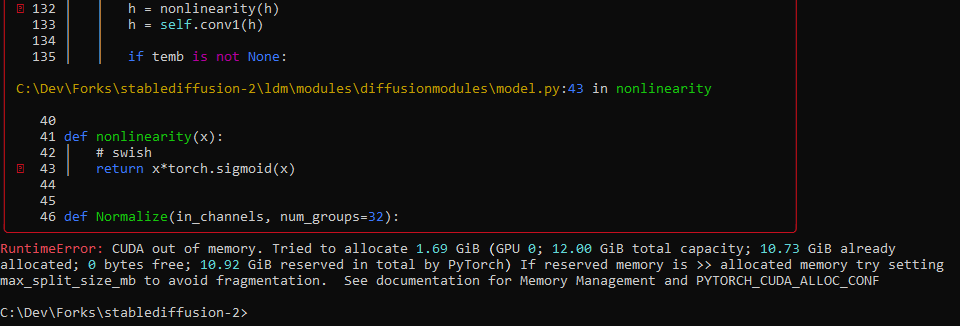
Getting OOM memory errors at the decode stage with baseline arguments from the readme, specifying only --ckpt "..." --prompt "..." --config "..." --H 768 --W 768
Even with a Medium VRAM card (3080 Ti, 12GB) and Xformers installed. the default batch sizes will overflow vram at a size of 3 for the 768x768 model. This means the sample commands from the readme won't work unless one digs through the command-line args manually and notices the defaults.
Proposed PR
- This PR simply changes the defaults for img2img and txt2img to have batch sizes of 1, and in the case of txt2img the n_iter size to 2. This is a simple quality of life change that should help people get what they expect easier.
- txt2img: Leaves n_iter at 2 so you still get a nice grid of 2 samples, but with batch size 1.
Example command
python scripts/txt2img.py --prompt "a beautiful painting of an astronaut riding a unicorn" --ckpt 768-v-ema.ckpt --config configs/stable-diffusion/v2-inference-v.yaml --H 768 --W 768
System info
- Windows 10 21H2
- RTX 3080 Ti (12gb)
- torch 1.12.1+cu116
- xformers installed and working
- cuda_11.6.r11.6/compiler.31057947_0

Ok, change n_samples to 1 can fix some error, but don't you think we need a better memory management to be abble to generate 10 images with 16Go of VRAM ? For example, with SD1, I used script of @basujindal https://github.com/basujindal/stable-diffusion And I can generate 10 results with a T4 16Go in 3 minutes
And I don't spoke about upscaling :( (error tring upscaling 4x a 768x512 picture)
CUDA out of memory. Tried to allocate 576.00 GiB (GPU 0; 39.41 GiB total capacity; 10.90 GiB already allocated; 24.99 GiB free; 12.83 GiB reserved in total by PyTorch)
Edit : with xformers it's much better !
