

 SpecFlowOSS
Error: Collection was modified; enumeration operation may not execute.
SpecFlow Version
3.8.14
Which test runner are you using?
SpecFlow+ Runner
Test Runner Version Number
3.8.12
.NET Implementation
equal or greater .NET Framework 4.6.1
Project Format of the SpecFlow project
Classic project format using packages.config
.feature.cs files are generated using
SpecFlow.Tools.MsBuild.Generation NuGet package
Test Execution Method
Visual Studio Test Explorer
SpecFlow Section in app.config or content of specflow.json
Issue Description
I use SpecFlow + SpecRun, and I did an update of the NuGet package to the latest versions.
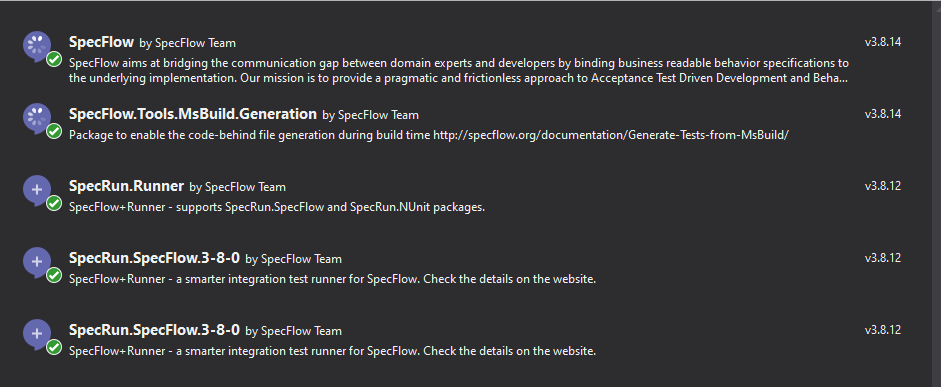
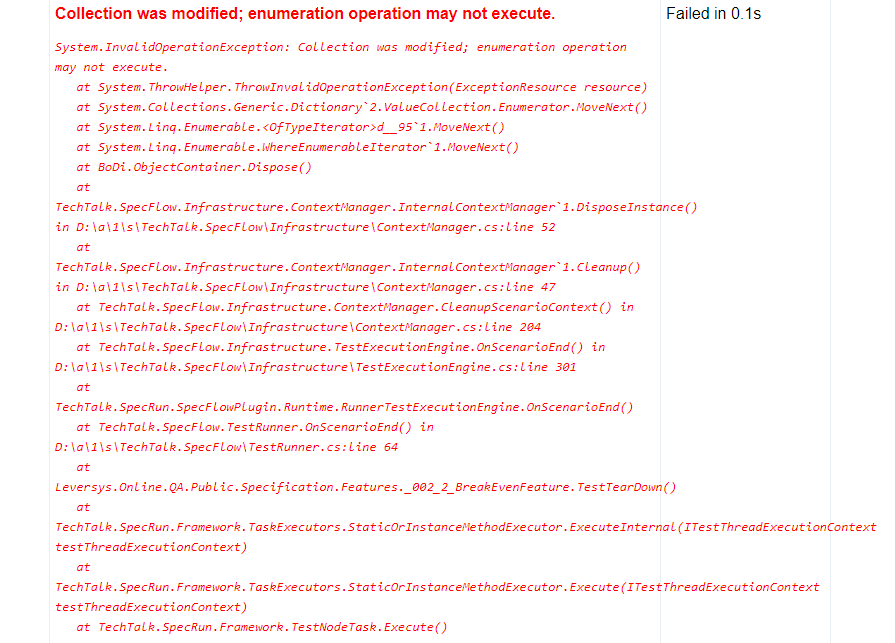
After I run the test, all the steps are done properly but in the final report the test failed with the following error:
 I am using Autofac library, last version

In the previous version of SpecFlow (3.0.220) everything worked fine
Steps to Reproduce
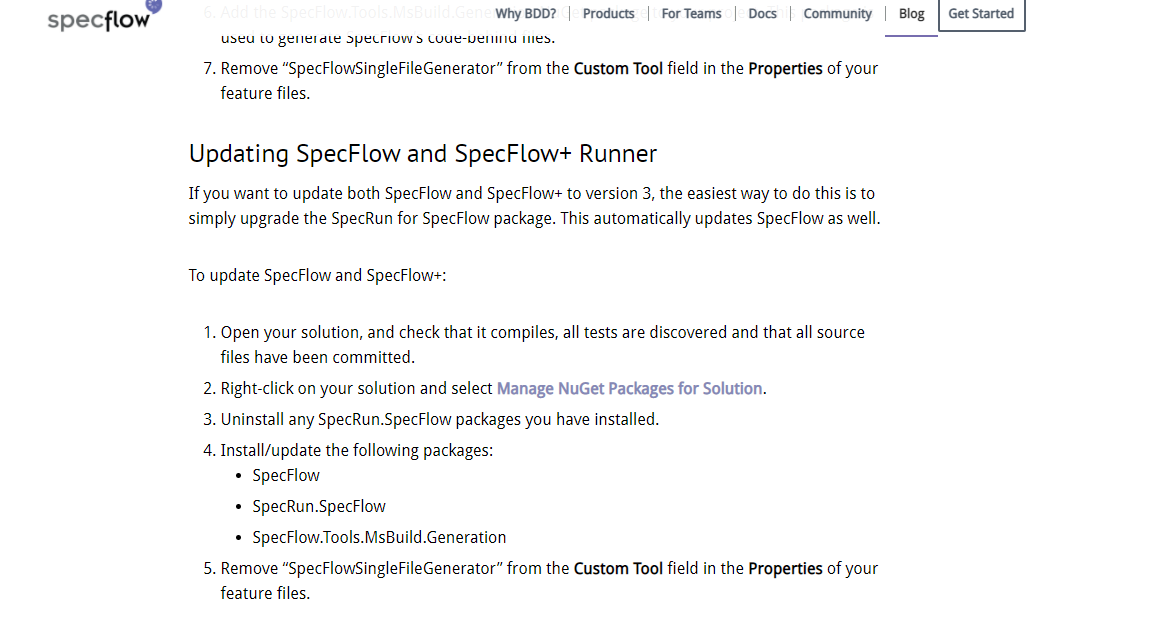
I followed the instructions from the official SpecFlow documentation:
Link to Repro Project
No response

It would help us, if you could try out the minor versions since 3.0 and 3.8 to find where we added this bug.

It would help us if you could try out the minor versions since 3.0 and 3.8 to find where we added this bug.
ok, I'll check and let you know.
It would help us, if you could try out the minor versions since 3.0 and 3.8 to find where we added this bug.
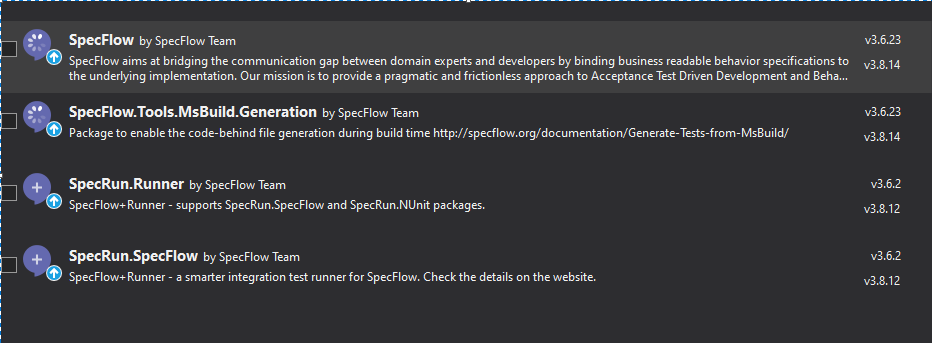
For a version higher than 3.6 I get the same error again.
In the picture below is the last version that worked correctly:
 Autofac version:


One part of the error is here: https://github.com/SpecFlowOSS/BoDi/blob/master/BoDi/BoDi.cs#L1011
The dictionary is enumerated to dispose its values. This exception tells you that something has modified the collection while it was being enumerated for disposal. (For the scenario container)
The only methods that modify it is either
- Resolve (Type or Factory)
- RegisterInstanceAs
=> So is there something your test is doing other than normal in a multithreaded fashion?

One part of the error is here: https://github.com/SpecFlowOSS/BoDi/blob/master/BoDi/BoDi.cs#L1011
The dictionary is enumerated to dispose its values. This exception tells you that something has modified the collection while it was being enumerated for disposal. (For the scenario container)
The only methods that modify it is either
- Resolve (Type or Factory)
- RegisterInstanceAs
=> So is there something your test is doing other than normal in a multithreaded fashion?
no, it's very strange that in version 3.6 it works properly while in version 3.7 the same code doesn't work ok. I call Dispose in AfterTestRun hook.
On which object do you call the dispose method?
On webdriver and ApplicationContainer (Application dependencies disposed)
Is it possible to view the source of it or to extract it in a small example published somewhere? I do not yet see what could modify the dictionary while disposing.
@bollhals issue first appeared after updating BoDi from 1.4.1 to 1.5 (as a result appeared in SpecFlow starting from 3.7.13) having a build of SpecFlow + NUnit + AutoFac leads to an error after every scenario only if you have hooks
simple way to reproduce:
- create a simple project from template of specflow + NUnit (feature+steps+hooks)
- add specflow.autofac NuGet
- create scenarioDependecy register as per (https://docs.specflow.org/projects/specflow/en/latest/Integrations/Autofac.html#a-typical-dependency-builder-method-probably-looks-like-this)
on cleanup you receive:
TearDown : System.InvalidOperationException : Collection was modified; enumeration operation may not execute.
--TearDown
   at System.ThrowHelper.ThrowInvalidOperationException(ExceptionResource resource)
   at System.Collections.Generic.Dictionary`2.ValueCollection.Enumerator.MoveNext()
   at System.Linq.Enumerable.<OfTypeIterator>d__95`1.MoveNext()
   at System.Linq.Enumerable.WhereEnumerableIterator`1.MoveNext()
   at BoDi.ObjectContainer.Dispose()
   at TechTalk.SpecFlow.Infrastructure.ContextManager.InternalContextManager`1.DisposeInstance()
   at TechTalk.SpecFlow.Infrastructure.ContextManager.InternalContextManager`1.Cleanup()
   at TechTalk.SpecFlow.Infrastructure.TestExecutionEngine.OnScenarioEnd()

My best guess: The dispose of the container disposes all resolved singletons, one of them (possibly related to autofac plugin) does something then with the container, which trips up the disposal.
I'm happy to take a quick peak if you can provide an example. (Not to be blunt, but as I'm not associated with specflow, I'm happy to help but I do not intend to invest my free time to setup an example to test it.)
Sure, thanks for looking into this https://github.com/dit2100/SpecFlowExample
Thanks for the example, I had a quick peak.
I can confirm that the disposal of the specflow container disposes the autofac, which tries again to dispose the specflow one.
The 2nd time autofac remembers and succeds, which then clears the specflow one, so the first iteration dies with a modified exception. => Bodi should probably fix this with a early exit if already disposed.
On the otherhand, I don't know if the autofaq plugin is working as expected, This is the output I get when I run your ONE test. 18 registrations, so 9 ScenarioContext and 9 Containers.... Don't know where or how they all end up there.
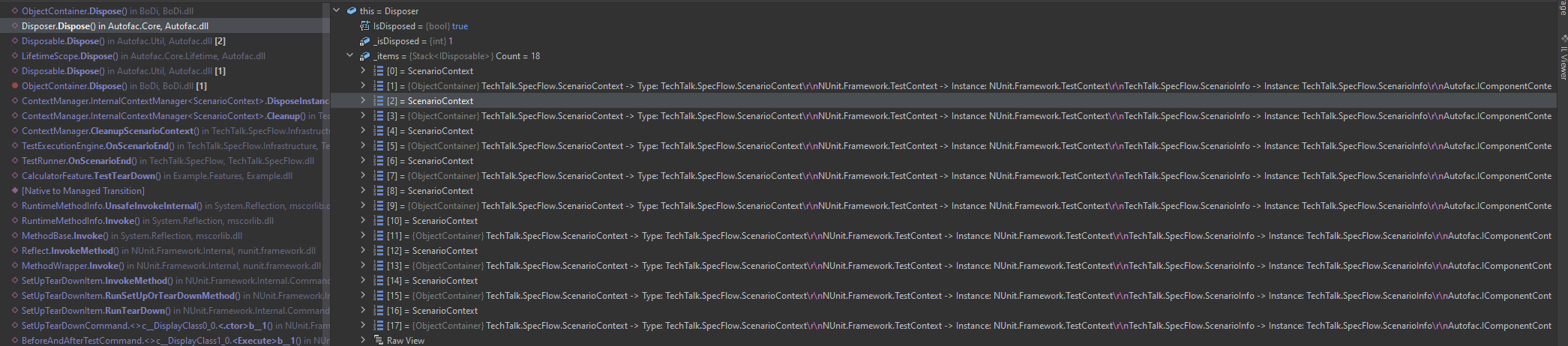
A quick search showed me that every time we resolve the ScenarioContext (e.g. to call the hook) we add the ScenarioContext and the IObjectContainer to the autofaq cleanup list. So maybe the registration is flawed or something?
Thanks a bunch for the confirmation. I had the same feeling, but didn't dig deep into internals (since new in C# world) Tried to stick to older versions of specflow just to find out that livingdoc for that version is broken and the fix is only available for the version with a broken autofac integration=) for now I ditched that impl in favor for built-in BoDi solution (since this issue persists for over an year now) I guess this thread(https://github.com/SpecFlowOSS/SpecFlow/issues/2353) is related and maybe will be addressed in upcoming releases Nonetheless thank you for your time @bollhals Cheers
If I find the time I'll make a PR in the bodi container to early exit the dispose. With this you should at least be able to continue. (It still does strange things, but at least it works)
Just hit this problem, is there a workaround or an update on when it's likely to be fixed?

there was an update in this area with a new approach, you can find more here: https://docs.specflow.org/projects/specflow/en/latest/Integrations/Autofac.html it resolves initial issue with disposal, but creates another one of initiating all necessary helper services (for specflow reports in my case)
so I've abandoned idea of autofac integration at this point of time in favor of build-in solution
I've managed to create a work around for this by creating a plugin that registers the IObjectContainer in Autofac as externally owned, that way Autofac won't attempt to dispose of it. I don't think this will lead to any memory leaks but let me know if I've missed something.
  // Register the SpecFlow DI container as externally owned so that
  // Autofac doesn't attempt to dispose of it
  containerBuilder.Register(ctx => objectContainer)
      .As<IObjectContainer>()
      .ExternallyOwned();
I've managed to create a work around for this by creating a plugin that registers the IObjectContainer in Autofac as externally owned, that way Autofac won't attempt to dispose of it. I don't think this will lead to any memory leaks but let me know if I've missed something.
  // Register the SpecFlow DI container as externally owned so that
  // Autofac doesn't attempt to dispose of it
  containerBuilder.Register(ctx => objectContainer)
      .As<IObjectContainer>()
      .ExternallyOwned();
I am facing exactly this issue and I am trying to apply your workaround.
Where do you get the instance objectContainer from?
Could you post a larger chunk of code?
Thanks!

You have to create a plugin to override the registrations, see https://github.com/chrisrichards/SpecFlowExample

You have to create a plugin to override the registrations, see https://github.com/chrisrichards/SpecFlowExample
This makes it work for me.. Thanks!