

 SpecFlowOSS
System.IO.FileLoadException in OneTimeSetup on SpecFlow 3.4 with NUnit
After migration from SpecFlow 2.4.1 to SpecFlow 3.4.8, the test runner throws a FileLoadException from generated NUnit.AssemblyHooks class:
OneTimeSetUp: System.IO.FileLoadException : Could not load file or assembly 'System.Threading.Tasks.Extensions, Version=4.1.1.0, Culture=neutral, PublicKeyToken=cc7b13ffcd2ddd51' or one of its dependencies. The located assembly's manifest definition does not match the assembly reference. (Exception from HRESULT: 0x80131040) Exception doesn't have a stacktrace
SpecFlow Version:
- [x] 3.4
- [ ] 3.3
- [ ] 3.1
- [ ] 3.0
- [ ] 2.4
- [ ] 2.3
- [ ] 2.2
- [ ] 2.1
- [ ] 2.0
- [ ] 1.9
Used Test Runner
- [ ] SpecFlow+Runner
- [ ] MSTest
- [x] NUnit
- [ ] Xunit
Version number: SpecFlow 3.4.8, Resharper 2020.3, Visual Studio 2019 16.7.4, Nunit 3.12
Project Format of the SpecFlow project
- [ ] Classic project format using
packages.config - [x] Classic project format using
<PackageReference>tags - [ ] Sdk-style project format
.feature.cs files are generated using
- [x]
SpecFlow.Tools.MsBuild.GenerationNuGet package - [ ]
SpecFlowSingleFileGeneratorcustom tool
Visual Studio Version
- [x] VS 2019
- [ ] VS 2017
- [ ] VS 2015
Enable SpecFlowSingleFileGenerator Custom Tool option in Visual Studio extension settings
- [ ] Enabled
- [x] Disabled
Are the latest Visual Studio updates installed?
- [x] Yes
- [ ] No, I use Visual Studio version
<Major>.<Minor>.<Patch>
.NET Framework:
- [x] >= .NET 4.5
- [ ] before .NET 4.5
- [ ] .NET Core 2.0
- [ ] .NET Core 2.1
- [ ] .NET Core 2.2
- [ ] .NET Core 3.0
- [ ] .NET Core 3.1
- [ ] .NET Core 5.0
Test Execution Method:
- [x] Visual Studio Test Explorer
- [ ] TFS/VSTS/Azure DevOps – Task – PLEASE SPECIFY THE NAME OF THE TASK
- [ ] Command line – PLEASE SPECIFY THE FULL COMMAND LINE
- [x] Resharper
<SpecFlow> Section in app.config or content of specflow.json
{
  "stepAssemblies": [
    { "assembly": "Tests" }
  ]
}
Issue Description
System.IO.FileLoadException HResult=0x80131040 Message=Could not load file or assembly 'System.Threading.Tasks.Extensions, Version=4.1.1.0, Culture=neutral, PublicKeyToken=cc7b13ffcd2ddd51' or one of its dependencies. The located assembly's manifest definition does not match the assembly reference. (Exception from HRESULT: 0x80131040) Source=Utf8Json StackTrace: at Utf8Json.JsonFormatterResolverExtensions.GetFormatterWithVerify[T](IJsonFormatterResolver resolver) at Utf8Json.JsonSerializer.Deserialize[T](Byte[] bytes, Int32 offset, IJsonFormatterResolver resolver) at TechTalk.SpecFlow.Configuration.JsonConfig.JsonConfigurationLoader.LoadJson(SpecFlowConfiguration specFlowConfiguration, String jsonContent) at TechTalk.SpecFlow.Configuration.ConfigurationLoader.LoadJson(SpecFlowConfiguration specFlowConfiguration) at TechTalk.SpecFlow.Infrastructure.ContainerBuilder.CreateGlobalContainer(Assembly testAssembly, IRuntimeConfigurationProvider configurationProvider) at TechTalk.SpecFlow.TestRunnerManager.CreateTestRunnerManager(Assembly testAssembly, IContainerBuilder containerBuilder) at TechTalk.SpecFlow.TestRunnerManager.GetTestRunnerManager(Assembly testAssembly, IContainerBuilder containerBuilder, Boolean createIfMissing) at TechTalk.SpecFlow.TestRunnerManager.OnTestRunStart(Assembly testAssembly, IContainerBuilder containerBuilder) at Smoke_NUnitAssemblyHooks.AssemblyInitialize() in D:\Repository**\Smoke\obj\Debug\NUnit.AssemblyHooks.cs:line 17
=== Pre-bind state information === LOG: DisplayName = System.Threading.Tasks.Extensions, Version=4.1.1.0, Culture=neutral, PublicKeyToken=cc7b13ffcd2ddd51 (Fully-specified) LOG: Appbase = file:///D:/Repository///Smoke/bin/Debug/ LOG: Initial PrivatePath = NULL Calling assembly : Utf8Json, Version=1.3.7.0, Culture=neutral, PublicKeyToken=8a73d3ba7e392e27. === LOG: This bind starts in default load context. LOG: Using application configuration file: C:\Users*\AppData\Local\JetBrains\Installations\ReSharperPlatformVs16_ef7fffdc\TestRunner\net461\ReSharperTestRunner64.exe.Config LOG: Using host configuration file: LOG: Using machine configuration file from C:\Windows\Microsoft.NET\Framework64\v4.0.30319\config\machine.config. LOG: Post-policy reference: System.Threading.Tasks.Extensions, Version=4.1.1.0, Culture=neutral, PublicKeyToken=cc7b13ffcd2ddd51 LOG: Attempting download of new URL file:///D:/Repository//************/Smoke/bin/Debug/System.Threading.Tasks.Extensions.DLL. WRN: Comparing the assembly name resulted in the mismatch: Minor Version ERR: Failed to complete setup of assembly (hr = 0x80131040). Probing terminated.
Steps to Reproduce
Just start the test
Repro Project
Can't provide

Please check your bindingredirects in your used app.config. Also try to delete the output directories. Perhaps there are some old files still left.

I've reverted projects to use packages.config as before the upgrade. Cleared all of the bindingredirects within both app.config files located in both assemblies. Deleted bin directories as well. Reinstalled SpecFlow 3.4.8 package with all of it's dependencies (some of dependent nuget packages were previously updated, so I thought that might cause an issue)
I think I'm missing something important (like config section or anythin else), but can't figure out what. Issue still remains.
I see you are using Resharper. In the past, they used a shadowcopy when running the tests. Do you have the same error in the Test Explorer?
Do you have somewhere a reference to the System.Threading.Tasks.Extensions package.
And only to be on the safe side. Could you create a new project with the project templates with NUnit and see if that works? Then it's something in your project and not on your system.
@SabotageAndi I was able to create a new project (in another solution) from scratch and run the test via ReSharper. No issues. System.Threading.Tasks.Extensions 4.4.0 is installed, since Utf8Json package depends on it (which actually throws an exception) And Utf8Json 1.3.7 is installed, because Gherkin 6.0.0 and SpecFlow 3.4.8 are dependent on it.
For now, it looks like some conflict of packages referenced in my project with feature file SmokeTests and step bindings Tests. According to VS NuGet window - all of the versions are the same, nothing to consolidate.
Tests project has SpecFlow 3.4.8 referenced, Selenium.WebDriver 3.1.4.1.0, Selenium.Support 3.141.0, NUnit 3.12.0, Microsoft.CrmSdk.CoreAssemblies 9.0.2.3, DotNetSeleniumExtras.WaitHelpers 3.11.- SmokeTests has SpecFlow 3.4.8, SpecFlow.NUnit 3.4.8. None of the projects has any app.config with bindingredirect section.
Is in both output directories of your project the System.Threading.Tasks.Extensions.dll with the correct version number?
 Versions are the same.
I've just created a sample projects with another feature and step bindins in the same solution, to verify the problem. Test ran successfully. It looks like the issue is with the specific two projects.
That's a different version I get from the sample project for .NET 4.8.
I get:
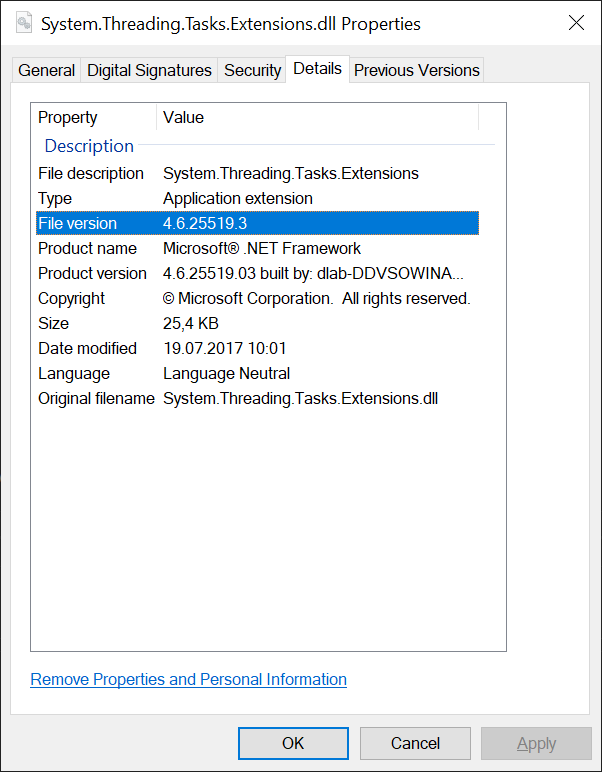
I think something is pulling it a higher version but doesn't create correct binding redirects.
@501NotImplemented As a temporal workaround:
I've installed the package "System.Threading.Tasks.Extensions" in my project:
<PackageReference Include="System.Threading.Tasks.Extensions" Version="4.5.4" />
After installing nuget dependencies and after building my project (with MSBuild.exe), I copy System.Threading.Tasks.Extensions.dll to the SpecFlowPlusRunner directory with powershell script
Copy-Item MyProject/bin/Debug/System.Threading.Tasks.Extensions.dll -Destination MyProject/bin/Debug/SpecFlowPlusRunner/net461/
In that way, I can run my tests without any problem
MyProject/bin/Debug/SpecFlowPlusRunner/net461/SpecRun.exe run default.srprofile --baseFolder MyProject/bin/Debug/ --filter '@tag'

We are getting exactly the same behaviour as @501NotImplemented describes - I'm not familiar with Specflow at all so I am a bit lost here but I'm puzzled by @fescobar comments about the resolution - we dont appear to be using SpecFlowPlusRunner and execute our tests via Test Explorer.
it seems the problem arises with Utf8Json.dll

