
SpecFlow.VS

SpecFlow.VS copied to clipboard
 SpecFlowOSS
Visual Studio 2022 - Ambiguous Steps Error With Different Phrasing Under Same Method
SpecFlow Version
3.9.40
Which test runner are you using?
NUnit
Test Runner Version Number
3.13.2
.NET Implementation
equal or greater .NET Framework 4.6.1
Project Format of the SpecFlow project
Sdk-style project format
.feature.cs files are generated using
SpecFlow.Tools.MsBuild.Generation NuGet package
Test Execution Method
Visual Studio Test Explorer
SpecFlow Section in app.config or content of specflow.json
<dependentAssembly>
        <assemblyIdentity name="TechTalk.SpecFlow" publicKeyToken="0778194805d6db41" culture="neutral" />
        <bindingRedirect oldVersion="0.0.0.0-3.9.0.0" newVersion="3.9.0.0" />
</dependentAssembly>
Issue Description
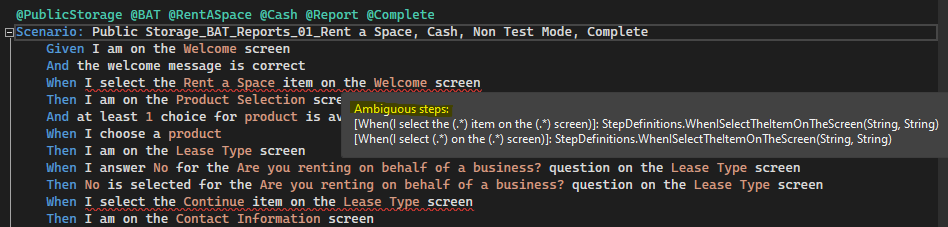
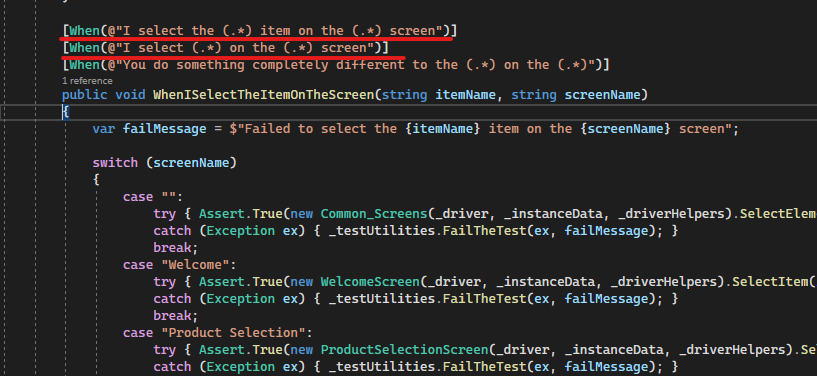
Steps having multiple (yet similar) phrasing shared by one method are underlined in red in the feature file and indicate "Ambiguous reference". When attempting to go to the definition I must choose which method to go to, even though there is only one underlying method. This does not happen in VS 2019.
Message:
Steps to Reproduce
Link to Repro Project
No response
