

 SpecFlowOSS
Feature files are not added to the csproj file
I have Rider
JetBrains Rider 2021.1.3
Build #RD-211.7442.29, built on May 26, 2021
with your plugin installed with version 1.8. When I add a new feature file
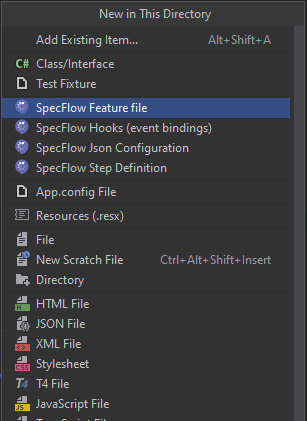
then it appears correctly in the solution explorer in Rider, but it is not listed in the specflow project's csproj file. One consequence of that is that people opening my project with visual studio won't see it.

It seems the issue is in the current MSBuild task in SpecFlow, we will keep you posted about the fix.
As a workaround your visual studio users can include the feature files in the project manually, after that it should also work in Rider.

Are we talking about a sdk-style project or a classic project? In a sdk-style project, the feature files don't need to be included in the csproj file.

I tried to reproduce the issue in both the sdk-style and classic project cases. I am working with both styles, therefore I couldn't tell anymore if there was a distinction between both styles.
So it seems like it's working fine for sdk-style projects, but not for classic projects. In the classic case where it doesn't work, the csproj looks something like this:
<?xml version="1.0" encoding="utf-8"?>
<Project ToolsVersion="12.0" DefaultTargets="Build" xmlns="http://schemas.microsoft.com/developer/msbuild/2003">
  <Import Project="..\packages\SpecFlow.NUnit.3.9.8\build\SpecFlow.NUnit.props" Condition="Exists('..\packages\SpecFlow.NUnit.3.9.8\build\SpecFlow.NUnit.props')" />
  <Import Project="..\packages\NUnit.3.13.1\build\NUnit.props" Condition="Exists('..\packages\NUnit.3.13.1\build\NUnit.props')" />
  <Import Project="..\packages\SpecFlow.Tools.MsBuild.Generation.3.9.8\build\SpecFlow.Tools.MsBuild.Generation.props" Condition="Exists('..\packages\SpecFlow.Tools.MsBuild.Generation.3.9.8\build\SpecFlow.Tools.MsBuild.Generation.props')" />
  <Import Project="$(MSBuildExtensionsPath)\$(MSBuildToolsVersion)\Microsoft.Common.props" Condition="Exists('$(MSBuildExtensionsPath)\$(MSBuildToolsVersion)\Microsoft.Common.props')" />
  <PropertyGroup>
    <Configuration Condition=" '$(Configuration)' == '' ">Debug</Configuration>
    <Platform Condition=" '$(Platform)' == '' ">AnyCPU</Platform>
    <ProjectGuid>{8F6D7511-C3AD-446A-B03C-4BE7E84DAA3B}</ProjectGuid>
    <OutputType>Library</OutputType>
    <AppDesignerFolder>Properties</AppDesignerFolder>
    <RootNamespace>Acceptance</RootNamespace>
    <AssemblyName>Acceptance</AssemblyName>
    <TargetFrameworkVersion>v4.6.2</TargetFrameworkVersion>
    <FileAlignment>512</FileAlignment>
    <TargetFrameworkProfile />
    <NuGetPackageImportStamp>
    </NuGetPackageImportStamp>
  </PropertyGroup>
  <PropertyGroup Condition="'$(Configuration)|$(Platform)' == 'Debug|AnyCPU'">
    [...]
  </PropertyGroup>
  [...]
  <ItemGroup>
    <Reference Include=... />
    [...]
  </ItemGroup>
  <ItemGroup>
    <Compile Include=... />
    [...]
  </ItemGroup>
  [...]
</Project>
In that case, the feature file appears in the Features folder of my SpecFlow project in Rider, but not in Visual Studio 2019. As a matter of fact, the file is not added to the csproj file.