

 SparkDevNetwork
Disabled Person Attributes in DataView Filters Continue To Work
Description
Disabled Person Attributes within Dataviews that filter on them (prior to disabling the attribute) continue to filter on that attribute, and when editing the filter the disabled Person Attribute now shows at the top of the list.
Steps to Reproduce
- Create a DataView that filters on any Person Attribute
- Observe that while choosing the attribute in the filter it's within the Person Attributes section of the list.
- Inactivate the Person Attribute from Admin | General | Person Attributes
- Edit the Dataview and open the attribute filter and observe this disabled attribute is now showing at the top of the list, and the DV is still returning accurate data based on that filter.
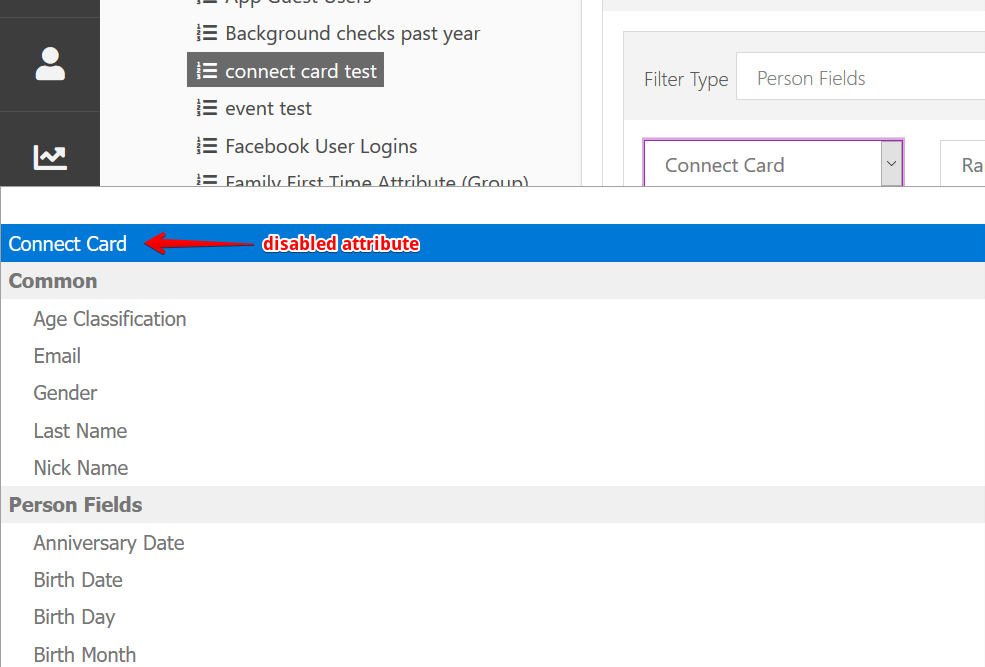
Expected behavior:
Not sure, really. Maybe it's just working as designed, but wanted Core Team to weigh in. This is a case where a dataview is still filtering on a subsequently disabled attribute. Should the DV continue returning results for that disabled attribute filter (as it does today), or should the DV throw an error, since this attribute is no longer supposed to be accessible?
Actual behavior:
DV's continue to filter on disabled person attributes, and show them at the top of the list when editing the filter.
Versions
- Rock Version: v8+
