

 SoftwareBrothers
Example section doesn't render anything.
After trying various settings I can't get the preview section to show up in the documentation.
Libraries Versions: "better-docs": "^2.3.2" "react": "^17.0.1"
My jsdoc config file looks like:
{ "tags": { "allowUnknownTags": true }, "source": { "include": ["./src"], "includePattern": "\\.(jsx|js|ts|tsx)$" }, "plugins": [ "better-docs/component", "better-docs/category", "plugins/markdown" ], "templates": { "better-docs": { "name": "My React components" } }, "opts": { "destination": "docs/", "readme": "README.md", "recurse": true, "encoding": "utf8", "verbose": true, "template": "node_modules/better-docs" } }
One of my test component: ` import React from "react"; import PropTypes from "prop-types";
/**
- Some documented component
- @component
- @example
- const size = 12
- const text = 'I am documented!'
- return (
-
- )
*/
const Documented = (props) => {
const { text, size } = props;
return (
{text}
); };
Documented.propTypes = { /**
- Text is a text :) / text: PropTypes.string.isRequired, /*
- Font size */ size: PropTypes.number, };
Documented.defaultProps = { text: "Hello World", size: 12, };
export default Documented; `
The output:
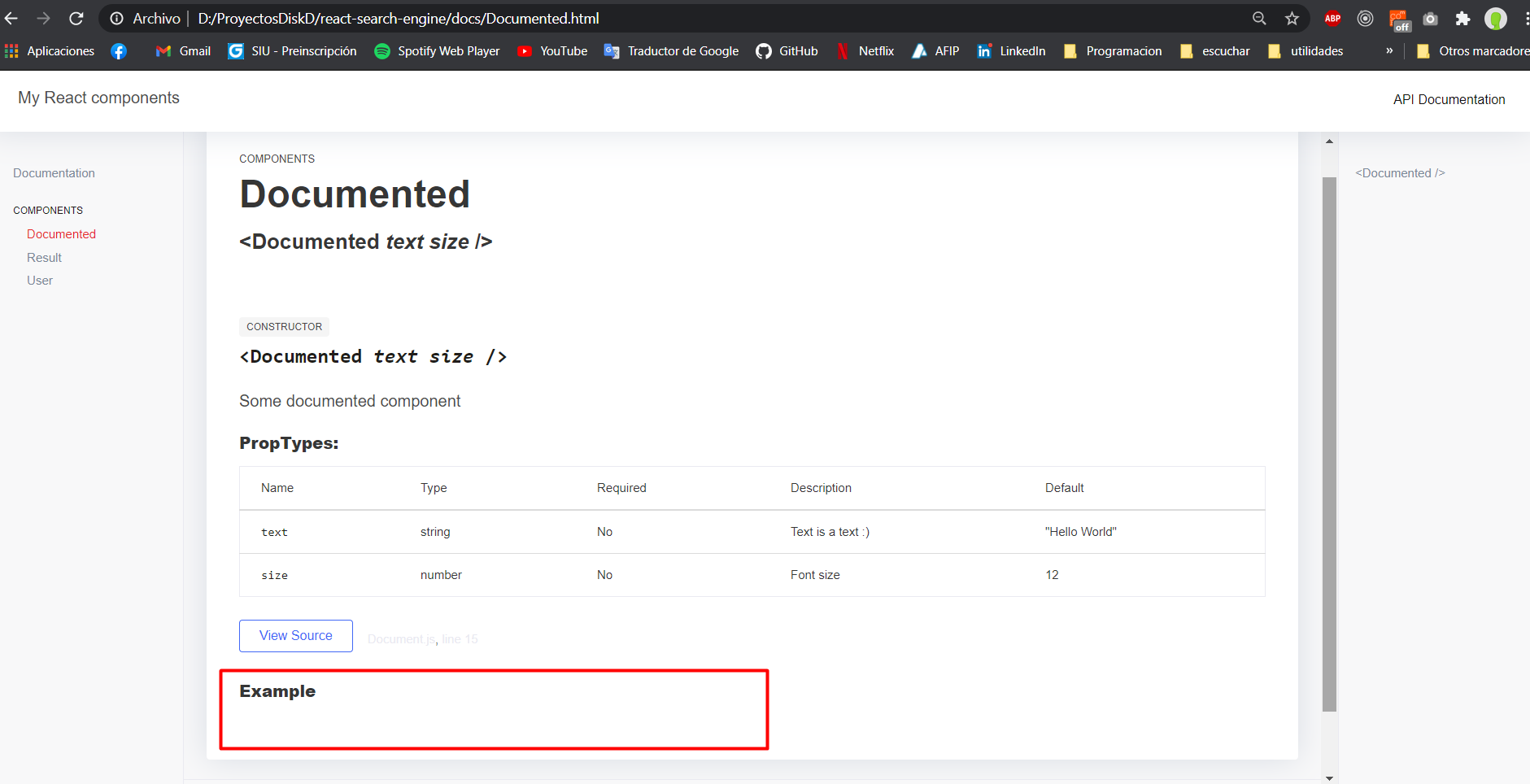
How can I solve this?

had the same issue. I have no idea of how JSdoc works but fixed this editing node_modules/better-docs/tmpl/properties.tmpl
<?js
    var data = obj.examples;
    var component = obj.component
    var self = this;

    data.forEach(function(example, number) {
    if (example.caption) {
?>
  <p class="code-caption">
    <?js= example.caption ?>
  </p>
<?js } ?>

  <pre class="prettyprint"><code><?js= self.htmlsafe(example.code) ?></code></pre>
<?js });
?>

This worked for me, but I had to modify examples.tmpl and not properties.tmpl (just in case someone else looks at this later).


After trying various settings I can't get the preview section to show up in the documentation.
Libraries Versions: "better-docs": "^2.3.2" "react": "^17.0.1"
My jsdoc config file looks like:
{ "tags": { "allowUnknownTags": true }, "source": { "include": ["./src"], "includePattern": "\\.(jsx|js|ts|tsx)$" }, "plugins": [ "better-docs/component", "better-docs/category", "plugins/markdown" ], "templates": { "better-docs": { "name": "My React components" } }, "opts": { "destination": "docs/", "readme": "README.md", "recurse": true, "encoding": "utf8", "verbose": true, "template": "node_modules/better-docs" } }One of my test component: ` import React from "react"; import PropTypes from "prop-types";
/**
Some documented component
@component
@example
const size = 12
const text = 'I am documented!'
return (
) */ const Documented = (props) => { const { text, size } = props; return (
{text}
); };
Documented.propTypes = { /**
- Text is a text :) / text: PropTypes.string.isRequired, /*
- Font size */ size: PropTypes.number, };
Documented.defaultProps = { text: "Hello World", size: 12, };
export default Documented; `
The output:
How can I solve this?
SOLUTION HERE: https://github.com/SoftwareBrothers/better-docs/issues/173#issuecomment-2106034007
