

 SoftwareBrothers
[Bug]: Parse int to string in json
Contact Details
No response
What happened?
Hello,
I use custom components to edit and show my object (json).
The problem when I edit or create the object after the save admin js parse the int to a string
ressource :
options: {
properties: {
config: {
type: 'mixed',
components: {
show: AdminJS.bundle('../components/ObjectsViewer'),
edit: AdminJS.bundle('../components/ObjectsEditor'),
list: AdminJS.bundle('../components/ObjectsViewer'),
},
},
},
Before :
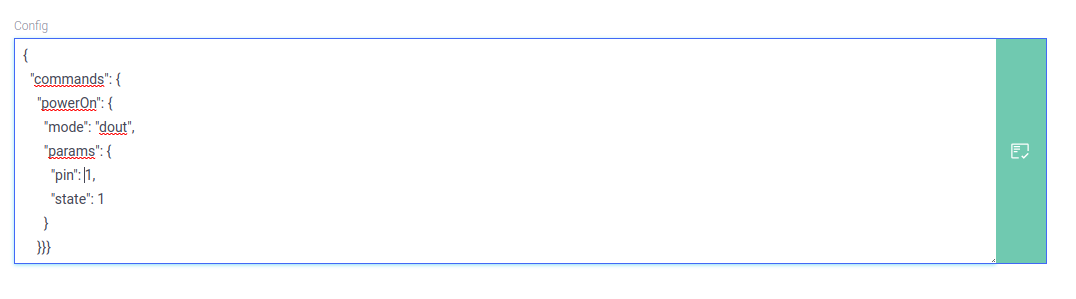 After :

ps : the JSON.parse not working for : unFlattenedData[property.name] throw error Thanks in advance
Bug prevalence
many times
AdminJS dependencies version
"@adminjs/design-system": "^2.0.2", "@adminjs/express": "^4.0.1", "@adminjs/mongoose": "^2.0.0", "adminjs": "^5.3.3",
What browsers do you see the problem on?
Chrome
Relevant log output
{
  "commands": {
    "powerOn": {
      "mode": "dout",
      "params": {
        "pin": "1",
        "state": "1"
      }
    }}}
Relevant code that's giving you issues
import React, { useCallback, useEffect, useState } from 'react';
import { ValueGroup, Loader } from '@adminjs/design-system';
import { flat } from 'adminjs';
import FieldJsonEditor from './form/fields/FieldJsonEditor';

const ObjectsEditor = (props) => {
    const { record, property, onChange } = props;

    const [data, setData] = useState(null);
    const [loading, setLoading] = useState(true);

    useEffect(() => {
        const abortController = new AbortController();
        const findData = () => {
            try {
                if (record && record.params && property.name) {
                    const unFlattenedData = flat.unflatten(record.params);
                    setData(JSON.stringify(unFlattenedData[property.name]));
                    setLoading(false);
                }
            } catch (e) {
                console.error('e==', e);
            }
        };
        findData();
        return () => {
            abortController.abort();
        };
    }, []);
    const onChangeValue = useCallback((value) => {
        if (value) {
            setData(value);
            onChange(property.path, value, record);
        }
    }, []);

    return loading ? (<Loader />) : (
        <ValueGroup label={property.label}>
            <FieldJsonEditor defaultValue={data || '{}'} onValueChange={onChangeValue} />
        </ValueGroup>
    );
};

export default ObjectsEditor;

You would need a before hook which converts values to a specific type, by default if you do not have a property type configured explicitly, it's stringified.

You would need a
beforehook which converts values to a specific type, by default if you do not have a property type configured explicitly, it's stringified.
Thanks @dziraf i can add typeof for every props and checked and persed with the hook, but I think it's not a very good idea. Other solutions ???