

 Snapmaker
Dual Extrusion: Bed leveling assumes fixed values for height
When using the dual extrusion print head, the firmware makes the assumption that the bed is beloz 50mm
https://github.com/Snapmaker/Snapmaker2-Controller/blob/3150c90a17f5eccc3f1c078a7d13439d6a5e97ca/snapmaker/src/service/bed_level.cpp#L39 https://github.com/Snapmaker/Snapmaker2-Controller/blob/c92df5047555307b14c078fd3080636f9bf6727f/Marlin/Configuration.h#L1239
I think both defines have the same intention.
When for some reason, the bed is higher, this blocks the calibration procedure: https://forum.snapmaker.com/t/dual-extruder-stuck-in-bed-level-calibration/30640 https://youtu.be/Usff7Z2fSm0
Because I created a custom easy bed switching mechanism, the thickness of the bed is higher, and this triggers an error. Increasing that value to 100mm solves the issue for now. However this doesn't solve the core issue. The actual value should be triggered by the probe, not be an arbitrary value.
This issue breaks down in two main problems:
- The value is arbitrary and should not be hardcoded (ideally)
- If it fails at this point in the calibration, the screen just hangs at the "calibrating" step and you're stuck
This is a similar issue as this one: https://github.com/Snapmaker/Snapmaker2-Controller/issues/27 That one was for the single extruder print head and has actually been solved. (so could be closed) A similar problem here occured again.

Hi @brvdboss , Thanks for the feedback. What 50mm really means is that when we reset the leveling compensation data we need a safe value and that value is 50mm, then you mention that the height of the first point of leveling should be the one that actually triggers, this is a reasonable statement, but given that there are some unusual scenarios where the user initiates leveling, the probe switch may be abnormal and not trigger properly. Therefore we still do not recommend using the first detected height as the destination for Z-axis descent when starting a level. Also, the screen does not give the correct indication of what you are experiencing, but is stuck. This is really something we need to fix.
Thanks Scott

Hello @scotthsl Thanks for the reply.
I understand your comment that just relying on the probe isn't the best solution either. Good point that it's not solving the issue when something is wrong with the probe itself.
However, in my case, the problem is that the 50mm isn't safe. I have "modded" the bed to incorporate a self built easy bed switching mechanism. This has resulted in an extra height, which means I need more than 50mm. Picture for illustration:
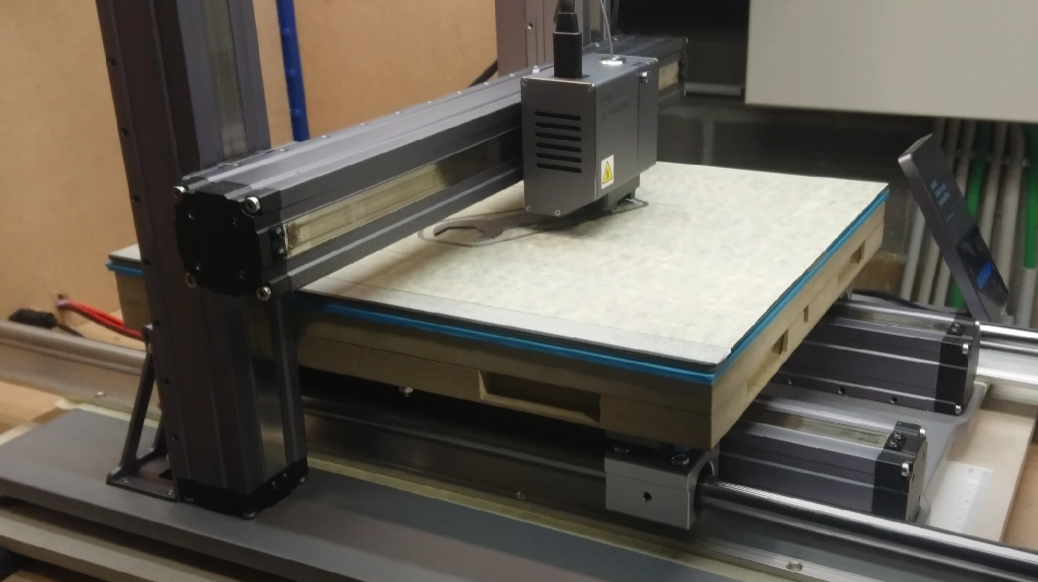
I am aware, that this is not a standard scenario :-) My current workaround is to have it set at 100mm, an alternative could be to have it set to the sum of the probe or even better max(0,probe height)+safe value. But it adds extra complexity to the code which I don't think is desired either. Especially this is a very non standard case.
Hi @brvdboss , Sorry for the late reply. And thank you for your understanding.
For your situation, we can improve it later: during the z-axis descent, we still try to descend to z=50mm, but if the probe triggers early, we will judge the z-axis coordinates when the probe triggers, and if z is less than 100mm, we consider it normal. However, if z is greater than 100mm, we consider the probe to be abnormal.