

 Snapmaker
Camera Picture Alignment
The alignment for camera captur doesn't work. No 'Reference Position' possible. I want to align the picture to the middle of the bed.
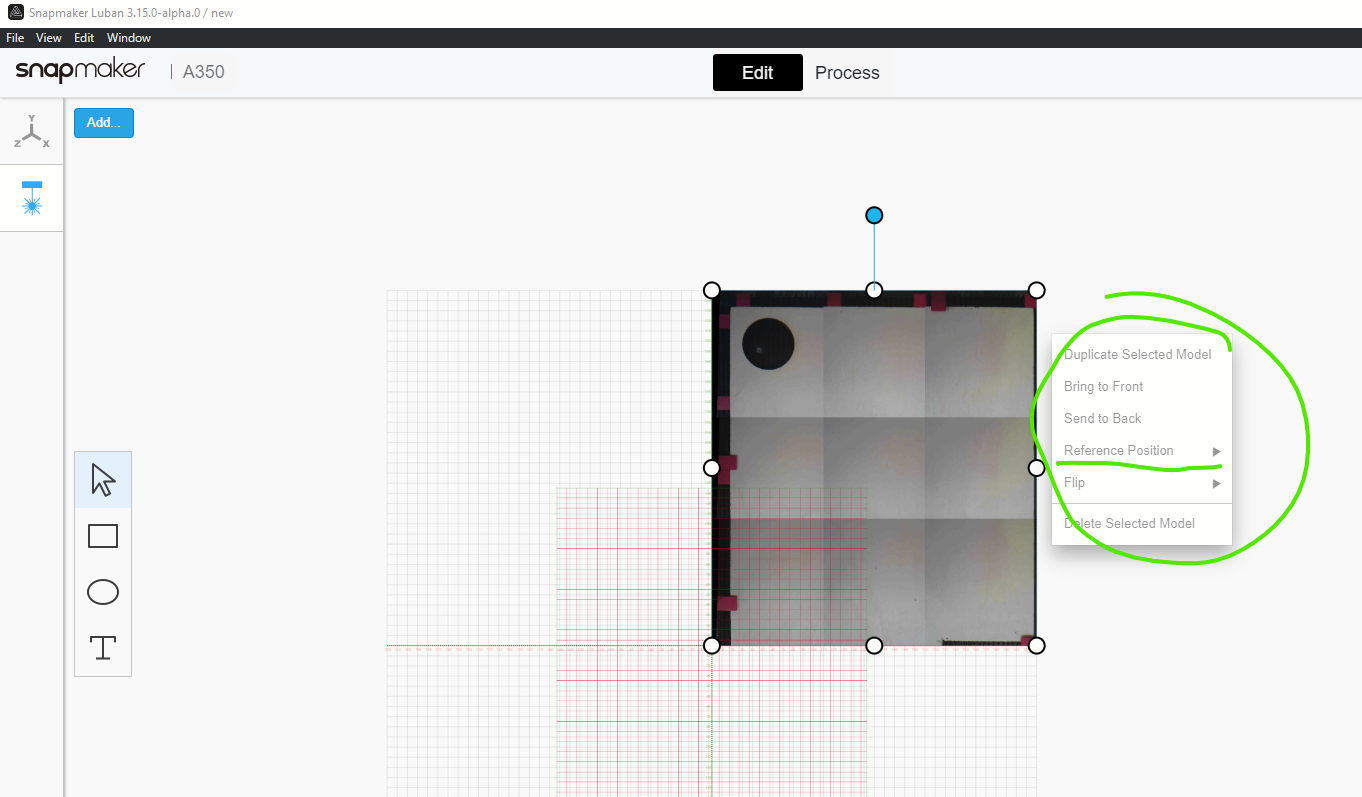

Sorry, i don't get your point. It is just on middle of the bed. Did u try to engrave something?

It also happened to me. The image captured apears in a corner and it's not intuitive. It should appear centred in the middle of the bed.


You can drag the picture to the center coordinates as you require.
I tried it and It's not possible for me. Using last version.
I just did a camera capture and was able to drag the picture around in edit mode - and could even rotate it, which is weird. But, when moving into process, it's still top right with the work origin set at 0,0. It appears that the work origin is forced to 0,0 in camera capture - am I interpreting that correctly? And if so, what value does moving the picture around in "Edit" have?

Also - this kind of a separate issue, but not :)
On my A350, I've done some testing where I meticulously align the camera to get the best possible bed capture, then engrave a piece of cardboard with some test shapes. Then, I capture an image of that cardboard, and redraw the same shapes over the ones captured. The results are kind of all over the place, and explain why I've ruined some pieces lately :)
It appears that the camera has some skew depending on where on the bed it's looking. On the left side of the bed, the image is stretched vertically by about 2mm on a 20mm square. Left to right is OK there, both in alignment and in size. On the right, it's stretched diagonally and offset a mm or 2.
Any change we can get a better camera alignment mapping method than just the 4 points? Seems like something that could be measured and adjusted for.
Im only guessing, but I suspect the implementation as currently presented, it just for you to reference that the size of your engraving fits on the size of the object captured by the camera.
Given that snap maker seems to want to operate in a +X/+Y plane, that’s where the camera capture comes from. The options therefor (as currently implemented) are to reference your engraving coordinates where the snap maker camera operates or drag the capture to the coordinates that your engraving is using. Its been easiest for me just to drag the captured picture to the same coordinates as the engraving.
jeff
From: jlaughter [email protected] Sent: Wednesday, February 17, 2021 10:21 AM To: Snapmaker/Luban [email protected] Cc: King, Jeff (GE CoreTech & Cyber) [email protected]; Comment [email protected] Subject: EXT: Re: [Snapmaker/Luban] Camera Picture Alignment (#688)
I just did a camera capture and was able to drag the picture around in edit mode - and could even rotate it, which is weird. But, when moving into process, it's still top right with the work origin set at 0,0. It appears that the work origin is forced to 0,0 in camera capture - am I interpreting that correctly? And if so, what value does moving the picture around in "Edit" have?
— You are receiving this because you commented. Reply to this email directly, view it on GitHubhttps://github.com/Snapmaker/Luban/issues/688#issuecomment-780628638, or unsubscribehttps://github.com/notifications/unsubscribe-auth/AD7GFAGO23B6SYAFDXJPY2TS7PNETANCNFSM4V2EB7AA.
The Snapmaker operates off work origin as set by the user - BUT for camera capture I suppose it's critical for the work origin to be fixed to ensure alignment between the captured workspace and image. So they force the work origin to machine zero/home - which is the bottom left corner of the bed. That part makes sense to me now.
Although, from a usability perspective, it would likely be more intuitive if the default work origin for camera capture was the middle of the bed. I see lots of similar topics where this has confused users, like it confused me.
I'd like to see that change, plus improvements to the camera calibration to account for skew/spherical lens distortion/whatever else that is preventing good engraving accuracy against the image. Camera capture has the potential to enable a really user and beginner-friendly workflow, but the spatial issues are holding it back.
One last thing: I see lots of issues where either auto calibration or the user has set unrealistic camera calibration corner values, and that causes camera capture to fail entirely. Might want to default those to a reasonable value and provide a "reset defaults" button, or constrain those where neither the machine nor the user can set those corners too crazy.