

 Skyscanner
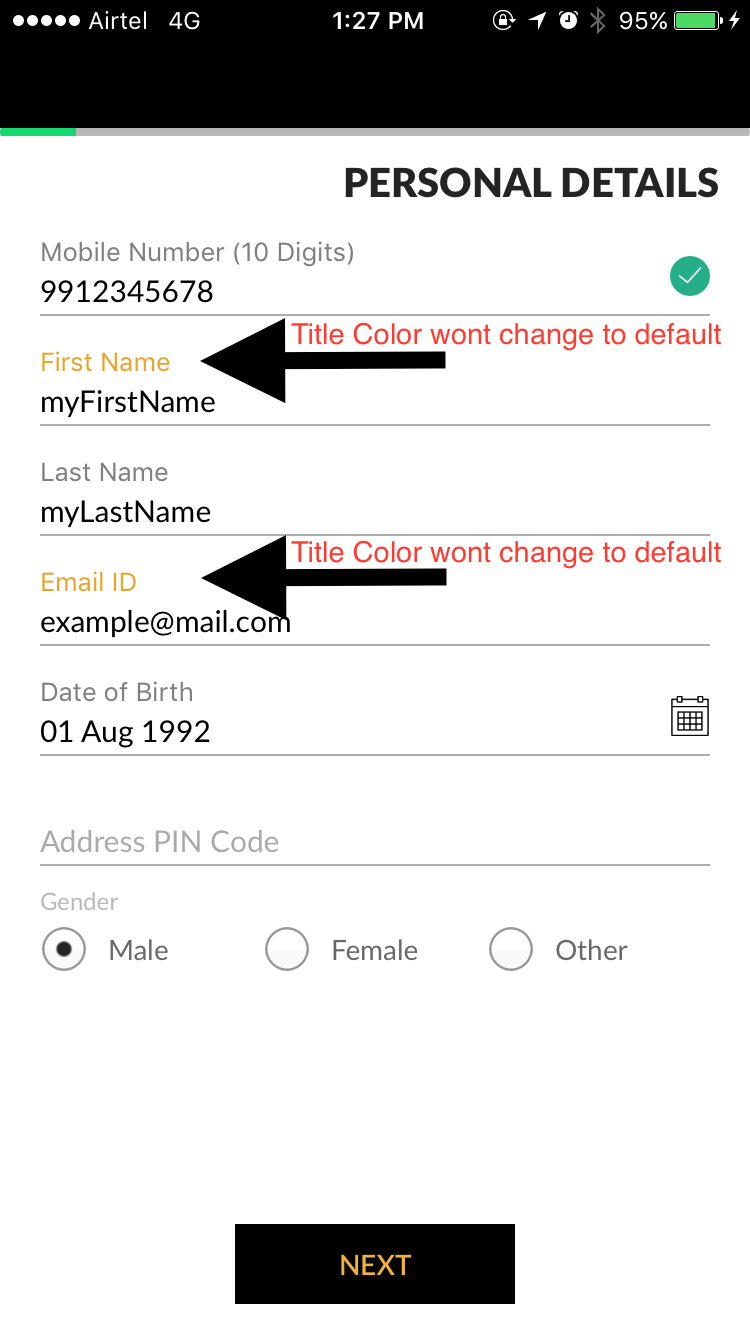
textField title color not set to default color when move to other textField
Report
What did you do?
I have some textfields with textfield class SkyFloatingLabelTextField
- changed selected line color
- changed selected text color
- added placeholder text
- added title text
but when I click any textfield and some text and move to other textfield title color won't change to default color and show selected title color only. but in your project REDME.md example shows different and its not working as per
please check screenshot for more details.
What did you expect to happen?
ℹ Please replace this with what you expected to happen.
What happened instead?
ℹ Please replace this with of what happened instead.
Environment
ℹ Please fill in this section with information about your environment
Xcode Version: SkyFloatingLabelTextField Version: SkyFloatingLabelTextField (3.2.0) Deployment Target: iOS 10.3 Base SDK: XCode 8.3.2 Method of Integration: CocoaPods
Project that demonstrates the issue
I have attached demo project please check attachment.


You can fix it by removing || isHighlighted from fileprivate func updateTitleColor()

It would be really nice to include this, as if we modify the code but then update the dependencies, this bug would be back again.
Thanks!

Same thing happening here, i have a view with 4 textfields, if i start filling them by tapping on the first one and proceeding trough them by the keyboard next button, just the one that i tapped stays with the selection color, the rest turns back to the normal color. After analyzing, i realized that only the fields that you tap stays with the selection color after populated, if you populate a field by getting to it trough the next button, the selection color does not stick to it.

Managed to fix by setting highlighted on viewdidload
textField.isHighlighted = true
Hey I had a closer look at this and I can't reproduce this with the demo project attached. Tapping on the fields work as expected and the selected style is only on the that's the first responder. If you manually set isHighlighted you should manually set it to false, but for normal stuff this isn't required at all as the control will change when it becomes first responder/resigns first responder

