

 SitronX
Replay functionality

Incomplete, but I've been taking a crack at it these past couple days, if you try it you will see some issues but this is the general direction I'm going with this, starting to go crosseyed
using System; using UnityEngine;
public class RewindManager : MonoBehaviour
{
///
/// <summary>
/// This property returns how many seconds are available for rewind, aka, the total number of recorded seconds, or record length in seconds
/// </summary>
public float num_seconds_recorded { get; private set; }


/// <summary>
/// Tells you if scene is currently being rewinded
/// </summary>
public bool IsBeingRewinded { get; private set; } = false;

public bool isRecording { get; private set; } = true;           //Tells you if buffers are being written to


public float rewindSeconds = 0;                              //I believe this is the current "time" since the last buffer value was written

private void OnEnable()
{
    num_seconds_recorded = 0;                                 //I believe this is used as a time index for writing to buffers or something similiar?
}
private void Awake()
{
    RewindManager[] managers= FindObjectsOfType<RewindManager>();

    if (managers.Length>1)                                               //Check if each scene contains only one script with RewindManager
    {
        Debug.LogError("RewindManager cannot be more than once in each scene. Remove the other RewindManager!!!");
    }
}


/// <summary>
/// (Edited) Variable defining how much time the buffers can store
/// </summary>
public static readonly float max_recordingtime_seconds = 5;

private void FixedUpdate()
{
    if(!isRecording && !IsBeingRewinded)                       //Might need to support negative rewindTime and convert it to the proper "time index" to restore from.
    {
       // RestoreBuffers(rewindSeconds);
        if(rewindSeconds != 0)
        {
            rewindSeconds -= Time.fixedDeltaTime;

            if (rewindSeconds <= 0)
            {
                rewindSeconds = 0;
                StartRewindTimeBySeconds(0);
                return;
            }
            else
            {
                RestoreBuffers.Invoke(0);
            }
        }
        else
        {
            RestoreBuffers.Invoke(0);
        }

    }
    else if (IsBeingRewinded)                                                            //If we are rewinding, invoke it
    {
        RewindTimeCall?.Invoke(rewindSeconds);
    }
    else if (num_seconds_recorded != max_recordingtime_seconds)                     //Else if the length of recorded time is greater than the max_recording_timeincrease the recorded time by a fixedtime step
    {
       // Debug.Log("IsNotBeingRewinded");
        num_seconds_recorded += Time.fixedDeltaTime;

        if (num_seconds_recorded >= max_recordingtime_seconds)
        {
            num_seconds_recorded = max_recordingtime_seconds;
            StartRewindTimeBySeconds(0);
        } //Added an automatic pause when it reaches the max recording length
    }

}

/// <summary>
/// Call this method to rewind time by specified seconds instantly without snapshot preview
/// </summary>
/// <param name="seconds_to_rewind">Parameter defining how many seconds should object rewind to from now (Parameter must be >=0).</param>
public void RewindTimeBySeconds(float seconds_to_rewind)
{
    if(seconds_to_rewind>num_seconds_recorded)
    {
        seconds_to_rewind = num_seconds_recorded;
        Debug.LogError("Not enough stored tracked value!!! Reaching on wrong index. Called rewind should be less than HowManySecondsAvailableForRewind property");
        //return;
    }
    if(seconds_to_rewind<0)
    {
        Debug.LogError("Parameter in RewindTimeBySeconds() must have positive value!!!");
        return;
    }
    TrackingStateCall?.Invoke(false);
    RewindTimeCall?.Invoke(seconds_to_rewind);
    RestoreBuffers?.Invoke(seconds_to_rewind);
    TrackingStateCall?.Invoke(true);
}
/// <summary>
/// Call this method if you want to start rewinding time with ability to preview snapshots. After done rewinding, StopRewindTimeBySeconds() must be called!!!. To update snapshot preview between, call method SetTimeSecondsInRewind()
/// </summary>
/// <param name="seconds">Parameter defining how many seconds before should the rewind preview rewind to (Parameter must be >=0)</param>
/// <returns></returns>
public void StartRewindTimeBySeconds(float seconds)                                                                 //This is effectively a pause and go back x seconds button, with StopRewindTime being the "resume"
{
    if (IsBeingRewinded)
    {
        return;
    }
    if (seconds > num_seconds_recorded)
    {
        Debug.LogError("Not enough stored tracked value!!! Reaching on wrong index. Called rewind should be less than HowManySecondsAvailableForRewind property");
        return;
    }
    if (seconds < 0)
    {
        //Debug.LogError("Parameter in StartRewindTimeBySeconds() must have positive value!!!");
        return;
    }

    rewindSeconds = seconds;
    TrackingStateCall?.Invoke(false);
    IsBeingRewinded = true;
    isRecording = false;
}


/// <summary>
/// Call this method to update rewind preview while rewind is active (StartRewindTimeBySeconds() method was called before)
/// </summary>
/// <param name="seconds">Parameter defining how many seconds should the rewind preview move to (Parameter must be >=0)</param>
public void SetTimeSecondsInRewind(float seconds)                                                                                   //In other words, use this while Paused (StartRewindTimeBySeconds), to seek and preview a different time
{

    if (seconds > num_seconds_recorded)
    {
        Debug.LogError("Not enough stored tracked value!!! Reaching on wrong index. Called rewind should be less than HowManySecondsAvailableForRewind property");
        return;
    }

    if (seconds < 0)
    {
        Debug.LogError("Parameter in SetTimeSecondsInRewind() must have positive value!!!");
        return;
    }
    rewindSeconds = seconds;
}
/// <summary>
/// Call this method to stop previewing rewind state and effectively set current values to the rewind state
/// </summary>
public void StopRewindTimeBySeconds(bool andStartRecording = true)
{
    if (andStartRecording)                                                                   //Default recording behaviour
    {
        num_seconds_recorded -= rewindSeconds;
        RestoreBuffers?.Invoke(rewindSeconds);
        rewindSeconds = 0;
        TrackingStateCall?.Invoke(true);
        isRecording = true;
    }
    else                                                                                         //If not recording we don't enable tracking, and will instead read from the buffers
    {
        isRecording = false;
        RestoreBuffers?.Invoke(rewindSeconds);
    }
    IsBeingRewinded = false;
}
}
A minor change in CircularBuffer.WriteLastValue(T val) where instead of setting bufferCurrentPosition to 0 and overwriting that index, we set the bufferCurrentPosition to bufferCapacity - 1 and return. I know changing this functionality destroys your original function but I didn't intend to use it for that, but maybe it's still helpful to you if you're still floating the idea of implementing the replay feature.
I let the user decide if they want to record or not for now, even if it leads to inconsistencies in the timeline, but it should be simple to do a check if buffer values dont match the obj current values, then automatically begin overwriting.
Need to add a way in the RewindManager to access an array of all the rewind components in the scene, to be able to do individual tracking/buffer restoring/recording so that changing one object in the past unrelated to another does not overwrite everything.
I'm not exactly clear what RewindTimeCall does or where in your 3 main scripts that events are subscribed to
Here's the Inputs code from a separate script:
[SerializeField] float rewindIntensity = 0.02f; //Variable to change rewind speed float rewindValue = 0;
private void FixedUpdate()
{
    if (Input.GetKey(KeyCode.P))                                                    //P for Pause
    {
        if (!rewindManager.IsBeingRewinded)
        {
            rewindManager.StartRewindTimeBySeconds(0);
            //rewindValue = 0;
        }
    }


    if(Input.GetKey(KeyCode.O))                              //O for Overwrite/Record
    {
        if(rewindManager.IsBeingRewinded && !rewindManager.isRecording)
        {
            rewindManager.StopRewindTimeBySeconds();
            rewindValue = 0;
        }
    }


    if (Input.GetKey(KeyCode.I))                                                    //I for resume
    {
        if (rewindManager.IsBeingRewinded)
        {
            rewindManager.StopRewindTimeBySeconds(false);
            //rewindValue = 0;
        }
    }


    if (Input.GetKey(KeyCode.Space)      //Change keycode for your own custom
                                                                 key if you want
    {
        rewindValue += rewindIntensity;    //While holding the button, we will gradually rewind more and more time into the past

        if (!rewindManager.IsBeingRewinded)
        {
            rewindManager.StartRewindTimeBySeconds(rewindValue);

        }
        else
        {
       if (rewindManager.num_seconds_recorded > rewindValue)  //Safety check so it is not grabbing values out of the bounds

         rewindManager.SetTimeSecondsInRewind(rewindValue);
        }
    }


    if(!rewindManager.IsBeingRewinded && rewindValue > 0)  //If there is still distance between "now" and the total length of the recording, wind down the rewindValue  to prevent pressing Space while paused from jumping buffer positions
    {
        rewindValue -= Time.fixedDeltaTime;
        if(rewindValue < 0)
        {
            rewindValue = 0;
        }
    }
}

Hello, thanks for trying. But it is kinda hard for me to really follow, it has been some time i was coding it it, so it is quite hard to recognize what is original and what is edited code with this formatting. Anyway is it working? How is it working, can you show?
Need to add a way in the RewindManager to access an array of all the rewind components in the scene, to be able to do individual tracking/buffer restoring/recording so that changing one object in the past unrelated to another does not overwrite everything.
RewindManager should not really access the individual components in the scene, it is only sending actions/events and these individual components are subscribed to it thru RewindAbstract.cs (every rewinded object in the scene implements this RewindAbstract class)
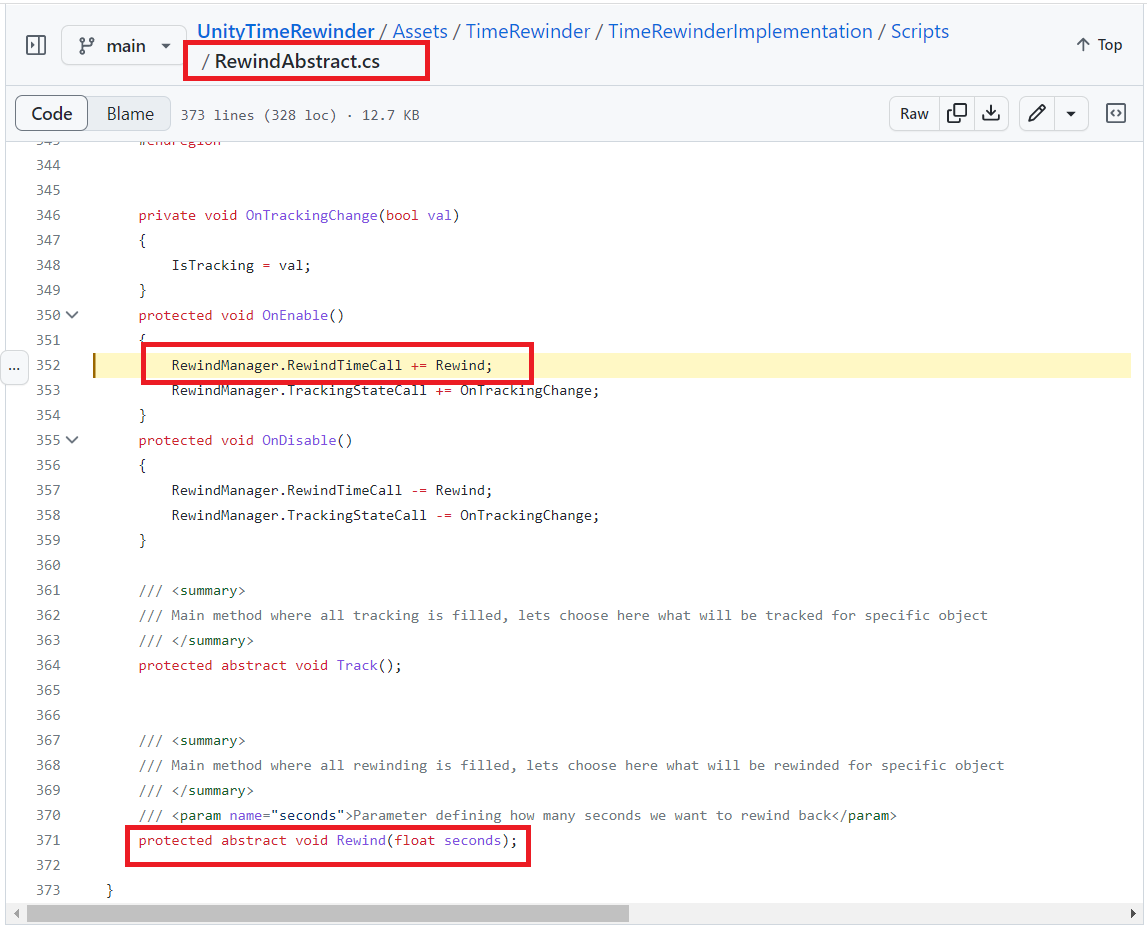
I'm not exactly clear what RewindTimeCall does or where in your 3 main scripts that events are subscribed to
RewindAbstract class is subscribed to the most of the RewindManager events. RewindTimeCall is shown on image below.
If you want to contribute, it would be the best if you forked this and added your changes as new commits so i can look into it properly. If it is really necessary for it to alter the original behaviour so much that rewinding cannot be used anymore i can temporary make separate branch here, until we resolve these integration issues.
Sorry yeah, thought it would be easier if I reuploaded your whole script with commented changes. It's probably not necessary to destroy the original behaviour, but it's easier to test/find your position in the buffer/recording when it's not overwriting itself. It half works, I need to add logic to turn off rigidbody when not tracking, and that should confirm it. I'll get a fork going once I've ironed some more out. Should I edit down/delete my previous comment?
Should I edit down/delete my previous comment?
No it is fine, leave it as it is here.
I'll get a fork going once I've ironed some more out
Great, i look forward to it.
Also if you will need help with some specifics, dont hesitate to ask.