

 Shopify
Expected a valid shop query parameter
I was trying to finish the tutorial with instructions. So after I redirect the user to the edit products page I am facing this error inside of admin UI.
Expected a valid shop query parameter
The main page of the app still works correctly.
Specifications
- Browser: Chrome
- Operating System: Windows 10

Thanks for pointing this out @aburak256, you should be able to navigate properly if you add a ClientRouter to your app, which is one of the next steps in that page.
We'll rearrange the steps so they don't lead to an error scenario.

This tripped me up as well...
The redirect using ?shop= should probably be mentioned earlier also - https://shopify.dev/tutorials/build-a-shopify-app-with-node-and-react/build-your-user-interface-with-polaris#add-shopify-app-bridge

@paulomarg This appears to be ineffective. The app's initial page works fine, but when you navigate to the navigation link, it throws an error message saying "Expected a valid shop query parameter" in the app.
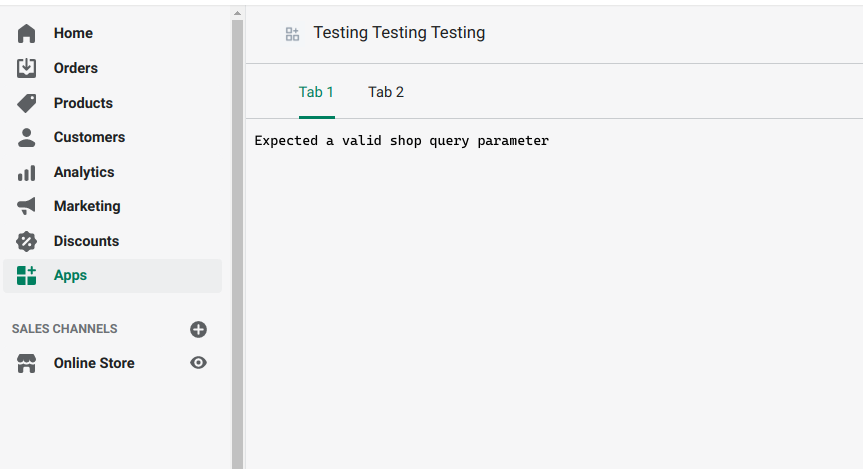
Furthermore, even though I clicked on "Tab 2," the active navigation tab is still set to "Tab 1."
And I have added a <ClientRouter /> component already.
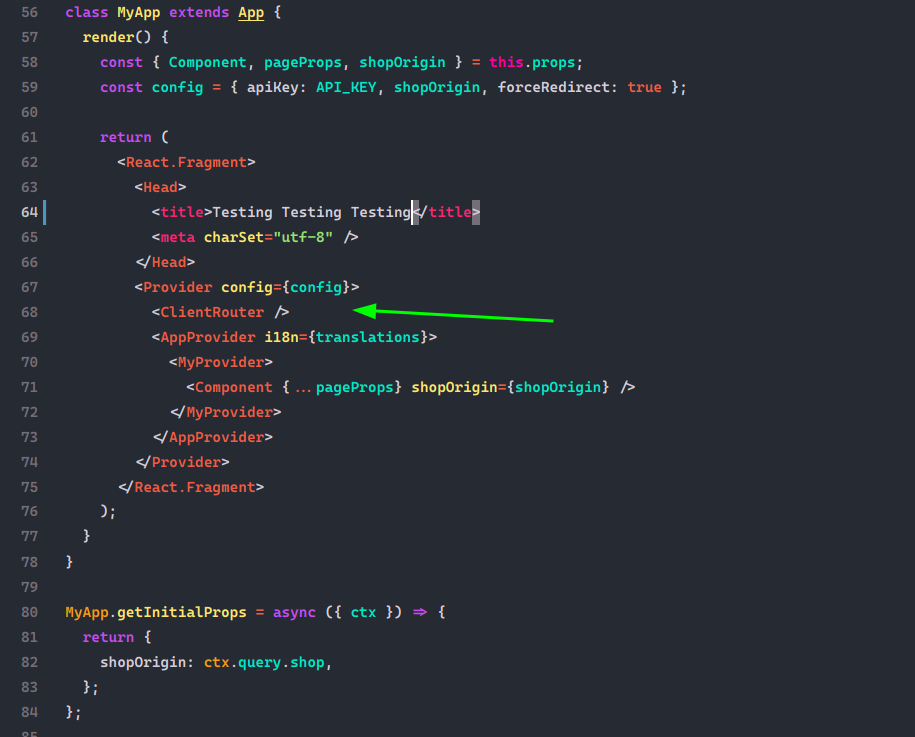
This was no longer an issue with the cookie based approach described in the past examples.

@rahilwazir same as me bro, I've tried everything in the last 2 days but couldn't get rid of that bug In my opinion, the API is just unstable
The current solution that I'm using:
- Use the production build:
yarn buildthenyarn start - The dev process just not work!

@rahilwazir Which is this cookie based approach you are referring to? Hopefully that can solve my problem.

The tutorial is not updated and has been like this for a long while now.
@Theantipioneer The cookie approach is not recommended because of restriction the browser brings accessing cookie across multiple sites, hence it is switched to Session based approach. Anyway, this is the sample app with Cookie based approach: https://github.com/Shopify/shopify-demo-app-node-react
The guide here: https://shopify.dev/tutorials/build-a-shopify-app-with-node-and-react/embed-your-app-in-shopify were updated few months ago.
This tutorial is the one im following and its the one that has not been updated because changes were introduced according to this 629. These have not been editted into the tutorial.
when connect to the app bridge my error says either 'host not provided' despite having done this, or the app authenticates but the annotated-layout page has the error mentioned right at the top of this thread.
@Theantipioneer This is the PR https://github.com/Shopify/shopify-app-node/commit/442b3cd05012fe88f577e3901c7f4a310033d2ba that removed the Cookie implementation.
Might sound stupid, but when setting up the navigation menu items I have left the Link field for "Simple resource list" empty, instead of writing "/index". Seems to work fine.

@cboiangiu Yes, this is a workaround, but it is not permanent. The shop query parameter error may reappear with a new (browser) session.
a workaround:
"scripts": { ... "nextstart": "next start", .... }
then use
npm run nextstart

This issue is stale because it has been open for 60 days with no activity. It will be closed if no further action occurs in 14 days.
![github-actions[bot] avatar](https://avatars.githubusercontent.com/in/15368?v=4 "Published by a pub.dev verified publisher")
We are closing this issue because it has been inactive for a few months. This probably means that it is not reproducible or it has been fixed in a newer version. If it’s an enhancement and hasn’t been taken on since it was submitted, then it seems other issues have taken priority.
If you still encounter this issue with the latest stable version, please reopen using the issue template. You can also contribute directly by submitting a pull request– see the CONTRIBUTING.md file for guidelines
Thank you!