

 Shopify
Theme Editor color picker breaks liquid files in the assets folder when choosing branding colors
Issue
If a user chooses a dynamic source for the color picker in the Theme Editor, such as Brand > Primary Color 1, any .liquid files in the assets folder that rely on the setting will output {{ shop.brand.colors.primary[0].background }} instead of the css color.
Expected Behaviour
If the file theme/assets/test.css.liquid has the following
.some-class {
    background-color: {{ settings.theme_color }}; /* set as Brand > Primary Color 1 */
}
it should become
.some-class {
    background-color: #112233; /* set as Brand > Primary Color 1 */
}
Actual
Instead it does this
.some-class {
    background-color: {{ shop.brand.colors.primary[0].background }}; /* set as Brand > Primary Color 1 */
}
Steps to Replicate
- Create a color picker in the theme's settings, such as
{
  "type": "color",
  "id": "theme_color",
  "label": "Theme Color",
  "default": "#000000"
}
- Choose a dynamic color source, such as Brand > Primary Color 1
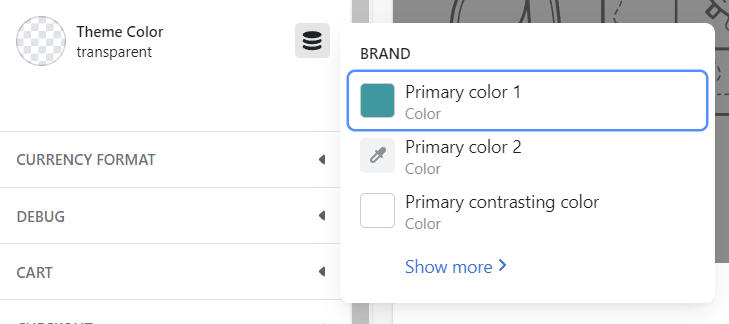
- Create a test.css.liquid file in the assets folder of the theme
.some-class {
    background-color: {{ settings.theme_color }};
}
- Add the css file to the theme to get the link to the generated file, such as
{{ 'test.css' | asset_url | stylesheet_tag }}
- View the file and it will show
{{ shop.brand.colors.primary[0].background }}instead of the css color, such as #112233
.some-class {
    background-color: {{ shop.brand.colors.primary[0].background }};
}


Also having this problem in our themes. Partner Support referred me to this GitHub Issue.

Having the same issue. A quick way to fix this issue is to move the css variables into the <head> tag of layout/theme.liquid. The liquid variable: {{ shop.brand.colors.primary[0].background }} seems to work outside of the assets directory.

+1 I have the same issue. I'd like to follow best practices while working on client's themes without creating my own custom convention for calling brand colors/assets.

Shopify please fix!

I came across this bug myself too. Reported to Shopify Plus support who told me "heavily customised themes aren't supported", or something to that effect.
Nothing to do with customised themes, since I've replicated the same issue on other themes from the Shopify Theme Store installed as theme trials (e.g. not possible to change any of the original coding).
This is a clear bug on Shopify's side. You're supposed to be able to use Liquid in css.liquid files, all we're doing is reference a settings.my_setting_name, the problem is introduced by Shopify within Theme Customiser.

Having the same problem here. It's sad that I have to put a lot of css code into theme.liquid instead, it makes that file even more bloated. And worse, makes the DOM on the site bigger which is not good for SEO and performance. I would prefer to be able to have styling in separate css files.
