

 Shopify
React Hydration Error upon loading hello world starter
What is the location of your example repository?
No location - just spun up the hello world template and ran the dev script
What version of Hydrogen are you using?
v2023.1.2
What version of Remix are you using?
v1.12.0
Steps to Reproduce
- npm create @shopify/hydrogen@latest
- choose hello world
- choose typescript
- choose install dir
- install with npm - yes
- cd into install dir and execute npm run dev
Expected Behavior
Following the execution of npm run dev, its expected to view the site at localhost:3000 and to not see any react errors within the browser console.
Actual Behavior
Following the execution of npm run dev, when I expect the index page at localhost:3000 within chrome (with react-dev-tools installed) A number of console errors are present related to react hydration errors.
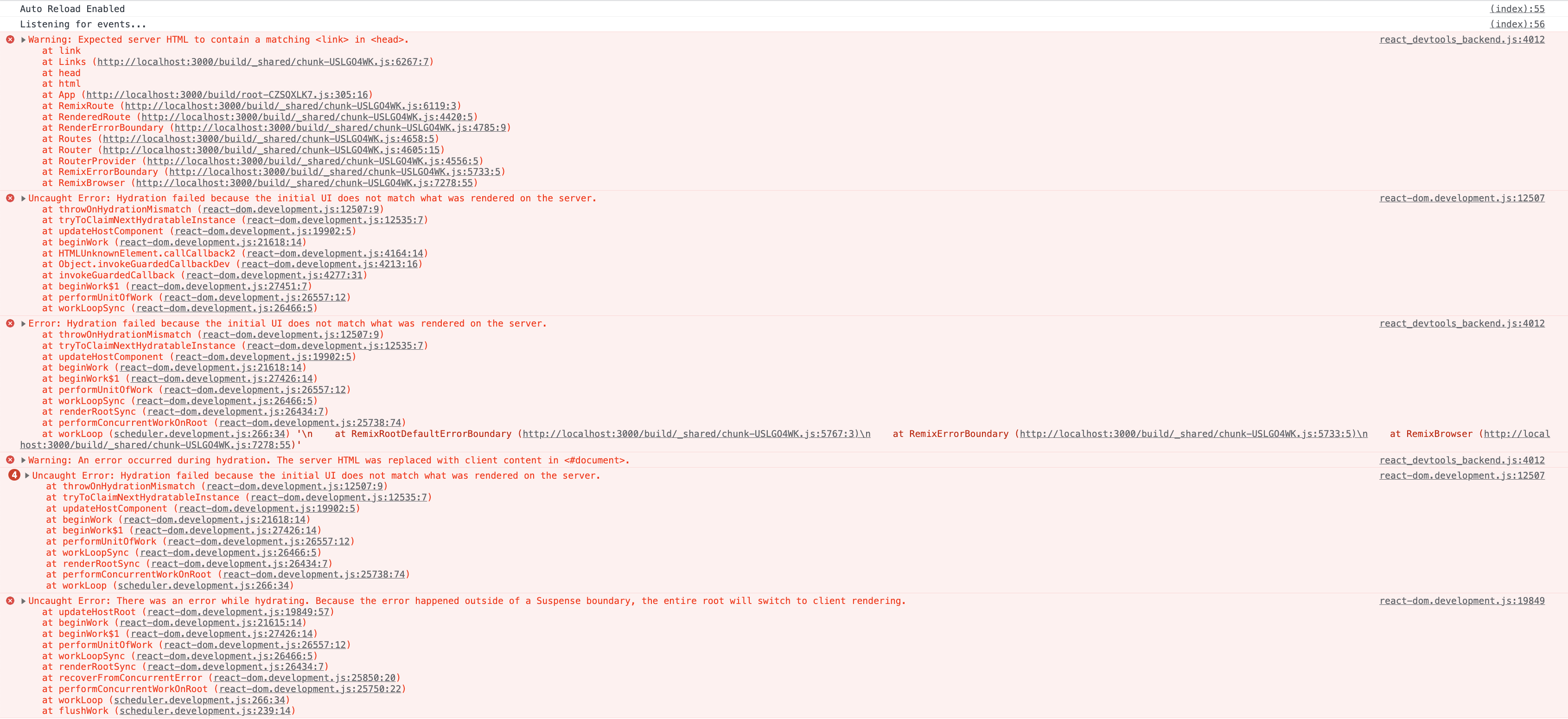
Not sure if this is an obvious fix, but I figured it's worth raising as I've not modified any of the code within the hello world started other than to run npm update @shopify/hydrogen - I thought I'd try updating first in case there was a fix included but the error is present in the current version as well as the previous version.

Could this issue be linked to https://github.com/remix-run/remix/issues/5416 and as such not a @shopify/hydrogen framework issue but linked to my browser extension configuration or remix? Apologies if so.
@sun33t You can try loading your app within a private browsing window, or a different browser that doesn't have any extensions installed, in order to test whether that's the problem :)

Thanks @davidhousedev, I did exactly that and experienced the following:
Normal Chrome window with apollo client dev tools - hydration errors Incognito Chrome (no extensions) - no errors Normal Chrome window without apollo client dev tools - no hydration errors
I repeated the same steps above for Firefox and received the same results so I think it's definitely happening because of Apollo Client devtools.
This related to Remix and React. More info: https://github.com/remix-run/remix/discussions/4902

Since the @shopify packages seem to be having issues from recent commits I went back to just npm create @shopify/hydrogen npm install npm run dev leaving off the @latest I also had a hydrogen 2 project from the first day of release I had work in that I had did a pull and npm install and hit all the package vulnerabilities and errors after npm run dev. So I deleted my node_modules and replaced the package.json and package.lock with the code from repo where I did npm create @shopify/hydrogen and then re-ran npm install and npm dev on it and it was back up and working.

Here is a temporary fix that is getting us past this problem on our Hydrogen 2 builds that use Styled Components (applied here to the H2 hello-world template.
Based on @kiliman's initial fix, wrapped into remix-island by @Xiphe and https://github.com/remix-run/remix/discussions/5244#discussioncomment-4890083 by @clgeoio
More information:
- https://github.com/remix-run/remix/issues/5569
- https://github.com/remix-run/remix/discussions/5244
- Remix Roadmap Discussion
- https://github.com/facebook/react/issues/24430

@duncan-fairley is this really solving the issue for you? I am still experiencing it, but with your solution the error becomes:
Warning: Expected server HTML to contain a matching <body> in <div>.
    at body
Uncaught Error: Hydration failed because the initial UI does not match what was rendered on the server.
 Warning: validateDOMNesting(...): <body> cannot appear as a child of <div>.
    at body

As this is really a fundamental React problem, there isn't that much to do at the moment. Though you can try if the React 1.8.3-canary release helps.

@blittle I tried 18.3 but it did not help, with the hydration error, but updating the react dom as well to canary at least got the flashing away. the hydration errors still exist in the logs
I am experiencing this issue, it prevents my modals and drawers from rendering with issues "only in production". I am using chakra UI for the drawers and modals. are there any fixes for this? @sun33t


This is not an issue we can solve. It is something we need from React. Please test hydration issues an an incognito window to make sure extensions are no the culprit.