

 SharePoint
Custom fields example inside elements.xml vs schema.xml
I wanted to create a new List with custom fields/columns and Edit form configuration when the application is added to the App catalogue. I followed the guide on this page and also saw the video which shows that the fields should be part of the elements.xml file:
 but if the configuration shown above is used, it only creates a new list without any required fields.
After moving fields configuration to schema.xml my list with required configuration was created:

All examples I've found are using this page as a reference, but it hasn't been working for me. I'm using SPFx 1.15.2.
Could you, please, add more information about fields section in schema.xml, compare to elements.xml and list of individual field?
Thank you. M0jimo
Document Details
⚠ Do not edit this section. It is required for learn.microsoft.com ➟ GitHub issue linking.
- ID: 2c30373b-3c44-c8bc-75d1-bb788efb479e
- Version Independent ID: 5ad284d8-3320-e7f3-0164-d29d3d82b74d
- Content: Provision SharePoint assets from your SharePoint client-side web part
- Content Source: docs/spfx/web-parts/get-started/provision-sp-assets-from-package.md
- Product: sharepoint
- Technology: sharepoint-framework
- GitHub Login: @VesaJuvonen
- Microsoft Alias: vesaj

Thank you for reporting this issue. We will be triaging your incoming issue as soon as possible.

Hi, could you clarify a bit more how we could make the documentation easier to follow?
The documentation explicitly says using the Elements.xml sample is provisioning out fields to the site, a content type, and a list instance with a custom schema. It goes on to say that in the Elements.xml we reference the schema.xml file using CustomSchema attribute, so we need to include the schema.xml file in our package, and then provides the additional schema.xml sample to use.
To be clear, the field definitions do not have to exist in the schema file, if they have been added to the content type in the elements.xml, as specified in the documentation. Did you add the content type definitions like in the example?
I would love to make this page easier for others to use. Could you help and give us some pointers where we can clarify the instructions?

I tried to create two SPFx solutions again. One with Field(s) inside elements.xml and the other with Field(s) inside Fields element in schema.xml. I hope it helps me present my issue vs documentation better. So I'm providing xml files and screenshot with the result. I'm really confused as I could clearly see that the step-by-step guide in the tutorials video works but in my case the result is different.
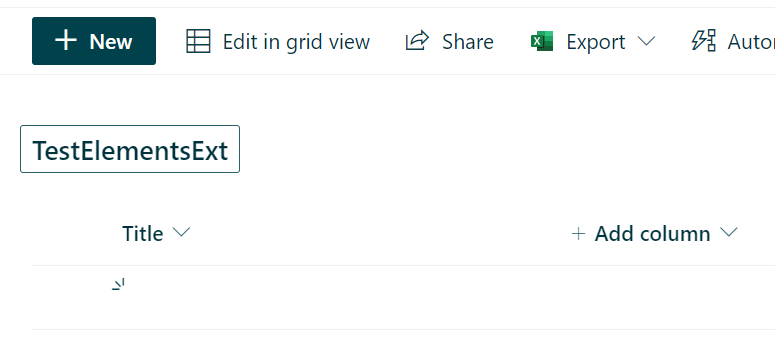
Here is the result from the first case (as in tutorial).
- Columns in the list are not created
- View is not configured (because fields don't exists)
- Data in rows are not added (because fields don't exists)
elements.xml
<Elements xmlns="http://schemas.microsoft.com/sharepoint/">
<!-- Field elements are NOT CREATED inside the List-->
<Field ID="{d00658fd-ad97-4f5f-ad6d-dd6dde4c968e}"
Name="TestElementsExtSPFxAmount"
DisplayName="Amount"
Type="Currency"
Decimals="2"
Min="0"
Required="FALSE"
Group="SPFx TestElements Columns" />
<Field ID="{530a4a23-00fb-4ca0-97e7-7b7398e7eb4d}"
Name="TestElementsExtSPFxCostCenter"
DisplayName="Cost Center"
Type="Choice"
Required="FALSE"
Group="SPFx TestElements Columns">
<CHOICES>
<CHOICE>Administration</CHOICE>
<CHOICE>Information</CHOICE>
</CHOICES>
</Field>
<ContentType ID="0x010042D0C1C200A14B6887742B6344675C8B"
Name="TestElementsExt Content Type"
Group="SPFx TestElements Content Types"
Description="Sample content types from web part solution">
<FieldRefs>
<!-- Referenced to field above with the same GUID -->
<FieldRef ID="{d00658fd-ad97-4f5f-ad6d-dd6dde4c968e}" />
<FieldRef ID="{530a4a23-00fb-4ca0-97e7-7b7398e7eb4d}" />
</FieldRefs>
</ContentType>
<CustomAction
Title="TestElementExt"
Location="ClientSideExtension.ApplicationCustomizer"
ClientSideComponentId="6d8d97d0-a9f1-41ba-a5f6-590c390b4b55"
ClientSideComponentProperties="{"testMessage":"Test message"}">
</CustomAction>
<!-- ListInstance create a new list which will contains fields defined above -->
<ListInstance
CustomSchema="schema.xml"
FeatureId="00bfea71-de22-43b2-a848-c05709900100"
Title="TestElementsExt"
Description="TestElementsExt List"
TemplateType="100"
Url="Lists/TestElementsExt">
<!-- You can add your own data to a new list -->
<Data>
<Rows>
<Row>
<Field Name="TestElementsExtSPFxAmount">1</Field>
<Field Name="TestElementsExtSPFxCostCenter">Information</Field>
</Row>
</Rows>
</Data>
</ListInstance>
</Elements>
schema.xml
```<!-- What is the use case for Fields element? -->
<Fields></Fields>
<Views>
<View BaseViewID="1" Type="HTML" WebPartZoneID="Main" DisplayName="$Resources:core,objectiv_schema_mwsidcamlidC24;" DefaultView="TRUE" MobileView="TRUE" MobileDefaultView="TRUE" SetupPath="pages\viewpage.aspx" ImageUrl="/_layouts/images/generic.png" Url="AllItems.aspx">
<XslLink Default="TRUE">main.xsl</XslLink>
<JSLink>clienttemplates.js</JSLink>
<RowLimit Paged="TRUE">30</RowLimit>
<Toolbar Type="Standard" />
<ViewFields>
<FieldRef Name="TestElementsExtSPFxAmount"></FieldRef>
<FieldRef Name="TestElementsExtSPFxCostCenter"></FieldRef>
</ViewFields>
</View>
</Views>
<Forms>
<Form Type="DisplayForm" Url="DispForm.aspx" SetupPath="pages\form.aspx" WebPartZoneID="Main" />
<Form Type="EditForm" Url="EditForm.aspx" SetupPath="pages\form.aspx" WebPartZoneID="Main" />
<Form Type="NewForm" Url="NewForm.aspx" SetupPath="pages\form.aspx" WebPartZoneID="Main" />
</Forms>
package-solution.json
..."features": [
{
"title": "Application Extension - Deployment of custom action",
"description": "Deploys a custom action with ClientSideComponentId association",
"id": "f77d755b-0438-46d1-815d-5b4f78288831",
"version": "1.0.0.0",
"assets": {
"elementManifests": [
"elements.xml"
],
"elementFiles": ["schema.xml"]
}
}
]
...
And here you can see the screenshot of the result
What I tried to move fields from elements.xml to schema.xml into the <Fields></Fields> part which there but empty once the solution is created. Solution was not copied but created with Yo and new GUIDs were replaced for Fields.
elements.xml
<?xml version="1.0" encoding="utf-8"?>
<Elements xmlns="http://schemas.microsoft.com/sharepoint/">
<CustomAction
Title="TestSchemaExt"
Location="ClientSideExtension.ApplicationCustomizer"
ClientSideComponentId="b2efc885-583e-4636-8d93-c554e7f61ba0"
ClientSideComponentProperties="{"testMessage":"Test message"}">
</CustomAction>
<ContentType ID="0x010042D0C1C200A14B6887742B6344675C8B"
Name="TestSchemaExt Content Type"
Group="SPFx Schema Content Types"
Description="Sample content types from web part solution">
<FieldRefs>
<!-- Referenced to field above with the same GUID -->
<FieldRef ID="{a751f2a3-e389-49c2-a4fc-c2baf0064941}" />
<FieldRef ID="{a2a0de28-9673-4f45-8a27-9c70daefefe3}" />
</FieldRefs>
</ContentType>
<ListInstance
CustomSchema="schema.xml"
FeatureId="00bfea71-de22-43b2-a848-c05709900100"
Title="TestSchemaExt"
Description="TestSchemaExt List"
TemplateType="100"
Url="Lists/TestSchemaExt">
<!-- You can add your own data to a new list -->
<Data>
<Rows>
<Row>
<Field Name="TestSchemaExtSPFxAmount">1</Field>
<Field Name="TestSchemaExtSPFxCostCenter">Information</Field>
</Row>
</Rows>
</Data>
</ListInstance>
</Elements>
schema.xml
<List xmlns:ows="Microsoft SharePoint" Title="Basic List" EnableContentTypes="TRUE" FolderCreation="FALSE" Direction="$Resources:Direction;" Url="Lists/Basic List" BaseType="0" xmlns="http://schemas.microsoft.com/sharepoint/">
  <MetaData>
    <ContentTypes>
      <ContentTypeRef ID="0x010042D0C1C200A14B6887742B6344675C8B" />
    </ContentTypes>

    <!-- What is the use case for Fields element? -->
    <Fields>
        <!-- This field will be created inside custom content type -->
        <!-- Field is referenced in ContentType part in elements.xml by ID and bellow for page View  by Name -->
        <Field ID="{a751f2a3-e389-49c2-a4fc-c2baf0064941}"
                Name="TestSchemaExtSPFxAmount"
                DisplayName="Amount"
                Type="Currency"
                Decimals="2"
                Min="0"
                Required="FALSE"
                Group="SPFx Columns" />

        <Field ID="{a2a0de28-9673-4f45-8a27-9c70daefefe3}"
                Name="TestSchemaExtSPFxCostCenter"
                DisplayName="Cost Center"
                Type="Choice"
                Required="FALSE"
                Group="SPFx Columns">
                <CHOICES>
                    <CHOICE>Administration</CHOICE>
                    <CHOICE>Information</CHOICE>
                </CHOICES>
        </Field>
    </Fields>

    <Views>
      <View BaseViewID="1" Type="HTML" WebPartZoneID="Main" DisplayName="$Resources:core,objectiv_schema_mwsidcamlidC24;" DefaultView="TRUE" MobileView="TRUE" MobileDefaultView="TRUE" SetupPath="pages\viewpage.aspx" ImageUrl="/_layouts/images/generic.png" Url="AllItems.aspx">
        <XslLink Default="TRUE">main.xsl</XslLink>
        <JSLink>clienttemplates.js</JSLink>
        <RowLimit Paged="TRUE">30</RowLimit>
        <Toolbar Type="Standard" />
        <ViewFields>
          <FieldRef Name="TestSchemaExtSPFxAmount"></FieldRef>
          <FieldRef Name="TestSchemaExtSPFxCostCenter"></FieldRef>
        </ViewFields>
      </View>
    </Views>
    <Forms>
      <Form Type="DisplayForm" Url="DispForm.aspx" SetupPath="pages\form.aspx" WebPartZoneID="Main" />
      <Form Type="EditForm" Url="EditForm.aspx" SetupPath="pages\form.aspx" WebPartZoneID="Main" />
      <Form Type="NewForm" Url="NewForm.aspx" SetupPath="pages\form.aspx" WebPartZoneID="Main" />
    </Forms>
  </MetaData>
</List>
package-solution.json contains the same fetaures part as the previous.
and here it creates
- list with required fields
- view is configured properly
- row is added
Screenshot is here:

Unfortunately what happed in both cases is that EditForm when I click NEW ITEM shows me only columns from the extension I had deployed in the last week.
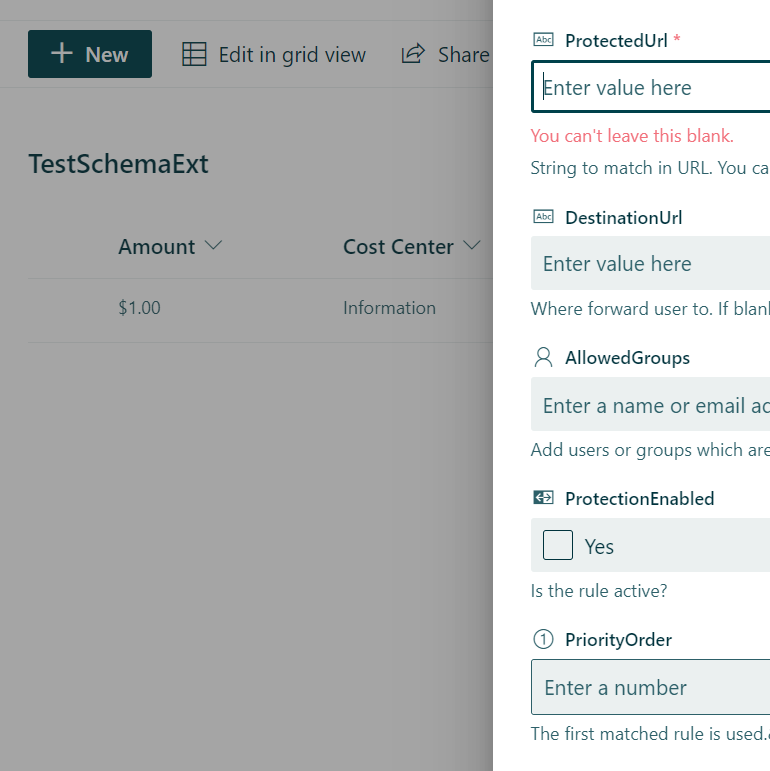
When I create a new list manually there is only Title, so it hasn't influenced Item content type :-). Which is good.
I know it is out of your scope to investigate my issues with configuration but if there would two things, I'd like to see in the tutorial page it would be:
- describe the purpose of
<Fields></Fields>inschema.xmlvs placing<Field/>individually insideelements.xml - what should user be aware of not to add a custom fields/columns to New Item for all other uploaded extensions
Hi. I just ran through the documentation and everything worked correctly for me. Please see the provisioned list.

I assume this was accidental copy/paste, but in your first schema.xml... you don't have the list instance in there or the metadata properties which include your content types and such.
I've uploaded the schema.xml and feature.xml I used (which worked) and copied directly from the documentation/tutorial
<?xml version="1.0" encoding="utf-8"?>
<Elements xmlns="http://schemas.microsoft.com/sharepoint/">

    <Field ID="{060E50AC-E9C1-4D3C-B1F9-DE0BCAC300F6}"
            Name="SPFxAmount"
            DisplayName="Amount"
            Type="Currency"
            Decimals="2"
            Min="0"
            Required="FALSE"
            Group="SPFx Columns" />

    <Field ID="{943E7530-5E2B-4C02-8259-CCD93A9ECB18}"
            Name="SPFxCostCenter"
            DisplayName="Cost Center"
            Type="Choice"
            Required="FALSE"
            Group="SPFx Columns">
        <CHOICES>
        <CHOICE>Administration</CHOICE>
        <CHOICE>Information</CHOICE>
        <CHOICE>Facilities</CHOICE>
        <CHOICE>Operations</CHOICE>
        <CHOICE>Sales</CHOICE>
        <CHOICE>Marketing</CHOICE>
        </CHOICES>
    </Field>

    <ContentType ID="0x010042D0C1C200A14B6887742B6344675C8B"
            Name="Cost Center"
            Group="SPFx Content Types"
            Description="Sample content types from web part solution">
        <FieldRefs>
            <FieldRef ID="{060E50AC-E9C1-4D3C-B1F9-DE0BCAC300F6}" />
            <FieldRef ID="{943E7530-5E2B-4C02-8259-CCD93A9ECB18}" />
        </FieldRefs>
    </ContentType>

    <ListInstance
            CustomSchema="schema.xml"
            FeatureId="00bfea71-de22-43b2-a848-c05709900100"
            Title="SPFx List"
            Description="SPFx List"
            TemplateType="100"
            Url="Lists/SPFxList">
    </ListInstance>

</Elements>
<List xmlns:ows="Microsoft SharePoint" Title="Basic List" EnableContentTypes="TRUE" FolderCreation="FALSE" Direction="$Resources:Direction;" Url="Lists/Basic List" BaseType="0" xmlns="http://schemas.microsoft.com/sharepoint/">
  <MetaData>
    <ContentTypes>
      <ContentTypeRef ID="0x010042D0C1C200A14B6887742B6344675C8B" />
    </ContentTypes>
    <Fields></Fields>
    <Views>
      <View BaseViewID="1" Type="HTML" WebPartZoneID="Main" DisplayName="$Resources:core,objectiv_schema_mwsidcamlidC24;" DefaultView="TRUE" MobileView="TRUE" MobileDefaultView="TRUE" SetupPath="pages\viewpage.aspx" ImageUrl="/_layouts/images/generic.png" Url="AllItems.aspx">
        <XslLink Default="TRUE">main.xsl</XslLink>
        <JSLink>clienttemplates.js</JSLink>
        <RowLimit Paged="TRUE">30</RowLimit>
        <Toolbar Type="Standard" />
        <ViewFields>
          <FieldRef Name="LinkTitle"></FieldRef>
          <FieldRef Name="SPFxAmount"></FieldRef>
          <FieldRef Name="SPFxCostCenter"></FieldRef>
        </ViewFields>
        <Query>
          <OrderBy>
            <FieldRef Name="ID" />
          </OrderBy>
        </Query>
      </View>
    </Views>
    <Forms>
      <Form Type="DisplayForm" Url="DispForm.aspx" SetupPath="pages\form.aspx" WebPartZoneID="Main" />
      <Form Type="EditForm" Url="EditForm.aspx" SetupPath="pages\form.aspx" WebPartZoneID="Main" />
      <Form Type="NewForm" Url="NewForm.aspx" SetupPath="pages\form.aspx" WebPartZoneID="Main" />
    </Forms>
  </MetaData>
</List>
I haven't had a chance to dive deeper in your xml files, but you're missing something somewhere.
Thanks for the check. Screenshot is worth thousands of words. I see it works for you. I realized that there are following differences in my solution:
- I'm creating an Extension not a WebPart like in tutorial
-
package-solution.jsonrequires"skipFeatureDeployment": false- spfx 1.15.2 - even with identical .xml files it doesn't work for me.
But after deploying WebPart I've the same List as I've described above without fields, so there must be something broken on my Site. Feel free to close this issue and thanks a lot for your help.
Just last comment. After following two changes (compare to Tutorial) my List and Edit form was created as expected.
- change
ContentTypeReftoContentTypein schema.xml - I had to move field elements to
node in schema.xml more about fields - I know it is not as it should be, but was the only way how to create a list with new columns.
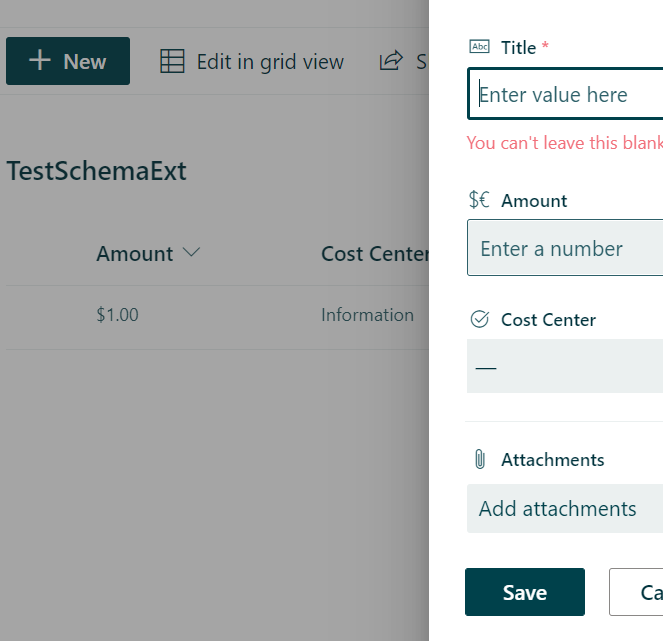
You are right field must be defined in elements.xml but to correctly configure the edit form, they have to be also in schema.xml in fields section. I'm closing this issue. Thanks.
Issues that have been closed & had no follow-up activity for at least 7 days are automatically locked. Please refer to our wiki for more details, including how to remediate this action if you feel this was done prematurely or in error: Issue List: Our approach to locked issues