

 Serial-Studio
UDP Packets
I'm confused about frame delimiters and UDP. My data that I want to display is comma delimited text values in a UDP datagram. By definition, UDP datagrams are discrete packets/frames of data, not a stream. So my data does not have explicit frame delimiters. I tried to define the frame delimiters as nothing "", but I don't think that worked.

Hi! For the moment, Serial Studio requires all data frames to contain frame delimiters (except for MQTT). I will add an option to ignore frame delimiters for UDP packets for the next release. I'll keep you updated on progress. Thanks for the tip!

Thanks. I look forward to the update. In the meantime, I will probably tweak my telemetry to include something innocuous as a delimiter that won't break other applications that read it, for example five spaces, or a TAB character, or something like that.
Hi, I just created a commit that allows the user to instruct Serial Studio to skip start/end sequence checks for UDP connections. Instead, each received datagram shall be considered a frame. Here is a screenshot of the updated settings section:
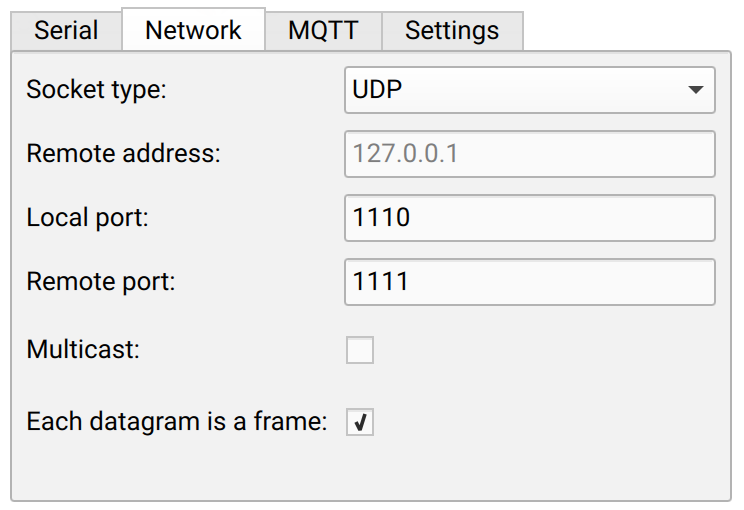
Please let me know if you have any observations or ideas!
Hi, I just drafted a new release that contains this feature. Please let me know if I should close this issue.
So, a couple of issues. The 1.16 release I downloaded, I don't see that option in the settings as you show above. Oh, it's called "Ignore data delimiters" now. Shouldn't that be "Ignore frame delimiters"?
I didn't realize you have to specify ALL the fields, I was trying just to cherry pick a few for a quick test. I expanded my json file to include all 25 fields. It's showing signs of working but not completely.
How do you specify white space as the field delimiter? It's probably poor design on my end, but I have a combination of tabs and spaces as delimiters. I think that could be contributing to why the dashboard doesn't look completely correct.
Does the program collapse multiple delimiters into one? For example, here are a three fields to illustrate what I mean:
1.23456[tab][space]3.14159[tab][space][space][space]3.4
IMHO, having the checkbox of "ignore data/frame delimiters" or "each datagram is a frame" doesn't make sense for UDP. It seems peculiar that someone would randomly send a telemetry frame as a sequence of arbitrary USB packets... you'd have to basically roll your own TCP-like protocol on top of UDP. I'd say that if UDP is being used, it is safe to say that one UDP datagram equals one data frame.
Some progress here. I temporarily changed my telemetry to remove all tabs and spaces, and only use one comma as field delimiter. This almost works! It seems that fields above 9 are random garbage (my telemetry line has 25 values currently, I expect more to be added soon). I see there is a bug report #78 on this, but according to the comments it was fixed in release 1.1.1.
Any idea why the “more than nine fields” seems to reappear in this latest release?
Some progress here. I temporarily changed my telemetry to remove all tabs and spaces, and only use one comma as field delimiter. This almost works! It seems that fields above 9 are random garbage (my telemetry line has 25 values currently, I expect more to be added soon). I see there is a bug report https://github.com/Serial-Studio/Serial-Studio/issues/78 on this, but according to the comments it was fixed in release 1.1.1.
Any idea why the “more than nine fields” seems to reappear in this latest release?
This might be a regression, I just made some changes to the JSON parsing code. If possible, please check if the latest continuous build is not affected by that issue. If so, please let me know so that I can draft a new bug fix release.
How do you specify white space as the field delimiter? It's probably poor design on my end, but I have a combination of tabs and spaces as delimiters. I think that could be contributing to why the dashboard doesn't look completely correct.
To be honest, I never tried using tabs and spaces as data delimiters, I will do some tests later in the evening and get back to you.
IMHO, having the checkbox of "ignore data/frame delimiters" or "each datagram is a frame" doesn't make sense for UDP. It seems peculiar that someone would randomly send a telemetry frame as a sequence of arbitrary USB packets... you'd have to basically roll your own TCP-like protocol on top of UDP. I'd say that if UDP is being used, it is safe to say that one UDP datagram equals one data frame.
I wouldn't count on that, I've seen some people printing debug/info messages in the console and sending data frames for the dashboard. In that case, not using data delimiters would result in displaying wrong data in the dashboard. I think that the best solution is to let users select the option that best fits their project requirements.
However, we need to come up with a better and clearer description for the "ignore data/frame delimiters" checkbox.
Good. I'll check that today.
I wouldn't count on that, I've seen some people printing debug/info messages in the console and sending data frames for the dashboard. In that case, not using data delimiters would result in displaying wrong data in the dashboard. I think that the best solution is to let users select the option that best fits their project requirements.
I see your point. The same stream (with frame delimiters such as /* */ ) is sent out the serial port and as a UDP packet, and there is no way to ignore those frame delimiters in the JSON format. It's interesting that my application is doing the exact same thing, although I had no knowledge of Serial Studio when I wrote it. My telemetry stream is a bunch of values, one "frame" per line. The reason I have tabs and spaces is that I wanted it to be somewhat sensible when viewing the serial stream from a terminal. Tab characters are the real separators to key on when I parse the telemetry by a program, and the individual values are printed using a format statement such as %10.3lf or %3d so everything lines up in columns.
From my point of view, it would be ideal if frames could be delimited (1) with custom sequence of character(s) like Serial Studio is currently doing, (2) just using the new line control character(s) to signal a frame, or (3) in the case of UDP no delimiters required (but if present could be ignored).
Regarding ignoring fields, I don't know how difficult this would be, but it was a pain for me to define all 25 fields for a quick test. It would be nice to be able to pick which fields that Serial Studio uses. For example, if I have 25 fields per frame but only want Serial Studio to use %4 and %9.
WOW, it works. I mean, all 25 fields seem to be plotting as expected.
Oh, speaking of delimiter confusion, there are two places where we specify delimiters? In the JSON file, we have field start and end and separator. In the settings window, there are also these same three fields.
Hello @thestumbler I'm facing similar issue mentioned in #146 using UDP connection. can you please guide me how I can implement this solution.
