

 Sentaroh
Rename target files to prevent being overwritten with newer ones (in "copy" mode)
Is there any way to prevent existing files from being overwritten with newer files, but still copy these new files to the destination?
For instance, I would like to have the older file to be renamed (e.g. appended tag+timestamp) before the new file being copied over.
I know this would make the destination different from the source, but the idea would be that several weeks of files would be kept safely backed up even if some copies of corrupted files are made that overwrite good copies on the destination.
In case I wasn't able to explain myself adequately, I'm referring to something like rsync's --backup option:
-b, --backup With this option, preexisting destination files are renamed as each file is transferred or deleted. You can control where the backup file goes and what (if any) suffix gets appended using the --backup-dir and --suffix options.

Hi,
How about the following method?
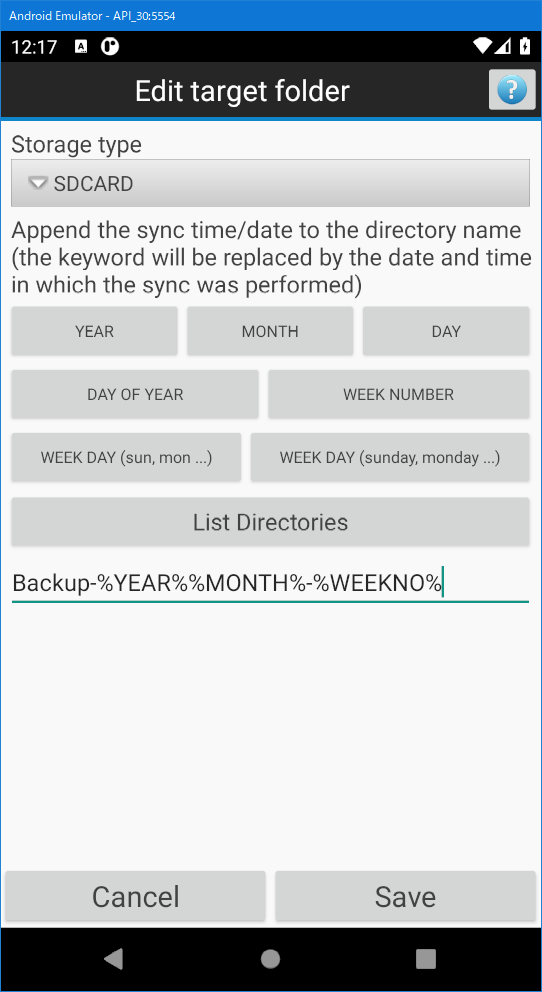
You can create backups daily or weekly by specifying a date and time in the output directory.
The figure below is an example of backing up weekly. If you run it on 2021/06/13, Backup-202106-25 will be created. The week number will be added every time the week changes, starting from January 1st.
Best regards.

Hi!
Thanks for taking the time to reply to my question!
Your suggestion would indeed work, but for my usage scenario it would be quite time- and storage-consuming. I'd like to backup a photo folder periodically (weekly would be fine), but the folder contents is quite large with some files being added regularly, while deletions and modifications are much less common. This would have space requirements for the backup several times the size of the whole folder. On the other hand, keeping copies only of file deletions and changes would be quite inexpensive and it would be feasible to keep the (few) backed up file even for a long time.
One way of saving storage space would be mass-deleting (on the NAS side) the duplicate files (size+date) between the full backup folders, however this would still be quite time-consuming due to the time SMB file transfers would initially take.
I took some time to test the "--backup-dir" implementation in rsync and I do find it would be a nice thing to have in SMBSync2, but I also understand if this may be quite a "niche" usage scenario. I do intend to keep using SMBSync2 for other sync and backup cases, as I consider SMBSync2 to be quite robust, nicely implemented and well documented. (Congrats!)
Regards Nuno