

 SeedVault
Fix window size on iOS - UX issue
When opening the keyboard on iOS the chat window gets wrong resized. Also, when closing the window the chat window size is not getting back to the correct size.
To reproduce the issue visit https://seedtoken.io/demo and open the keyboard of your mobile device. After talking with the bot close the keyboard. After that on some devices the window size will not be correct.
The issue will be fixed if the window after closing the keyboard goes back to the regular size (full mobile screen).
It is possible to test the code of hadron at https://codepen.io/BotanicTechnologies/pen/WarGxm


@SEEDToken I am not able to replicate this on any of my devices. Can you help me with replicating this?
@shad-k it seems to be happening only on iOS devices. I can reproduce it on my iPhone 6 with iOS 11.4.1.
What happens:
- on your iPhone in Safari, go to seedtoken.io/demo (or any other page on seedtoken.io) and open the bot by clicking the bubble icon in the lower right corner
- type any text into the text entry field
- depending on text length, you either see nothing, because the window does not scroll OR (long bot response) you'll see only parts of the bot response.
Reason: the whole bot window scrolls up instead of the content inside.
Screenshots:
 This looks good: Start screen of the bot
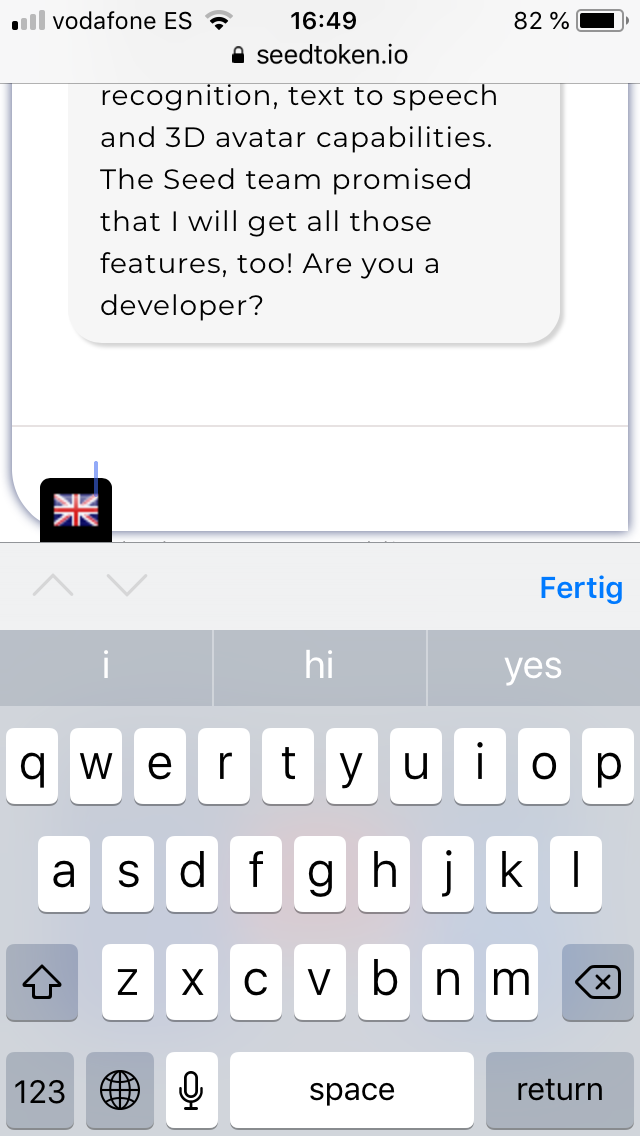 Instead of the content, the whole window scrolls out of screen (you can't see the logo anymore)
What should happen:
 the content inside the bot window should scroll.
Possible solutions:
- resize window (reduce size) and only scroll the content inside the window (possible UX problem: window would be too small for most bot responses)
- automatically close keyboard after each [return]
- any better UX idea
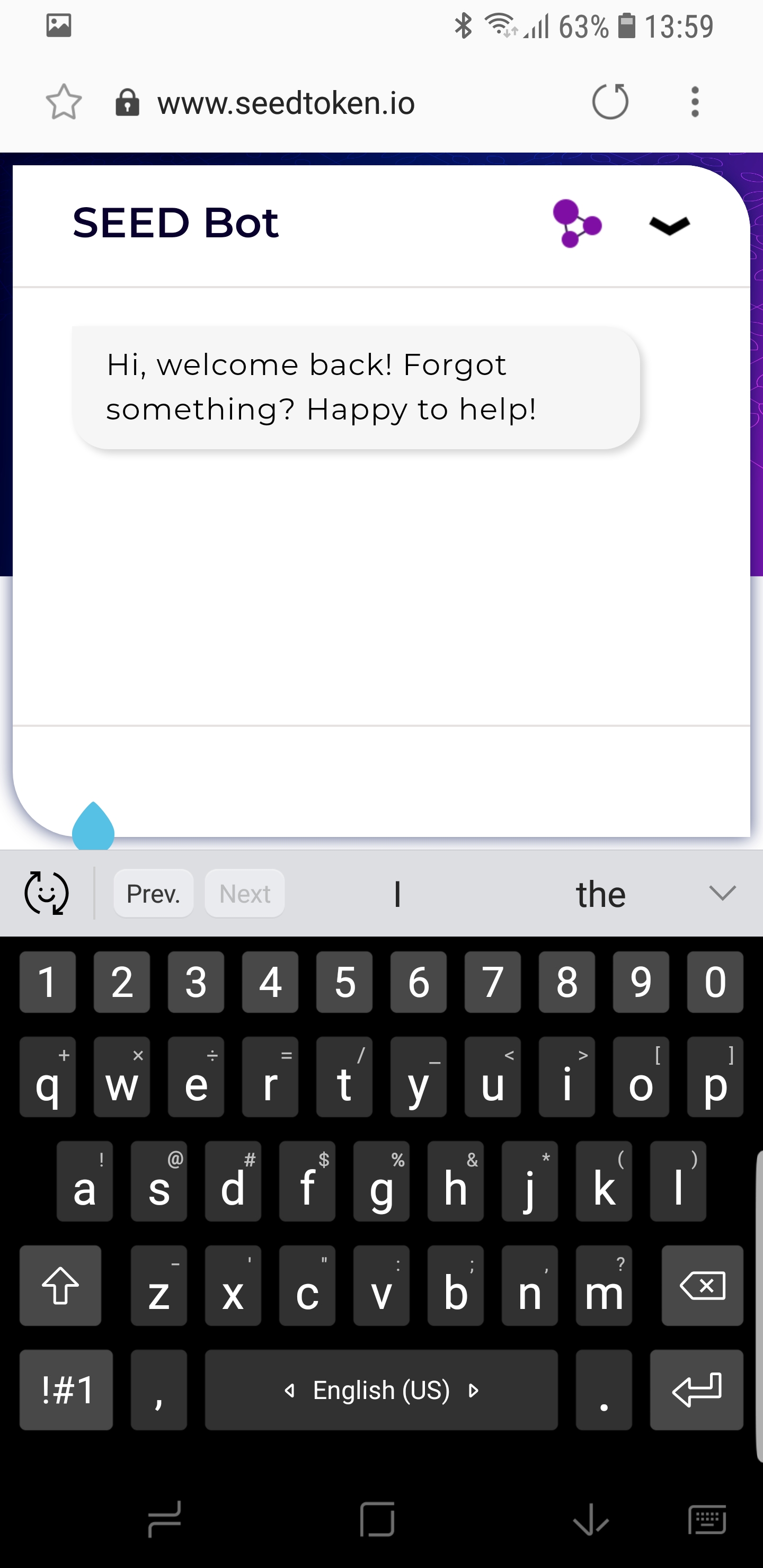
Example: it works fine on Android phones. @epolidor could you please provide screenshots as examples how the UX on Android looks?

@consiliera I guess making the bot window scroll is the best option. It will cause the problem that long bot responses would require a scroll but that is still a better UX than closing the window on return IMO.
@consiliera I guess making the bot window scroll is the best option. It will cause the problem that long bot responses would require a scroll but that is still a better UX than closing the window on return IMO.
@shad-k Okay, and please keep in mind how it looks on Android (epolidor's screen shot above): the bot window is shorter (but keeps the header).
Are you ready to go then or do you need anything to get started? Just let me know!
While looking through this issue for the past some days, I have found multiple sources stating that Safari doesn't fire the resize event when the virtual keyboard is opened. Neither does it resize the window as Chrome does. Thus, there is no definitive solution to this problem as there is no way to figure out the height of the keyboard across all the iOS devices. If we could know the height somehow, the approach would be as follows:
- Add an event listener for the focus event on
textarea - Whenever the
textareais in focus add a class which sets thetop: height-of-keyboardfor the bot window header. - Remove the class from within a blur event listener on `
But this above approach is hacky and doesn't provide the full solution.
Please advise on what can be done.
While looking through this issue for the past some days, I have found multiple sources stating that Safari doesn't fire the
resizeevent when the virtual keyboard is opened. Neither does it resize the window as Chrome does. Thus, there is no definitive solution to this problem as there is no way to figure out the height of the keyboard across all the iOS devices. If we could know the height somehow, the approach would be as follows:
- Add an event listener for the focus event on
textarea- Whenever the
textareais in focus add a class which sets thetop: height-of-keyboardfor the bot window header.- Remove the class from within a blur event listener on `
But this above approach is hacky and doesn't provide the full solution.
Please advise on what can be done.
@epolidor Can you please advise shad-k? Do you have another idea perhaps? Thank you!