

 ScoopInstaller
Postman post 9.19 fails to start
Bug Report
Package Name: Postman
Current Behaviour
Shows a white panel for a few seconds and quits
Expected Behaviour
Start postman
Additional context/output
cmd output:
The disableGPU setting is set to undefined
Not disabling GPU
ProtocolHandler~init - Success with status: true]
Main~createDefaultWorkingDir - Default working dir creation already attempted
1659431848652 main info "Booting Postman 9.25.2, win32-10.0.19043 on x64"
1659431848653 main info "EventBus~initialize - Success"
1659431848655 main info "Proxy configuration has not been setup"
1659431848656 main info "CloudProxyManager~init - Success"
1659431848658 main info "UpdateHandler~init - Success"
1659431848659 main info "LeaderSelection: Initialized successfully"
1659431848660 main info "VersionDependencyService: Initialized successfully"
1659431848698 main info "GPU detected VID 5140 DID 140 ACTIVE false"
1659431848700 main info "GPU detected VID 5140 DID 140 ACTIVE false"
[4928:0802/111729.672:ERROR:command_buffer_proxy_impl.cc(125)] ContextResult::kTransientFailure: Failed to send GpuControl.CreateCommandBuffer.
1659431850625 main info "RuntimeIPCAgent~started: Success"
1659431854067 main info "UpdateHandler~app-update-events - Received event",{"name":"checkForElectronVersionUpdated","namespace":"appUpdate"}
1659431854070 main info "@postman/app-updater: version Updated","9.19.0","9.25.2"
1659431854075 main info "UpdateHandler~app-update-events - Received event",{"name":"electronVersionUpdated","namespace":"appUpdate","data":{"lastKnownVersion":"9.19.0","currentVersion":"9.25.2"}}
Error: spawn C:\Users\User\scoop\apps\postman\Update.exe ENOENT
    at Process.ChildProcess._handle.onexit (node:internal/child_process:282:19)
    at onErrorNT (node:internal/child_process:480:16)
    at processTicksAndRejections (node:internal/process/task_queues:83:21)
1659431854082 main error "Main~handleUncaughtError - Uncaught errors",{"errno":-4058,"code":"ENOENT","syscall":"spawn C:\\Users\\User\\scoop\\apps\\postman\\Update.exe","path":"C:\\Users\\User\\scoop\\apps\\postman\\Update.exe","spawnargs":["--createShortcut=Postman.exe","--shortcut-locations=StartMenu"],"name":"Error","message":"spawn C:\\Users\\User\\scoop\\apps\\postman\\Update.exe ENOENT","stack":"Error: spawn C:\\Users\\User\\scoop\\apps\\postman\\Update.exe ENOENT\n    at Process.ChildProcess._handle.onexit (node:internal/child_process:282:19)\n    at onErrorNT (node:internal/child_process:480:16)\n    at processTicksAndRejections (node:internal/process/task_queues:83:21)"}
Main~handleUncaughtError - Uncaught errors Error: spawn C:\Users\User\scoop\apps\postman\Update.exe ENOENT
    at Process.ChildProcess._handle.onexit (node:internal/child_process:282:19)
    at onErrorNT (node:internal/child_process:480:16)
    at processTicksAndRejections (node:internal/process/task_queues:83:21) {
  errno: -4058,
  code: 'ENOENT',
  syscall: 'spawn C:\\Users\\User\\scoop\\apps\\postman\\Update.exe',
  path: 'C:\\Users\\User\\scoop\\apps\\postman\\Update.exe',
  spawnargs: [ '--createShortcut=Postman.exe', '--shortcut-locations=StartMenu' ]
}
1659431854138 main info "windowManager: First requester booted successfully."
1659431854141 main info "windowManager~restoreWindows: Restoring requester windows"
1659431854142 main info "Main~AppEvents - Received booted event for process requester.Version undefined UI Version: undefined Desktop Platform Version: 9.25.2"
System details
Windows version: Windows 10 Enterprise
OS architecture: x86_64
PowerShell version: 7.2.5
Additional software: Git, micro, nodejs
Scoop Configuration
{
  "lastUpdate": "2022-08-02T08:22:52.1805716+02:00",
  "SCOOP_REPO": "https://github.com/ScoopInstaller/Scoop",
  "SCOOP_BRANCH": "master"
}

I tried to install Postman to reproduce the problem, but it works fine.
Would you like to delete the config folder (%AppData%\Postman) and try again?

That works, but then I lose the data. That's where the updater is for I guess. Any chance this will be included in the future?
I can confirm the issue of @Jogai. Seems like the Update.exe is needed to convert the persistent data to the latest version. This is still valid for the current 9.27.0 version.

Hello, Still valid for 9.29.0 version.
Is there a workaround ?
Thanks

I fixed it without deleting my data by extracting "Update.exe" from Postman-win64-Setup.exe.
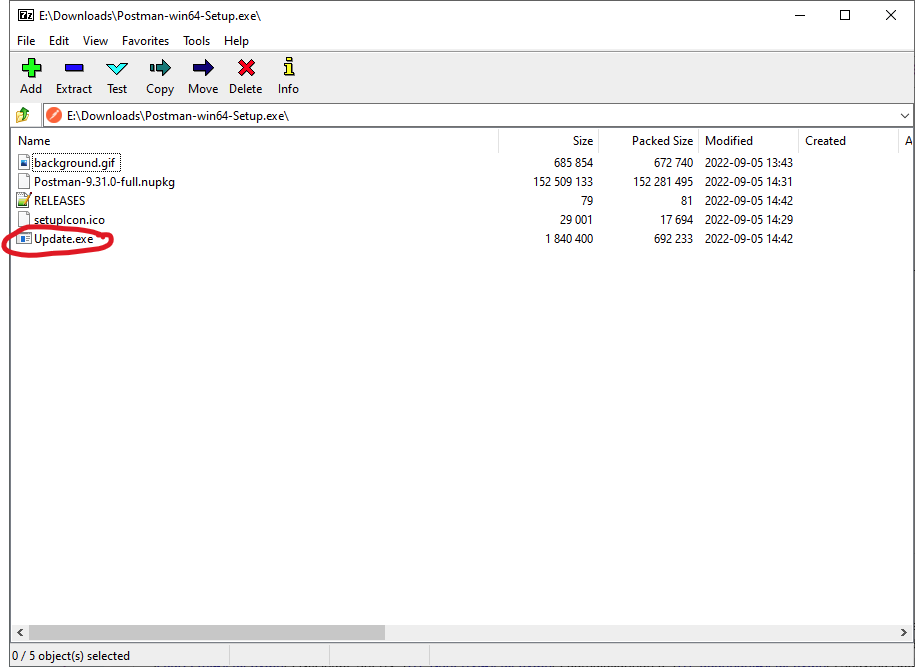
Steps:
- Download the Postman-win64-Setup.exe from here: https://dl.pstmn.io/download/latest/win64
- Use 7-zip to open Postman-win64-Setup.exe as an archive
- Copy Update.exe to
C:\Users\your_username\scoop\apps\postman\(note: it must be this folder exactly, not insidecurrentor any of the versions) - Run postman normally
- Delete Update.exe from
C:\Users\your_username\scoop\apps\postman\

