

 SciSharp
How to Freeze Graph in Tensorflow.Net
Hello, I am working to save the checkpoint file of the model to the Protocol Buffer file for deployment. As I know, to archive it, we should follow the important steps: 1-Save checkpoints. 2-Save graph. 3-Freeze graph.
I take a look at the example of logistic regression here. I focused on this.
public void SaveModel(Session sess)
        {
            //save checkpoint of model using train.Saver.
            var saver = tf.train.Saver();
            var save_path = saver.save(sess, ".resources/logistic_regression/model.ckpt");
            print("Finish save checkpoint");
            //this will only save the graph but variables will not be saved.
            tf.train.write_graph(sess.graph, ".resources/logistic_regression", "model.pbtxt", as_text:true);
            print("Finish write graph");
            //this will freeze graph (graph + parametters)
            //Method 1:
            //FreezeGraph.freeze_graph(input_graph: ".resources/logistic_regression/model.pbtxt",
            //                  input_saver: "",
            //                  input_binary: false,
            //                  input_checkpoint: ".resources/logistic_regression/model.ckpt",
            //                  output_node_names: "Softmax",
            //                  restore_op_name: "save/restore_all",
            //                  filename_tensor_name: "save/Const:0",
            //                  output_graph: ".resources/logistic_regression/model.pb",
            //                  clear_devices: true,
            //                  initializer_nodes: "");
            //Method: 2
            tf.train.freeze_graph(".resources/logistic_regression/model.ckpt", ".resources/logistic_regression/test.pb", new string[] { "Softmax" });
            print("Finish freeze graph");
        }
I modified a bit by add tf.train.freeze_graph(..) as above. But 2 both methods output only checkpoint file, text graph WITHOUT .pb.
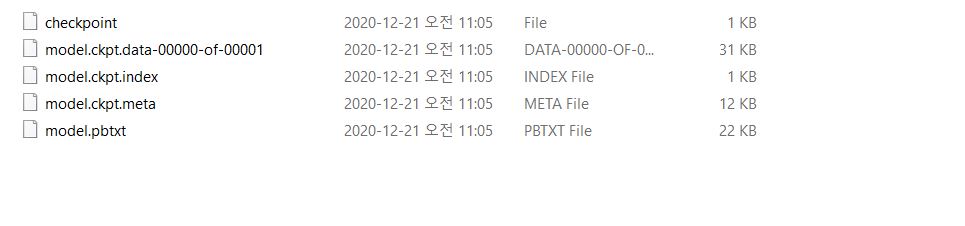
Do you have any idea about my issue? How to save the model as .pb file using Tensorflow.Net?
Thank you very much.

Hello, I am working to save the checkpoint file of the model to the Protocol Buffer file for deployment. As I know, to archive it, we should follow the important steps: 1-Save checkpoints. 2-Save graph. 3-Freeze graph.
I take a look at the example of logistic regression here. I focused on this.
public void SaveModel(Session sess)
        {
            //save checkpoint of model using train.Saver.
            var saver = tf.train.Saver();
            var save_path = saver.save(sess, ".resources/logistic_regression/model.ckpt");
            print("Finish save checkpoint");
            //this will only save the graph but variables will not be saved.
            tf.train.write_graph(sess.graph, ".resources/logistic_regression", "model.pbtxt", as_text:true);
            print("Finish write graph");
            //this will freeze graph (graph + parametters)
            //Method 1:
            //FreezeGraph.freeze_graph(input_graph: ".resources/logistic_regression/model.pbtxt",
            //                  input_saver: "",
            //                  input_binary: false,
            //                  input_checkpoint: ".resources/logistic_regression/model.ckpt",
            //                  output_node_names: "Softmax",
            //                  restore_op_name: "save/restore_all",
            //                  filename_tensor_name: "save/Const:0",
            //                  output_graph: ".resources/logistic_regression/model.pb",
            //                  clear_devices: true,
            //                  initializer_nodes: "");
            //Method: 2
            tf.train.freeze_graph(".resources/logistic_regression/model.ckpt", ".resources/logistic_regression/test.pb", new string[] { "Softmax" });
            print("Finish freeze graph");
        }
I modified a bit by add tf.train.freeze_graph(..) as above. But 2 both methods output only checkpoint file, text graph WITHOUT .pb.
Do you have any idea about my issue? How to save the model as
.pbfile using Tensorflow.Net? Thank you very much.
hi, have you get any function to save as a single .pb file? thanks

Sorry, I have been missing this thread.
This is the way I give it a try.
                {
                    var checkpoint = checkpoint_management.latest_checkpoint(Model.ModelCheckPointSetting.Directory);
                    if (!File.Exists($"{checkpoint}.meta"))
                    {
                        File.Copy(Path.Combine(Model.ModelCheckPointSetting.Directory, Model.ModelCheckPointSetting.Name) + ".meta", $"{checkpoint}.meta");
                    }
                    tf.train.freeze_graph(checkpoint_dir: Model.ModelCheckPointSetting.Directory, output_pb_name: checkpoint, output_node_names: new[] { "Input/X", "Input/Y", "Train/Prediction/predictions" });
                    File.Delete($"{checkpoint}.meta");
                    MessageBox.Show(this, "Freeze Graph Model sucessfully.", this.Text, MessageBoxButtons.OK, MessageBoxIcon.Information);
                    log.Debug($"Freeze graph model sucessfully");
                    return true;
                }
                catch (Exception ex)
                {
                    log.Error(ex.ToString());
                    throw;
                }

Note: I used Tensorflow.Net 0.15.1.0.
