

 Sandmann79
Choppy 4K HDR10(+) video on Android TV
Addon used
- [X] Amazon VOD (plugin.video.amazon-test)
- [ ] Browser Launcher (plugin.program.browser.launcher)
- Addon version: amazon-test-0.9.7.beta+matrix.1
Account type
- [ ] primevideo.com
- [X] amazon.(com/co.uk/de/jp)
System Setup (please provide the following information):
- Hardware: Philips 48OLED935
- OS version: Android TV 11
- Kodi version number: 21.0-ALPHA1 (20.90.101) Git:20230311-111eac1bf9
Upload Logs
https://paste.kodi.tv/didekamiga.kodi
Describe the bug
When playing 4K HDR10(+) video from the addon, the video is very choppy. If I turn off the HDR10+ option in the addon, the 4K version plays fine in SDR HEVC. Tested with various episodes of The Boys Season 3 and Reacher Season 1.
Note 1: 4K Dolby Vision plays fine (tested with Lord of the Rings: The Rings of Power).
Note 2: This does not only happen on my Philips TV, but also on the Nvidia Shield Pro 2019. And it also happens on Kodi 20 Nexus, so not just on Kodi 21 masters.
Btw, I am not sure if the issue lies with this addon, InputStream Adaptive or the Kodi core, but I thought this would be a good place to start.

Yes same issue for me as well since 0.9.5 and so on disabling HDR10+ fixes the issue it might be a VRR issue the way amazon handles HDR10+ and Kodi doesn't have VRR support yet or just an addon issue or inputstream issue 🤷🏾♂️ amazon not to recently started support for sam-nuts (samsung) HDR10+ there answer to DV 🤦🏾♂️

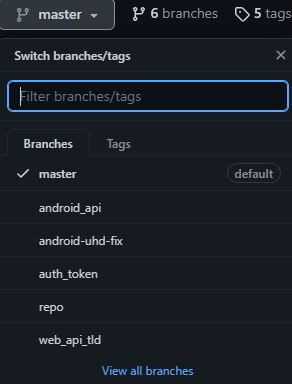

u tested the android-uhd-fix tag to?
That branch was created to try to fix this issue: https://github.com/Sandmann79/xbmc/issues/632
But it never worked unfortunately.
@Sandmann79 @Varstahl Any clues as to why HDR10+ has choppy video? If you think this is not caused by the addon but by InputStream Adaptive or Kodi core, please let me know, so I can create a new issue in the proper git.
i think should be good to know if there are "a/v corrections" when the video become choppy
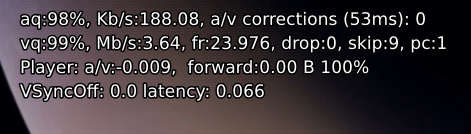 to open debug player info https://kodi.wiki/view/Player_process_info#Player_Debug_Info
i also see many DEMUX_SPECIALID_STREAMCHANGE event in a very short time that could be weird you should compare the same video without HDR so we can see if the log is fillled of DEMUX_SPECIALID_STREAMCHANGE in same way or not
could be useful also having the manifest file, on the ISAdaptive expert settings is possible save the manifest see https://github.com/xbmc/inputstream.adaptive/wiki/Dev.-FAQ#how-to-get-downloaded-manifests-files

@CastagnaIT At the request of @glennguy I created a new issue here:
https://github.com/xbmc/inputstream.adaptive/issues/1197
I can confirm the same behaviour, with HDR disabled it does not happen. Other thing I've noticed is that Kodi set the TV ouput for "The Boys" content at 4K/60Hz. Not that it has anything to do with this issue, but for any other content Kodi sets my TV output to 24 or 50Hz. My device is a Fire TV 4K Max.

@pmsobrado I've come to the conclusion that because of the lack of HDR10+ support for the nvidia shield tv thats why it's choppy playback when enabled in settings. Its an hardware limitation (no acceleration) cpu only which the shield is rocking 5y old hardware specifically the cpu its just no powerful enough to do it on its own. (For my nvidia shield users only)
The log in the related issue from Maurice shows that there's an issue in IA, looking into now finally

@Gemini88 What you said about the Nvidia Shield is not true. I have the same choppiness if I play an HDR10+ stream through the Kodi addon on my Philips 48OLED935 which supports HDR10+ natively.
Anyway let's continue the discussion here: https://github.com/xbmc/inputstream.adaptive/issues/1197
@MauriceW67 i said the "Nvidia Shield TV" im not referring to any TV the/your NVIDIA SHIELD TV i quote Does not Support HDR10+ my/your TV does which has nothing to do the shield its a hardware limitation thats like saying my monitor Supports 144hz natively so playing that back with a gpu that doesn't support its not true. The Nvidia shield does not support HDR10+ this is how its so easy to sell to consumers because we don't naturally research.
@Gemini88 I know what you said. I also have an Nvidia Shield 2019 Pro and I know it does not support HDR10+.
However, I don't believe the choppiness is caused by the fact that the Shield uses software decoding for these streams. If I play an MKV file with an HDR10+ stream it plays just fine and falls back to normal HDR.
My point was that the choppiness also happens when running Kodi and the addon on my Philips Android TV, even though that TV does have support for HDR10+.
@MauriceW67 exactly brother its falls back to HDR so your not really playing the file back @ HDR10+ HDR10 yes + no. Lol brother you still didn't make a point on that, but the point you did make is that the nvidia shield falls back to HDR10 because it doesn't support HDR10+ thats exactly what any device would do in an incompatible situation (backwards compatible) to make it compatible brother idk what else i have to say. The HDR10+ needs hardware acceleration when it comes to the shield if the shield had a more power chip (cpu) then yes no choppiness its doesn't matter where you watch HDR10+ or any app on the shield you will have the same results Choppiness or falling back to HDR10 or strictly HDR and then ofc you won't get the choppiness because it would then be hardware accelerated i have Kodi as well whatever you run on the shield is subjected to its hardware and its support same with vp9 and av1 (only for nvidia shield) cant speak for any other devices that I haven't used. and you literally said what I said about the shield tv was wrong I guess you googled it and found out the right 😂🤣😭
@MauriceW67 your tv supporting it means your tv can decode and has the power to play it back so playing from apps on your TV that support HDR10+ there will be no problems. Its just like your tv not supporting DV but the shield does you know what happens (theres a green and purple tint) on your tv because your tv can't
@MauriceW67 you can try that solo without running Kodi (plaything file/stream directly on your tv) and see it maybe that playing that file/stream on top of running Kodi thats heavy on the cpu, Kodi is beastly, because HDR10+ should play on your Philip TV without a problem
@Gemini88 the point is that there's an issue in inputstream.adaptive that's causing the choppy issue.
@pmsobrado I've come to the conclusion that because of the lack of HDR10+ support for the nvidia shield tv thats why it's choppy playback when enabled in settings. Its an hardware limitation (no acceleration) cpu only which the shield is rocking 5y old hardware specifically the cpu its just no powerful enough to do it on its own. (For my nvidia shield users only)
I do not own a Nvidia Shield TV, but a Fire TV 4K Max.
@glennguy that was my next thought the manifest was given but no answer on it but I think your right
@pmsobrado ok and if thats happening on your FS 4K Max then thats definitely on Amazons end because they chose exclusively to support HDR10+ as to some ordeal with samsung already having there app pre-installed or may have worded it wrong or maybe wrong. But I think I maybe right
With this InputStream Adaptive version, the problem with Kodi Nexus seems to have been solved.
https://jenkins.kodi.tv/blue/organizations/jenkins/xbmc%2Finputstream.adaptive/detail/Nexus/275/artifacts

