

 Sakati84
Feature request: Sharpie release agent for full density supports
Would it be possible to extend the plugin to support using the Sharpie as a release agent for support structures?
Check out this video, which shows how you can use Sharpie as a release agent to enable printing over 100% density support structures with zero Z-gap, and still have the support structure break away from the part easily. https://www.youtube.com/watch?v=lcOcetpHhTU&ab_channel=ChristianGalles
I've tried it with PLA and ABS and it works amazingly well. The one major downside is either needing to apply the Sharpie manually, or being stuck using a non-zero Z-gap, since none of the open slicer engines support zero-thickness layers. Your system would be perfect for an application like this!


Some other results. This print has no gap between the print and the support interface and was easy to remove.

looks like the automated system works really well! This is all using the current plugin code? Next step: get this in the hands of a prominent influencer to popularize the technique and the use of the plugin?
@jmding8 i tried to pitch it to makers muse and make anything some weeks ago but got no reply.
@jmding8 the Support Mode isn‘t on GitHub yet. I want to change some stuff before I upload it

@ssilverm thats really cool. Would be nice if you could post some pictures.
I made a branch for this feature. It´s still very much WIP. I only tested it for supporting horizontal overhangs right now. In the branch you have an updated plugin. In the settings panel you can switch the mode to "support removal". I also suggest you use the new support removal profile a uploaded to the software folder. The new TestModels folder contains my test model from before. If you want to do your own profile you should increase the wall & top speed to a normal/fast level (normally they should be reduced for the colorization profile).
but what if i want to print support and also a multicolor model at the same time?
Great addon idea btw

I don't think this would work very well. One would probably destroy parts of the model when removing the support because of the reduced layer adhesion in the Colorado parts
well currently i am using a colored model with uncolored supports and it is extremely hard to remove them. i think this would at least make my life easier if the supports were colored also and therefore had a weaker layer adhesion, just like the model. Combined with other support weakening options like decreased flow rate and fill density i could actually print colored protein models quite well :)
I think the only change needed is to remove or ";TYPE:SUPPORT-INTERFACE"
Edit: @ssilverm feel free to download my branch which includes this change (and I'm printing a model with colorized support right now!) https://github.com/dr3y/3DPrintColorizer/tree/colorize-support-interface
I am trying to use the support removal branch of the repo and I made one or two modifications to the profile but when I try the test model the underside surface ends up looking like this:
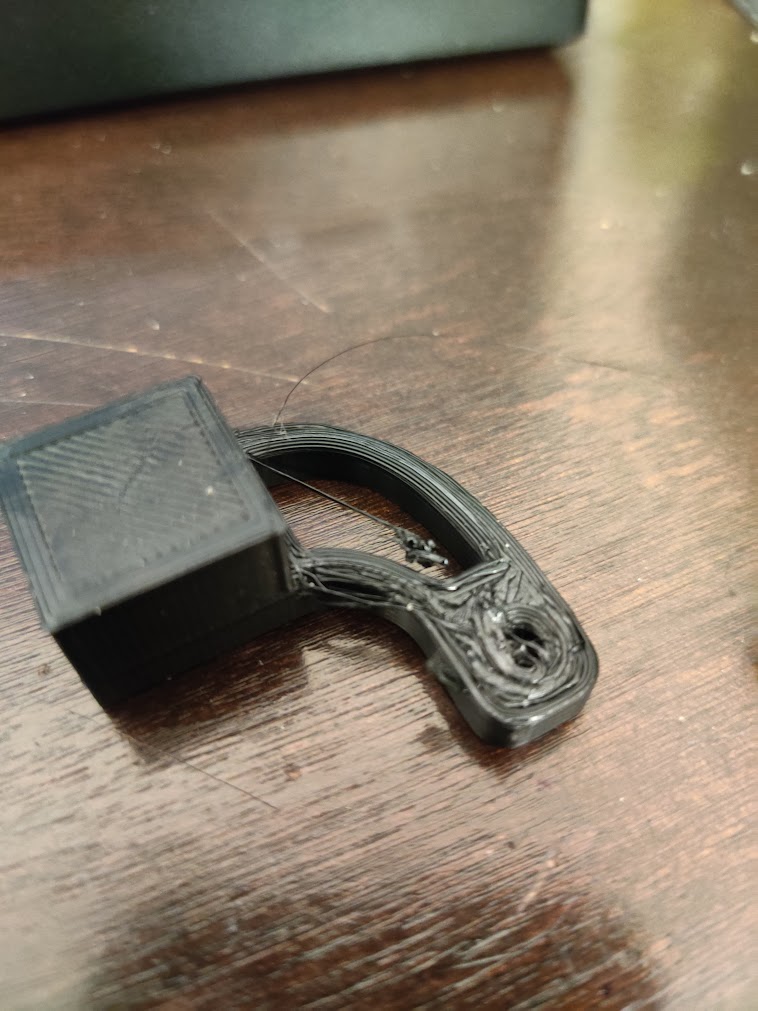
I watched it while printing and the layer above the support interface didn't stick at all to the sharpie layer while going down (which is what we want of course but not while it's printing!). So I ended up with a bunch of balled up filament on that layer, resulting in the bad underside finish. Since yours clearly worked out @Sakati84 is there anything I did wrong?

Also, I noticed that there is a z-axis hop every time it moves over the support material even though z-hop is disabled in cura..
Guessing that your profile isn't optimized for fully dense supports? support z distance = 0.0mm enable support interface = true support interface density = 90% to 100%
If that doesn't fix it, use the plugin referenced in this conversation to export your settings. Paste them here, and I can take a look
@jmding8 I do have those settings, yes. 0.0mm, 100% concentric roof interface. I don't see the plugin referenced in this conversation could you tell me what it is?
Apologies, I meant to paste this link, but I guess I forgot
https://community.ultimaker.com/topic/35866-include-cura-settings-as-comment-in-gcode-file/
https://pastebin.com/qMk07FxQ
Here's a pastebin, is this what you were looking for? Or were you referencing the one where you use end gCode to export the settings
Also, I noticed that there is a z-axis hop every time it moves over the support material even though z-hop is disabled in cura..
That is one of the WIP things in this branch ;-)
SupportTest1.zip Too big for a pastebin so I zipped it up The major modification I made was to increase the speed because the printer can handle it, but even when it was slowed down to 33% for the layer above the sharpie it still didn't adhere properly :( . The filament just got dragged around and only some of it stuck down enough to finish the print
Intriguingly using the default profile in the folder yields much better results, so I am going to do some testing on what parameters are messing up the print and report back in a few days :)
Hello Hello! I'm wondering if this project is still being worked on. If so, have there been any updates to this request?

Hello Hello! I'm wondering if this project is still being worked on. If so, have there been any updates to this request?
It's been 11 months, I doubt its ever going to reach its full potential sadly.