SORMAS-Foundation
Distinguish existing and newly added pathogen tests when processing lab messages [2]
Situation Description
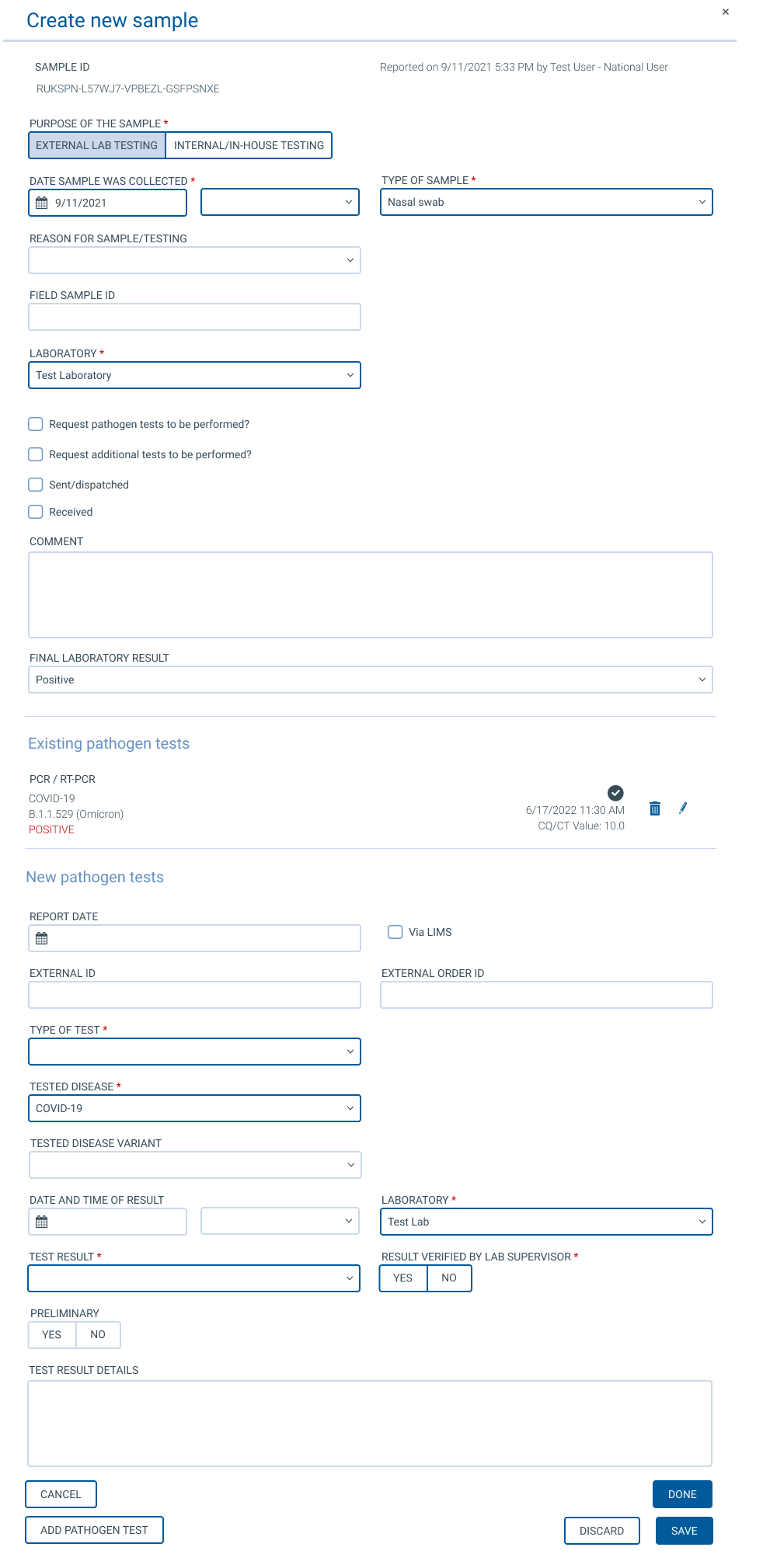
When processing lab messages, users sometimes get to editing a sample. The sample edit component shown in such situations displays the existing and the newly added pathogen tests derived from the lab message's test reports below a sample edit form. It is not clear to the user which pathogen test is an already existing one, and which is a newly added one. Currently, this can sometimes be derrived because the newly added pathogen tests lack some required information, but it can not be relied on that.
Feature Description
Divide the currently shown forms into three sections divided by a horizontal line and with a captions describing the content:
- Sample information
- Existing pathogen tests
- New pathogen tests
The user should still be able to remove existing and new pathogen tests.
When creating a new sample, the distinction between existing and new pathogen tests is not necessary, as there never are existing ones.
When one section is empty (e.g. when there are no new pathogen tests), the according section and heading should generally be hidden.
Change the window caption from Edit sample to Process sample and test reports.

When #7378 is implemented, pathogen tests could be distinguished by different headings, e.g. "Existing pathogen tests" and "New pathogen tests".