

 SFDO-Tooling
Open Test Browser TypeError: 'NoneType' object is not callable when using useralias param
Describe the bug
Hi, Trying to open a test browser with a different user of a persistent org gives me this error TypeError: 'NoneType' object is not callable. If I use a scratch org the keyword works perfectly and it allows me to open 2 browsers with different accounts. To authenticate i use 'sfdx auth:web:login' for both the persistents accounts, while for the scratch org ones i generated a password and then created a new profile with sfdx following this youtube video. Here the robot file i execute
`*** Settings ***

Resource        cumulusci/robotframework/Salesforce.robot
Library         cumulusci.robotframework.PageObjects

Test Teardown    Delete Records and Close Browser
*** Test Cases ***
Utente admin
    Open Test Browser       useralias=Chatter
Utente UTest
    Open Test Browser            useralias=UTest`
Here the log with the same error in each case
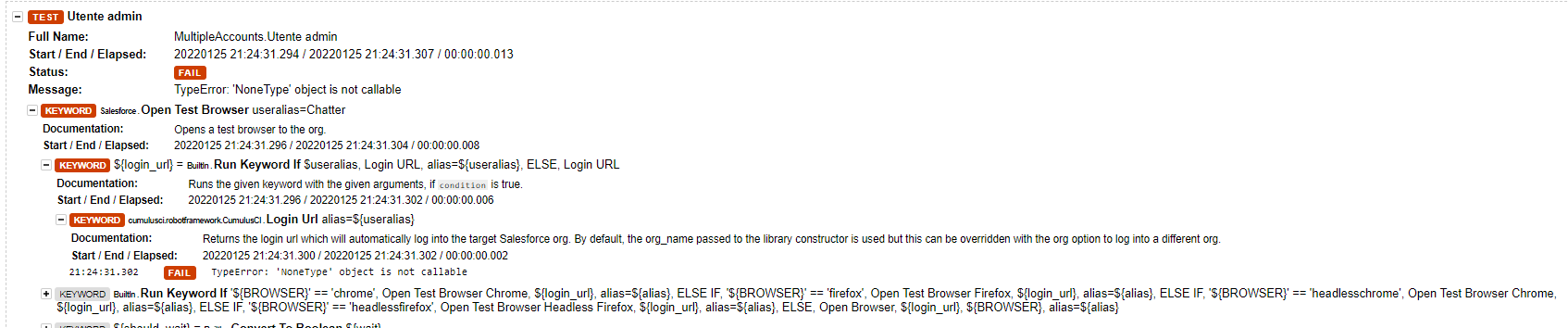
Reproduction steps
1.connect to a persistent org with sfdx auth:web:login with the first account
2.connect to a persistent org with sfdx auth:web:login with the second account
3.execute the file robot with cci task run robot --suites pathToFile.robot
4.get the TypeError: 'NoneType' object is not callable
Your CumulusCI and Python versions
CumulusCI version: 3.51.0 (C:\Users${user}.local\bin\cci) Python version: 3.9.8 (C:\Users${users}.local\pipx\venvs\cumulusci\Scripts\python.exe)
Operating System
Microsoft Windows 10.0.19042
Windows environment
Command Prompt
CumulusCI installation method
pipx
Error Gist
No response
Additional information
No response

The useralias for the Open Test Browser keyword refers to an org in the CumulusCI keychain, not the sfdx keychain. In other words the alias needs to show up in cci org list in order for it to work. For a persistent org, that means you would need to connect the org using cci org connect rather than using sfdx. Unfortunately we don't currently provide a way to import a persistent org from sfdx into the cci keychain.

Sorry didn't receive the notification for your answer and i duplicated the question.
First i thank you for you attention and patience.
To be clear you are saying that if i use cci org connect twice and i see the persistent orgs in the cci org list the rf script will work?
Because i also tried that and still the error is the same. I will try to provide more infos if required. How can i fix this problem and open multiple browsers with different accounts from a persistent org?Thank you
@ZephyrusMB I'm saying that it will not work unless the persistent orgs have been connected that way. But perhaps there is another problem as well. Could you run cci error gist after the NoneType error occurs and provide the link to the gist so that we can see more information about where the error is happening?
Here it is, I edited some paths or email for privacy reasons.
CumulusCI version: 3.51.1
Python version: 3.9.8
Environment Info: Windows / AMD64

Last Command Run
================================
cci task run robot --suites .\robot\demo\tests\PersistentOrg\PersistentOrgAdmin\openBrowser.robot --robot_debug true
[01/26/22 17:46:31] Org info updated, writing to keychain
                    Beginning task: Robot
                    As user: [email protected]
                    In org: IDORG

==============================================================================
openBrowser
==============================================================================
Utente Chatter                                                        F.

Utente Chatter                                                        | FAIL |
TypeError: 'NoneType' object is not callable
------------------------------------------------------------------------------
Utente Standard                                                       F.

Utente Standard                                                       | FAIL |
TypeError: 'NoneType' object is not callable
------------------------------------------------------------------------------
openBrowser                                                           | FAIL |
2 tests, 0 passed, 2 failed
==============================================================================
Output:  C:\Users\Desktop\RobotFramework\Cumulusci\PyconDemo\robot\demo\results\output.xml
Log:     C:\Users\Desktop\RobotFramework\Cumulusci\PyconDemo\robot\demo\results\log.html
Report:  C:\Users\Desktop\RobotFramework\Cumulusci\PyconDemo\robot\demo\results\report.html
Error: 2 tests failed.
Run this command for more information about debugging errors: cci error --help
Traceback (most recent call last):
  File "C:\Users\.local\pipx\venvs\cumulusci\lib\site-packages\cumulusci\cli\cci.py", line 79, in main
    cli(args[1:], standalone_mode=False, obj=runtime)
  File "C:\Users\.local\pipx\venvs\cumulusci\lib\site-packages\click\core.py", line 829, in __call__
    return self.main(*args, **kwargs)
  File "C:\Users\.local\pipx\venvs\cumulusci\lib\site-packages\click\core.py", line 782, in main
    rv = self.invoke(ctx)
  File "C:\Users\.local\pipx\venvs\cumulusci\lib\site-packages\click\core.py", line 1259, in invoke
    return _process_result(sub_ctx.command.invoke(sub_ctx))
  File "C:\Users\.local\pipx\venvs\cumulusci\lib\site-packages\click\core.py", line 1259, in invoke
    return _process_result(sub_ctx.command.invoke(sub_ctx))
  File "C:\Users\.local\pipx\venvs\cumulusci\lib\site-packages\click\core.py", line 1259, in invoke
    return _process_result(sub_ctx.command.invoke(sub_ctx))
  File "C:\Users\.local\pipx\venvs\cumulusci\lib\site-packages\click\core.py", line 1066, in invoke
    return ctx.invoke(self.callback, **ctx.params)
  File "C:\Users\.local\pipx\venvs\cumulusci\lib\site-packages\click\core.py", line 610, in invoke
    return callback(*args, **kwargs)
  File "C:\Users\.local\pipx\venvs\cumulusci\lib\site-packages\cumulusci\cli\task.py", line 181, in run_task
    task()
  File "C:\Users\.local\pipx\venvs\cumulusci\lib\site-packages\cumulusci\core\tasks.py", line 160, in __call__
    self.result = self._run_task()
  File "C:\Users\.local\pipx\venvs\cumulusci\lib\site-packages\cumulusci\tasks\robotframework\robotframework.py", line 282, in _run_task
    raise RobotTestFailure(
cumulusci.core.exceptions.RobotTestFailure: 2 tests failed.
@ZephyrusMB Thanks. Unfortunately since the error happened in a Robot Framework test, the stack trace does not give enough information (it's showing where Robot Framework was called, not where the test failed while Robot Framework was running).
If you look at the Robot Framework log (the log.html file mentioned in the output), does it show any more information about where the error happened?
I believe you should be able to repeat this error following the steps:
- log in to a persistent org with the first user with
cci org connect - log in to the same persistent org with the second user with
cci org connect - check the successful connection with
cci org list - run the script in the first post with
cci task run robot --suites path/to/file.robot
Repeating the test with Setting log level to DEBUG i receive this more info. Thank you
Traceback (most recent call last):
  File "C:\Users\.local\pipx\venvs\cumulusci\lib\site-packages\cumulusci\robotframework\CumulusCI.py", line 120, in login_url
    access_token = org.get_access_token(**userfields)
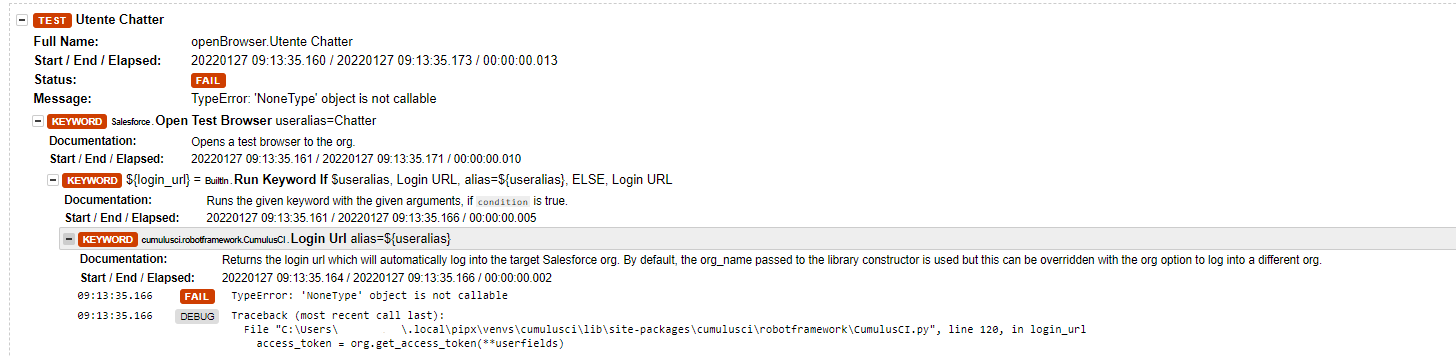
@ZephyrusMB Thanks. That traceback makes me realize that unfortunately this is currently implemented in a way that will only work for scratch orgs. Thanks for reporting it.
Thank you very much for your feedback @davisagli. Any chance to have this feature to be implemented for persistent orgs too in the future?
@davidmreed Can you comment on the likelihood of this being added to our roadmap?
I think this enhancement will likely benefit multiple stakeholders in our Scaling/Internal Environments theme, and would be happy to add it to the roadmap.
With that said, I do not believe this is something we will deliver on a near-term timeframe; intermediate-term is the best case.
